Managed hosting
This page is for hosting companies that want to offer managed Exponential hosting, where the host does not only provide the machine but also runs the site's platform for the customer: updates, backups, monitoring, security. It answers which tasks such a service usually takes over, which tool in Exponential supports each one, how to write down who does what, and what the project's steward 7x offers itself. It names no prices or service levels: those are choices a host makes (SLA options).
Contents
- What "managed" can cover
- The tools for each task
- A responsibility matrix
- Keeping the customer's changes and yours apart
- Access for your staff
- 7x as a managed host
- Checklist
What "managed" can cover
| Area | Unmanaged | Managed (options) |
|---|---|---|
| Machine, operating system, PHP | host or customer | host |
| Web server or Velocity, certificates | customer | host |
| Exponential and extension updates | customer | host, on an agreed schedule and with a test step |
| Database and file backups, restore tests | customer | host |
| Monitoring and log review | customer | host |
| Security hardening and incident response | customer | host, with the customer for content and users |
| Content, users, roles | customer | customer |
| Custom code (extensions, designs) | customer or their agency | customer or their agency; the host deploys it |
The tools for each task
| Task | Tool in Exponential | Where it is described |
|---|---|---|
| Updates and new packages | ezupdate: Setup > Updates and packages (/update/dashboard); "a check that changes nothing, a dry run, a backup confirmation, and Composer's own output as it runs"; also on the command line (php extension/ezupdate/bin/php/ezupdate.php) | ezupdate, Automated updates with ezupdate |
| Before an upgrade | Setup > Upgrade check (/setup/systemupgrade): file and database consistency, read-only | The upgrade check |
| Upgrading | the update files and upgrade steps of the release | Chapter 11, Upgrading customer sites |
| Backups | maintenance mode, the database tool of the engine, tar of the files | 10.9 Backups and restore |
| Taking the site offline | Setup > Maintenance, or php bin/php/maintenance.php on ... / off / status | Maintenance mode |
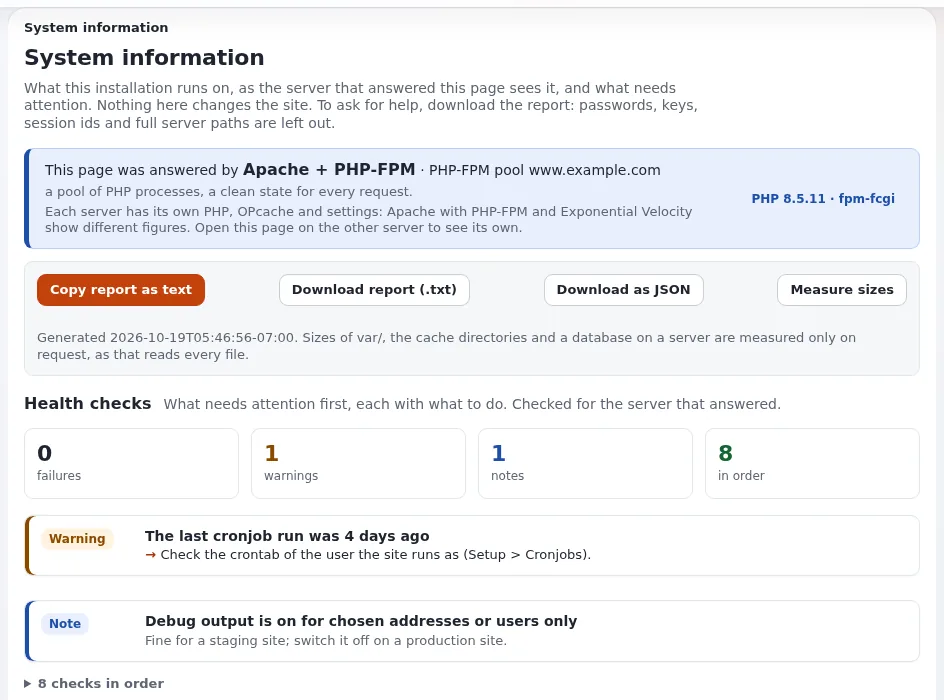
| Health | Setup > System information (/setup/info) and exp:system:info | System information |
| Logs | Setup > Log files (setup/logs), with permalinks; rotation | Log viewer, Log viewer and rotation |
| Scheduled jobs | Setup > Cronjobs, which runs parts and proposes crontab lines | Cronjobs |
| Who did what | the audit trail | The audit trail, Audit trail for hosts |
| Deploying code changes | exp:velocity deploy (autoloads, caches, PHP-FPM reload, Velocity restart in order) | 8.3.14 |
| Performance checks | exp:benchmark | Benchmark |
Note
A managed backup is the database and var/storage, settings/override and settings/siteaccess, taken at
the same moment, stored off the server, and restored once on another machine to prove it works. The first-week
checklist of the installation book asks for exactly that
(10.15).
A responsibility matrix
Write one per customer and keep it with the contract. A starting point:
Customer: <customer>     Site: <domain>     Plan: <plan name>     Reviewed: <date>

Task                                   Host   Customer   Agency   Notes
Operating system and PHP updates        R                          window: <when>
Exponential and extension updates       R      A                   test on staging first
Custom extensions and designs                  A          R        host deploys
Backups (database + files)              R                          kept: <generations>
Restore test                            R      I                   last: <date>
Certificates                            R
Monitoring and alerts                   R      I
Security incidents                      R      I          C
Content, users and roles                       R

R = does it, A = approves, C = consulted, I = informed
Keeping the customer's changes and yours apart
On a managed installation, settings changed in the administration and settings deployed by you can contradict each
other. Without precautions, "the INI editor, the toolbar and menu editors and the template editor write
*.ini.append.php and .tpl files into the release directory, where version control does not see them and the next
deployment drops them" (Configuration managed by the deployment).
Two options:
ManagedByDeployment=enabledper siteaccess ([ConfigurationSettings]): the configuration comes from the deployment only; the writing views answer as if switched off, andeZINI::save()refuses. Read-only views, the logs and the command line stay open. This suits a host that deploys every configuration change.- Leave it off and agree that configuration changes in the browser are the customer's; back up
settings/and compare before every deployment.
Access for your staff
- Give each member of your staff their own administrator account, never a shared one, so the audit trail names the person (Restricting the administration).
- Use two-factor sign-in for those accounts (Two-factor sign-in).
- Shell access as the site's user, not as root, so files your staff create stay writable for the site (8.7.2).
7x as a managed host
7x, the steward of the project, "sells services around the open source software; the software itself stays free". Its offer includes "managed hosting: 'Exponential Website Hosting' and 'Exponential Platform SSD Hosting'", support and maintenance contracts and upgrades from older versions. "Prices and terms are on the 7x website, not here." (Who is 7x?)
Exponential is free software: any host may offer managed Exponential hosting, and a customer may move between hosts. See Working with the project and 7x and Licensing for hosts.
Checklist
- To do: The tasks the service takes over are written down per plan.
- To do: A responsibility matrix exists for every customer.
- To do: Updates: ezupdate installed, check and dry run before every update, a staging step.
- To do: Backups with maintenance mode, off-site, restore tested.
- To do: Monitoring: system information, logs and cron output reviewed on a schedule.
- To do:
ManagedByDeploymentdecided per siteaccess. - To do: Personal staff accounts with two-factor sign-in.
Related pages
- Choosing a hosting model
- Support tiers, SLA options
- Checklist: monthly operations
- Free documentation: this page is free to copy, translate and improve under the GNU FDL 1.3.
Become an Exponential Partner
Partners share their information, provide funding, contribute back and develop the products with us, and that is how Exponential grows. A partner website and dashboard are planned for mid-2027: please become a partner today to speed up our growth rate and land new features faster.