Site packages glossary
This page explains the words used across the site packages help. Each entry names where the term comes from in the code or the packages and links the page that explains it in full.
Contents
Packages and their files
| Term | Meaning | More |
|---|---|---|
| Package | A folder with a package.xml and the files it names: content classes, content objects, extensions, settings files, images, documents | What a site installer package is |
.ezpkg | One package as a single file: a gzip compressed tar of the package folder, package.xml at the top. The upload also accepts .tar.gz and .tgz (package.ini [UploadSettings] AllowedSuffixes[]) | The .ezpkg file |
package.xml | The package definition: name, summary, description, vendor, type, version, maintainers, license, documents, changelog, files, dependencies, settings files, install and uninstall items | package.xml reference |
package.json | The definition in the JSON package format, an alternative to package.xml with checksums of every file | Classic and JSON packages |
| Package type | The <type value="..."/> of a package. The index of 6.0.15 uses site, contentclass, contentobject, sitestyle and extension; package.ini [PackageSettings] TypeList[] names the types the administration lists | Package types |
| Site package | A package of type site: the starting point of a new installation, offered by the setup wizard. It requires other packages and can carry install scripts | What a site installer package is |
| Site style | A package of type sitestyle: a design (style sheets and images) for a site package, such as sevenx_design_blue | Package types |
| Demo content package | A contentobject package with the sample content of a site package, such as sevenx_multisite_democontent | The demo content packages |
| Clean package | A site package whose name ends in _clean: the same site without the demo articles and images | The clean variant and sevenx_site |
| Install item | One step of <install> in package.xml, carried out by a package handler (a class, an object list, an extension, a SQL file ...) | Install items and handlers |
| Package handler | The kernel class that installs one kind of install item, named in package.ini [PackageSettings] HandlerAlias[], for example ezcontentclass = eZContentClassPackageHandler | Install items and handlers |
| Dependency | A <require type="ezpackage" name="..." min-version="..."/> in <dependencies><requires>: a package that must be there too | Dependencies and the install order |
| Install script | A PHP file a site package lists in <settings><settings-file>, run by the installer while the site is created: siteaccess settings, roles, preferences, the multisite installer | Install scripts in a site package |
LICENCE | The license text a package carries in documents/ and names in <documents>; the element is <licence> (both keep their historical spelling) | License and documents |
Where packages are kept
| Term | Meaning | More |
|---|---|---|
| Repository | A folder below var/storage/packages/ that holds packages: local for packages made or imported here, and one per vendor | The local package repository |
| Vendor | The <vendor> of a package; it decides the repository folder (7x, ez-systems). package.ini [RepositorySettings] Vendor=7x is the setup wizard's repository | The local package repository |
| Installer source | A package the setup wizard depends on: in the wizard's repository, a site package, or required by one. Marked in Setup > Packages; removing one needs an extra confirmation | Packages guide, 4. Installer sources |
| Source repository | The Git repository with the unpacked folders a package is built from, such as se7enxweb/sevenx-ezpackage | The source repositories |
Installing
| Term | Meaning | More |
|---|---|---|
| Import | Unpack a package into a repository without changing the site | Import versus install |
| Install | Carry out a package's install items, so its classes, content and files are created on the site | Installing and uninstalling |
| Setup wizard | The installer in the browser; its site types and site packages steps download and import packages | How the setup wizard uses packages |
Kickstarter, exp:install | The installers without a browser; they take the site package's name from kickstart.ini or --package | How the kickstarter and the console use packages |
| Multisite installer | The install script sevenx-multi-site-installer.php of sevenx_multisite (and its counterpart cjw-multi-site-installer.php of cjw_multisite) that builds the sites, siteaccesses and settings | The multisite installer script |
The package server
| Term | Meaning | More |
|---|---|---|
| Package server | A static HTTPS site that publishes .ezpkg files and an index.xml per Exponential release; the default is exponential.packages.exponential.earth | What the package server is |
index.xml | The list of the packages of one release: a <packages vendor="7x"> root with one <package> element per package (name, type, URL; site packages also version, summary, description, thumbnail) | The index.xml format |
RemotePackagesIndexURL | package.ini [RepositorySettings]: the folder whose index.xml the setup wizard reads. When empty, RemotePackagesIndexURLBase plus the version is used | Package server settings |
| Mirror | A copy of a release folder on another server or on disk, used for offline installs or your own packages | Offline installs and mirrors |
Tools
| Term | Meaning | More |
|---|---|---|
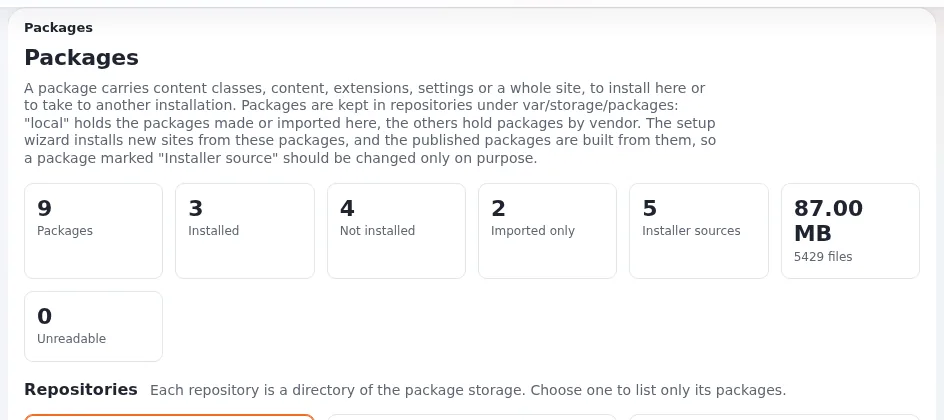
| Setup > Packages | The package pages of the administration (/package/list) | Packages in the administration |
| Package wizard | Create new package in Setup > Packages: content object, content class, extension and site style packages | The package wizard |
ezpm.php | The package manager on the command line, in the installation root | Creating packages with ezpm |
build.sh | The script in a source repository that packs every package folder into an .ezpkg | Rebuilding with build.sh |
| ezupdate | The extension behind Setup > Updates and packages; its package servers page lists and adds .ezpkg servers | Package servers in ezupdate |
Related pages
- Site packages: start here
- Contribute your site package
- The Exponential glossary
- Free documentation: this page is free to copy, translate and improve under the GNU FDL 1.3.
Become an Exponential Partner
Partners share their information, provide funding, contribute back and develop the products with us, and that is how Exponential grows. A partner website and dashboard are planned for mid-2027: please become a partner today to speed up our growth rate and land new features faster.