Schedules and cron in 7x SQLI Import
An import can start by itself: on a schedule (every night at 02:30, every 10 minutes) or when another system calls it (a shop that just exported its products). This page shows both.
Contents
- A schedule, step by step
- Schedule kinds
- The Schedules page
- Time zones and missed runs
- The cron parts
- Started by another system
A schedule, step by step
The example is the demo import "Demo: PHP news (Atom feed)", which reads a news feed every 10 minutes.
- Open the import with Edit and choose the step 5 Schedule.
- Under Runs by itself, choose Every N minutes, from the date and time below.
- Date and time: the first run. Time zone:
UTC(or your own, such asEurope/Berlin). - Every how many minutes:
10(at least 5). - When runs were missed: Run once as soon as possible.
- E-mail when a run fails: an address such as
[email protected], or empty. - Keep The schedule is active ticked and press Save. The step lists the next five run times.

From then on, the cron part sqliimport queues a run every 10 minutes. A feed that did not change gives runs with
only Unchanged records, and no new versions.
Schedule kinds
The editor keeps one schedule per import; choosing Never removes it.
| Kind | Runs |
|---|---|
| Once | At a date and time |
| Every N minutes | From the date and time, every N minutes, at least 5 |
| Every hour | At the minute of the time |
| Every day | At the time |
| Every week | On the weekday at the time |
| Every month | On the day at the time (the last day in a shorter month) |
| A cron expression | Five fields, such as 30 2 * * * (02:30 every day) or 0 6 * * mon-fri (06:00 on workdays) |
Cron expressions support lists, ranges, steps, the names of months and days, and the shortcuts @hourly, @daily,
@weekly, @monthly and @yearly. Details: /exphelp/viewer/ext/sqliimport/schedules.md.
The Schedules page
Schedules in the left menu of the Imports tab (sqliimport/schedules) lists every schedule with its import,
the schedule in words, whether it is active or paused, the next three run times and the last run.

Users with Manage imports also get these actions:
- Pause switches the schedule off and keeps it; Resume switches it on again and computes its next run from now;
- Edit opens the schedule step of the import in the editor;
- Delete removes the schedule after a confirmation; the import stays.
A disabled import keeps its schedule, but its scheduled runs are skipped until it is enabled again.
Time zones and missed runs
- Every schedule has a time zone (
UTCby default). "Daily at 02:30" inEurope/Berlinstays at 02:30 local time all year. On the day clocks jump forward, a time that does not exist is skipped; on the day they go back, a time that exists twice runs once. - When the cron did not run for a while, a schedule runs once to catch up (the default), or waits for its next time if it is set to skip missed runs.
- If the import is still running when its schedule is due, that run is not started; the schedule waits for its next time.
- The schedule's e-mail addresses are told when one of its runs fails or ends with failed records, in addition to the import's own notifications (Imports and runs).
The cron parts
Two cron parts must run every minute:
* * * * * cd /path/to/exponential && php runcronjobs.php -q expqueue
* * * * * cd /path/to/exponential && php runcronjobs.php -q sqliimportsqliimportqueues the runs of due schedules and of pending 1.x import requests, ends runs whose jobs ended, and removes old runs. It only queues; it does no import work itself.expqueueruns the workers that process the runs. expqueue can also run as a systemd service instead.
./console ext:sqliimport:tick runs one round of the sqliimport part by hand and prints what it did.
The 1.x cron parts sqliimport_run and sqliimport_cleanup still work but are deprecated. Replace them with
sqliimport.
Started by another system
Another system (a shop, a CRM, a build pipeline) can start an import by calling an address of the site, and may send the data in the call. This is the import's webhook / API trigger. It is off for every import until you switch it on in the step Schedule, section Started by another system (webhook or API):
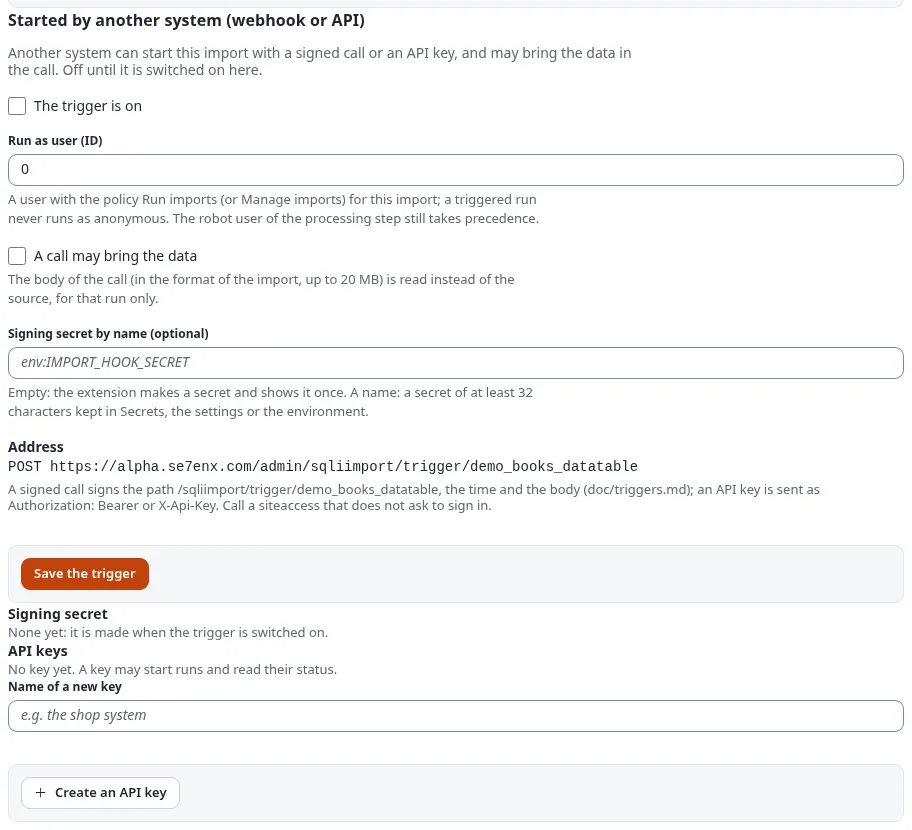
- Tick The trigger is on and enter the Run as user (ID): a user with Run imports or Manage imports for this import. A triggered run never runs as anonymous.
- Tick A call may bring the data if the caller sends the file itself (up to 20 MB, in the format of the import).
- Save the trigger. The section shows the address, such as
POST https://www.example.invalid/admin/sqliimport/trigger/books, on the siteaccess where the extension is active. - Either let the extension make a signing secret (it is shown once; the caller signs each call with HMAC-SHA256), or give the key a name and press Create an API key (also shown once). Store it in the other system, never in a page or a repository.
A call with an API key, sending a CSV file as the data of the run:
curl -sS -X POST "https://www.example.invalid/admin/sqliimport/trigger/books" \
     -H "Authorization: Bearer sq-demo-token-REPLACE" \
     -H "Content-Type: text/csv" --data-binary @books.csv
The answer is JSON, 202 with the new run's ID, such as {"run_id": 42, "status": "queued", "status_url": "..."};
the same key can ask for the run's status at status_url. A call without a valid signature or key gets 401, an
import whose trigger is off answers 404 as if it did not exist, and 409 means a run of the import is still going.
The run page shows REST API as the run's trigger. Every call is audited and rate limited. How to sign a call, all
answers and the limits: /exphelp/viewer/ext/sqliimport/triggers.md.
Next: Upgrading from 1.x.