Forms and collected information
This page is for owners who collect information from visitors: contact and feedback forms, polls, sign-ups, lead forms. In Exponential a form is an item of a class whose fields are marked Information collector; each time a visitor sends it, one collection is stored (Collected information). The form itself is built by your site builder (Forms with the information collector); what happens to the submissions is your routine.
Contents
- What you get
- Who reads the submissions
- Mail to the right team
- Spam
- Export, deletion and retention
- Before you add a new form
What you get
Setup > Collected information lists the items that collected, with figures, search, sorting and paging; each links to its collections, to the item and to a CSV export (Collected information).
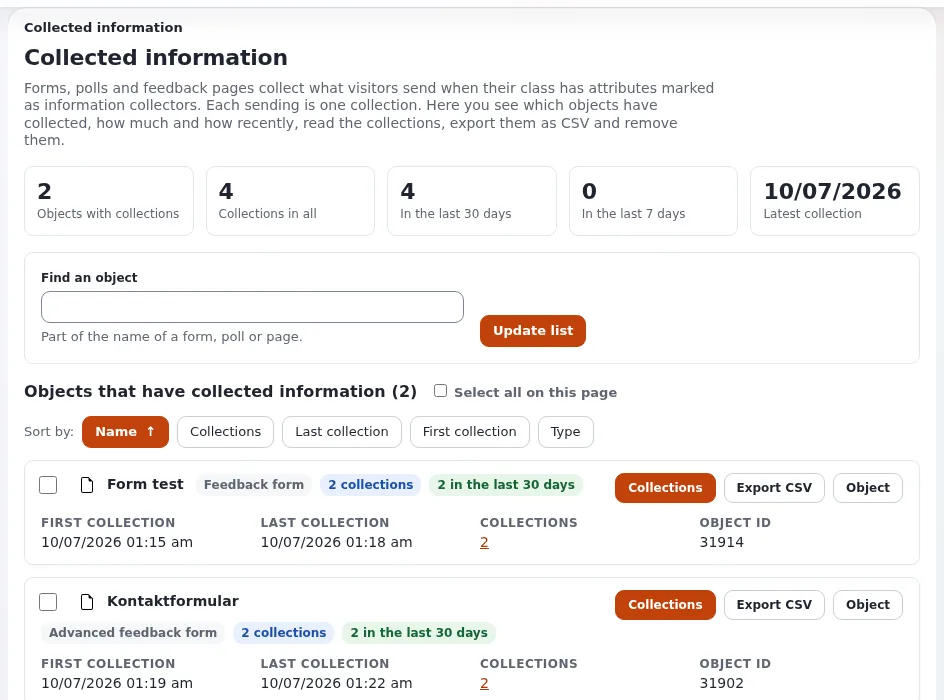
Setup, Collected information: the figures, a search for an object and each form with its collections and the CSV export Three form types are known: form, feedback and poll; a poll can be answered once per user, and polls send no mail by default (
settings/collect.ini, see Forms with the information collector).Visitors who are not signed in may send forms by default (
CollectAnonymousData=enabled).
Who reads the submissions
Everything on the collected information pages needs the policy infocollector/read, and with it a person reads
every form's submissions (Collected information). Give it to the people
who answer forms, not to every editor (Roles for your team).
| Form | Who answers | How fast (your promise) |
|---|---|---|
| Contact | ||
| Feedback | ||
| Lead or quote request | ||
| Poll | nobody; read the results |
Mail to the right team
The default receiver of form mails is site.ini [InformationCollectionSettings] EmailReceiver. Mail templates can set
the receiver per form; the shipped ezwebin templates take it from a recipient field of the form item when it has one,
so each form can mail its own team
(Forms with the information collector).
Tip
Use a team or role address as receiver, not a person's address. When someone leaves, nothing gets lost (Offboarding staff).
Spam
Two layers protect forms: a form token proves a post came from your own page (the ezformtoken extension), and a
CAPTCHA (reCAPTCHA or hCaptcha) asks the visitor to prove they are human. Contact and feedback forms should have
both (Spam protection for forms). A CAPTCHA service
loads a script from its provider; mention it in your privacy information. Spam collections can be removed in bulk on
Setup > Collected information.
Export, deletion and retention
- Export a form's submissions as CSV when they need to go into another system.
- Removing deletes every collection of the ticked forms, or the ticked collections of one form, after a confirmation; the forms stay. It cannot be undone: export first if the data is still needed (Collected information).
- Decide how long submissions are kept, write it in your privacy information, and delete on that schedule. This is not legal advice (Consent and forms, Data retention and deletion).
A monthly routine:
- To do: Every new submission was answered.
- To do: Spam removed.
- To do: Submissions older than your retention period exported if needed, then removed.
- To do: CSV exports stored only where your rules allow, and deleted when no longer needed.
Before you add a new form
- To do: Ask only for what you need; every field is data you must look after.
- To do: Say on the form what you do with the data and how long you keep it.
- To do: Choose who receives the mail and who answers.
- To do: Token and CAPTCHA on; tested signed out.
- To do: Labels visible and errors clear (Accessibility for site builders).
- To do: The form is listed in your retention routine.
Related pages
- Collected information
- Reading and exporting form submissions
- Forms and member feedback
- Free documentation: this page is free to copy, translate and improve under the GNU FDL 1.3.
Become an Exponential Partner
Partners share their information, provide funding, contribute back and develop the products with us, and that is how Exponential grows. A partner website and dashboard are planned for mid-2027: please become a partner today to speed up our growth rate and land new features faster.