Two-factor sign-in
This page is for individuals who want a stolen password to be useless. With two-step sign-in, after the password the
site asks for a 6-digit code from an authenticator app on your phone, or one sent by mail. It ships with Exponential
as sevenx_authentication_2fa (the root composer.json requires it; the installers activate it), and the full guide
is Two-step sign-in.
Contents
- Why one person needs it most
- Setting it up for yourself
- App or mail
- If it is not offered yet
- Optional or required for others
- A lost phone
- Checklist
Why one person needs it most
When you run a site alone, your administrator account is the whole site: content, users, settings. Nobody else will notice a stranger signing in. Two-step sign-in is the single strongest protection for that account. Turn it on before launch.
Setting it up for yourself
- Sign in, open My account > Two-step sign-in (
/user2fa/setup). - Choose Authenticator app and scan the QR code with an app such as any RFC 6238 authenticator (the extension's
README.mdnames Google Authenticator, Authy and Microsoft Authenticator), or type the key shown. - Enter the code the app shows. Until you do, nothing changes.
- Sign out and in again to see it work.
The key is not shown again. If your app offers an encrypted backup of its codes, use it.
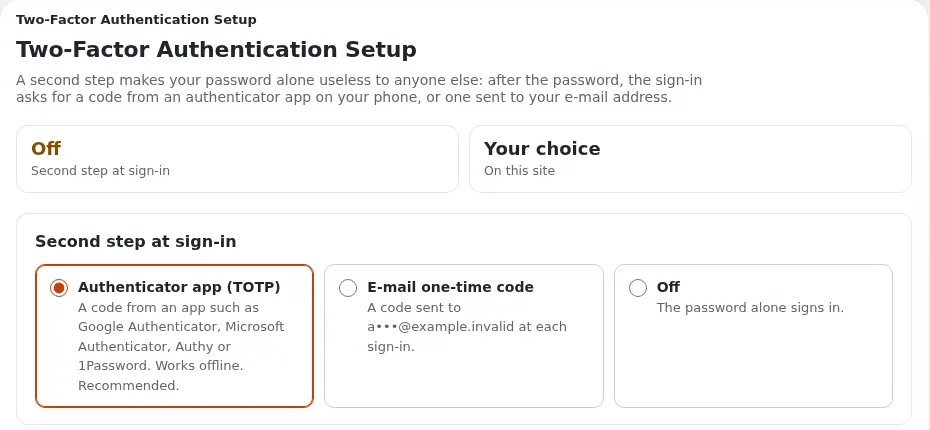
App or mail
| Method | Good | Less good |
|---|---|---|
| Authenticator app | Works without mail; codes change every 30 seconds | Needs a phone and a little care when the phone is replaced |
| Code by mail | Nothing to install; good for less technical relatives | Only as safe as the mailbox; depends on working mail |
Use the app for your administrator account. Offer mail codes to readers who struggle with apps.
If it is not offered yet
On an older or custom installation an administrator may need to switch it on once (Two-step sign-in, Turning it on):
- The extension and its login handler (
sevenxUser2fabeforestandard) insettings/override/site.ini.append.php. - A field of the datatype 7x 2FA Configuration on the user class.
- The policies
user2fa/setupanduser2fa/verifyfor every role that signs in (Member, Editor, Administrator). - Recommended: a
SecretKeyinsettings/override/sevenxauthentication2fa.ini.append.phpthat encrypts the stored secrets; keep it safe, losing it means everyone sets up the app again.
On your own site, you are that administrator.
Optional or required for others
[General] Enforce2FA | DefaultMethod | Effect |
|---|---|---|
disabled (default) | any | Each person opts in |
enabled | totp | A person without a second step sets up the app right after the password |
enabled | email | A person without a second step gets mail codes straight away |
A sensible split for a family or club site: required (app) for administrators and editors, optional for readers. Enroll yourself first, so you are never locked out by your own switch (Accounts, passwords and two-step sign-in).
A lost phone
For someone else: open their user object in the administration, set the Two-step sign-in field to E-mail one-time code or Disabled, and publish; they sign in and set up the app again.
For yourself, as the only administrator: prevent the problem.
- Keep a second administrator account (a deputy's, or your own emergency account with a long password kept offline) (Sharing the work with volunteers).
- Or set your own method to mail codes temporarily before changing phones.
Checklist
- To do: Your administrator account uses the app.
- To do: A second administrator account exists and is protected.
- To do: Editors and volunteers use two-step sign-in.
- To do: Readers can opt in.
- To do:
SecretKeyset and backed up somewhere safe. - To do: You know how to reset someone's second step.
Related pages
- Running it alone
- Two-step sign-in (guide)
- sevenx_authentication_2fa
- Accounts and sign-in
- Free documentation: this page is free to copy, translate and improve under the GNU FDL 1.3.
Become an Exponential Partner
Partners share their information, provide funding, contribute back and develop the products with us, and that is how Exponential grows. A partner website and dashboard are planned for mid-2027: please become a partner today to speed up our growth rate and land new features faster.