Updates for one person
This page is for individuals who run their own site and must keep it updated. Updates close security holes and fix defects; a site that is never updated becomes a risk to you and to your visitors (How updates work).
Contents
- What an update covers
- Where to hear about releases
- Security fixes first
- The update, step by step
- Tools in the administration
- PHP and the operating system
- If something goes wrong
What an update covers
| Part | Updated by |
|---|---|
| Exponential itself and its extensions | Composer or Git, run by you (Updates and upgrades) |
| Your own design and settings | Not touched by updates, if kept in your own extension and settings/override |
| PHP | Your host, or you on your own server |
| The operating system | Your host, or you on your own server |
Published versions never change; a fix always arrives as the next version (The support commitment).
Where to hear about releases
- The project's GitHub releases and the changelogs (Release line and support).
- Setup > Upgrade check in the administration compares your files and database with the release; it only reads (The upgrade check).
- Watching the repository on GitHub sends you a mail per release.
Security fixes first
A release that fixes a security problem is applied within days. Feature releases can wait for a quiet weekend. If you cannot apply a security fix soon, consider maintenance mode or switching off the affected feature until you can (Security basics).
The update, step by step
- Read the release notes: anything to do before or after?
- Back up database and files (Backups for one person).
- Maintenance mode on (Maintenance mode).
- Update the code with Composer or Git (Update with Git, Upgrading).
- Clear caches and, if the notes say so, run the update scripts.
- Check: front page, a deep page, sign in, edit and publish a test, a form.
- Maintenance mode off. Keep the pre-update backup until the site has run normally for a while.
Under Velocity, follow its deploy step so the running workers load the new code (Velocity is part of Exponential 6.0.15).
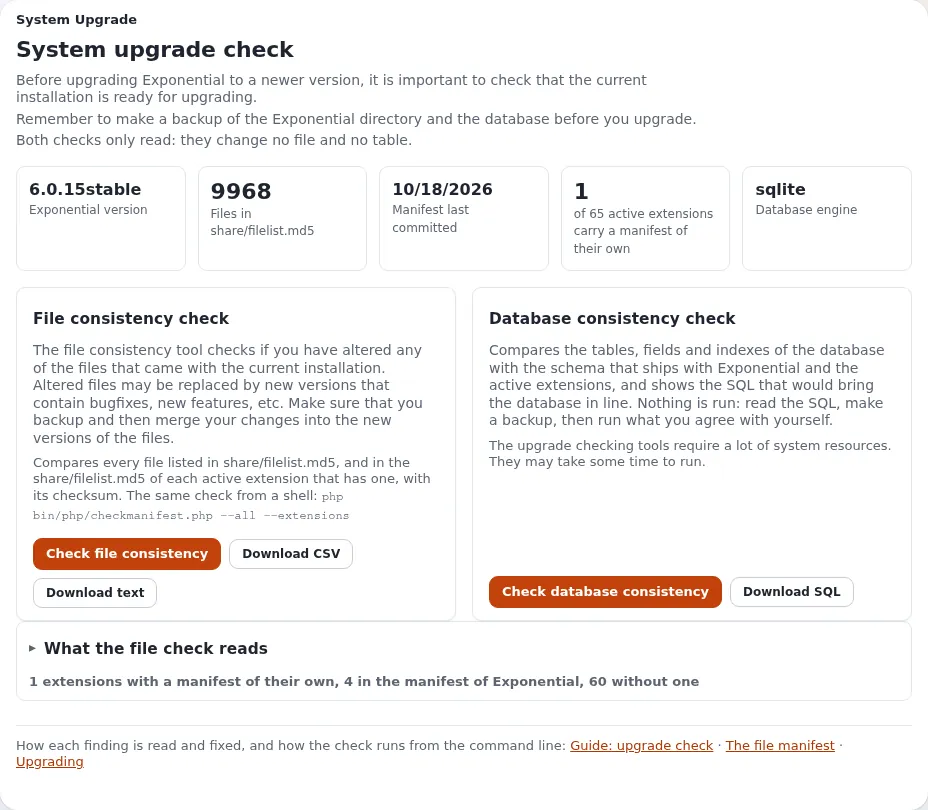
Tools in the administration
For people without a shell, or who prefer the browser:
| Tool | What it does | Page |
|---|---|---|
| Upgrade check | Compares files and database with the release; changes nothing | The upgrade check |
ezupdate | Updates from the administration | Automated updates with ezupdate |
git_manager | Git dashboard (pull, switch branches) and the backup manager | git_manager |
PHP and the operating system
- Exponential 6.0.15 runs on PHP 8.0 and later (PHP 7.4 usable without support); 8.5 is the newest tested (Requirements at a glance).
- When your host announces the end of a PHP version, test your site on the newer one first (a copy, or the host's per-site PHP switch) (PHP versions and extensions).
- On your own server, apply operating system security updates as they come.
If something goes wrong
- Stay calm; the site is in maintenance mode and nothing is lost.
- Note the error and its reference (Finding an error by its reference).
- Clear the caches once more.
- If it still fails, return to the previous version: restore the code and the pre-update backup.
- Ask for help with the error message (When something goes wrong, When to hire help).
Related pages
- Running it alone
- Updates and upgrades
- Upgrade day checklist
- Monthly upkeep checklist
- Free documentation: this page is free to copy, translate and improve under the GNU FDL 1.3.
Become an Exponential Partner
Partners share their information, provide funding, contribute back and develop the products with us, and that is how Exponential grows. A partner website and dashboard are planned for mid-2027: please become a partner today to speed up our growth rate and land new features faster.