Lesson 2.1: A first conversation in the Intelligence tab
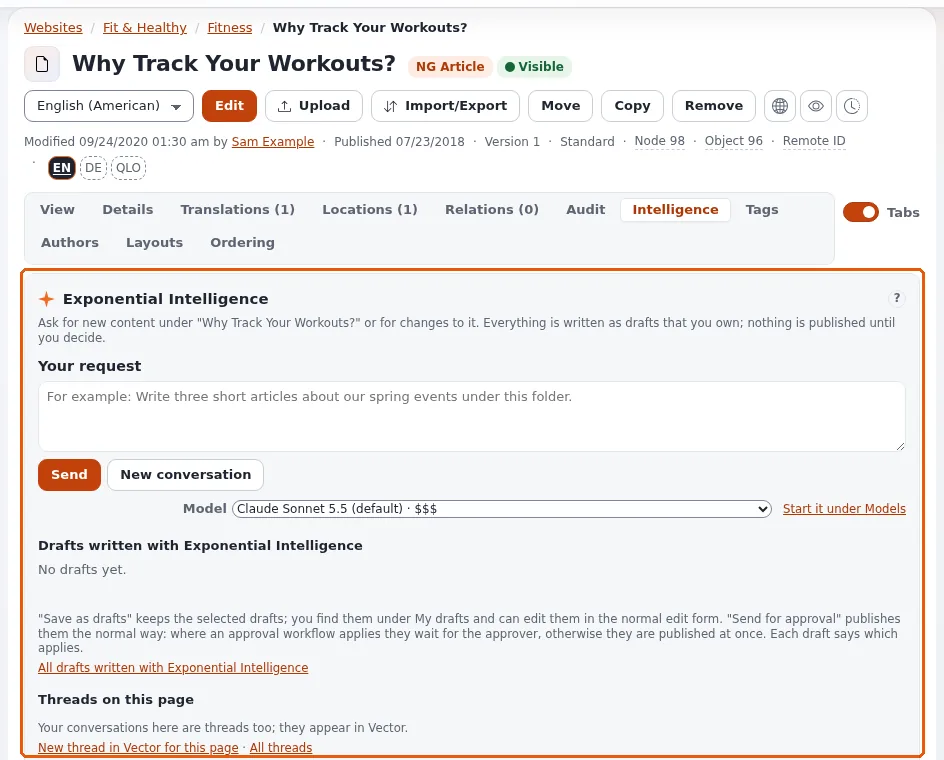
The Intelligence tab of an item's page is where editors talk to the assistant about that place in the tree. In this lesson every learner sends a first request below their own course folder and reads what comes back.
Note
This lesson sends requests to the model provider of the training installation. Use neutral topics, no personal data, and the training account's limits.
At a glance
| Course | Exponential Intelligence |
| Module | Module 2: The Intelligence tab |
| Duration | 45 minutes (15 presenting, 30 exercise) |
| Level | Beginner |
| Audience | Editors |
| Prerequisites | Module 1; a course folder where the learner may create articles |
Learning objectives
After this lesson, learners can:
- start a request from Start writing on the dashboard or in the Intelligence tab of an item;
- write a brief that names what, how many, where, for whom and how long;
- send it with Send (or Ctrl+Enter) and follow the working indicator and the steps;
- read the answer and the list Drafts written with Exponential Intelligence.
Trainer's notes
How to present it
Source: expai: For editors and the Intelligence tab page
under EI: Help (extension/expai/doc/full-view-panel.md).
- Two ways in (3 minutes). On the dashboard page, Start writing: a location (change), What should Exponential Intelligence write?, a model, Write. Write opens the item's page with the Intelligence tab and fills the request in; you still press Send. Or open an item and click its Intelligence tab directly.
- The tab (3 minutes). Conversation: the history, the field Your request (with an example such as Write three short articles about our spring events under this folder.), Send, and New conversation. A conversation belongs to one user and one item.
- A good brief (4 minutes). Write on the board: what (two articles), about what (spring planting), where (below this folder), for whom (beginners), how long (about 150 words), what to leave out (no prices). Short briefs give generic drafts.
- While it works (3 minutes). Exponential Intelligence is working...: it looks up what it needs (each lookup is a step) and writes drafts. One step at a time: a second request in another tab is refused while one runs.
- The result (2 minutes). The answer in words, and the drafts listed under Drafts written with Exponential Intelligence with links to view and edit them. Lesson 2.2 decides what to do with them.
Common questions
Why did it ask me a question instead of writing? The brief was unclear; answer in the field and send again.
Why did it not add images? It cannot upload images or set relations; it says so. Add them in the edit form.
How long does a request take? From seconds to minutes, depending on the model and the work; a local model on an ordinary server can take minutes per step.
Pitfalls
- Requests below someone else's folder. The assistant writes where the editor may create; make sure learners open their own folder.
- Personal data in the brief. Never names, addresses or customer details (module 6).
- Impatience and double clicks. One step at a time; wait for the answer.
Hands-on exercise
Use the training installation and your course folder.
- Open the dashboard page Exponential Intelligence. In Start writing, press change and choose your course folder.
- In What should Exponential Intelligence write?, type a brief, for example:
Write two short articles (about 120 words each) for beginners about planting spring bulbs, below this folder. No prices, no brand names. - Keep the default model and press Write. Your folder's page opens with the Intelligence tab and your request in the field.
- Read the request once more and press Send.
- Watch the working indicator and the steps. Write down how many lookups it made.
- Read the answer.
- Under Drafts written with Exponential Intelligence, find the drafts. Open one with its view link and read it.
- Do not save or send yet; lesson 2.2 continues here.
Expected result
- The learner's conversation shows the request, the steps and the answer.
- Two drafts below the learner's course folder are listed in the tab (they are not published).
- The trainer checks by opening one learner's tab on the projector and showing that the site is unchanged.
Quiz
- Name the two ways to start a request.
- What happens when you press Write in Start writing? A. The drafts are published B. The request is filled into the Intelligence tab; you still press Send C. Nothing D. The request is e-mailed
- Name four elements of a good brief.
- Why is a second request refused while one runs?
- Where are the drafts of the conversation listed?
Answers
- Start writing on the dashboard page, or the Intelligence tab of an item.
- B.
- Any four of: what, about what, where, for whom, how long, what to leave out.
- One step at a time per conversation, so tools do not run twice.
- Under Drafts written with Exponential Intelligence in the tab (and under My drafts).
Further reading
- expai: For editors
- The usage guide and the Intelligence tab page under EI: Help.
Related pages
- Module 2: The Intelligence tab
- Exponential Intelligence: course overview
- Trainers: start here
- Free documentation: this page is free to copy, translate and improve under the GNU FDL 1.3.
Become an Exponential Partner
Partners share their information, provide funding, contribute back and develop the products with us, and that is how Exponential grows. A partner website and dashboard are planned for mid-2027: please become a partner today to speed up our growth rate and land new features faster.