Lesson 6.3: Cost, limits and fair use
Each request to a hosted model is billed to the site's account. The assistant estimates every cost, the site can set limits and a monthly budget, and editors can save a lot with a few habits. This short lesson covers all three.
At a glance
| Course | Exponential Intelligence |
| Module | Module 6: Responsible use |
| Duration | 30 minutes (15 presenting, 15 exercise) |
| Level | Intermediate |
| Audience | Every user of the assistant; administrators |
| Prerequisites | Lesson 6.2 |
Learning objectives
After this lesson, learners can:
- read the estimated cost of a click (defaults line), a turn (record) and a period (dashboard);
- explain usage limits and the monthly budget, and what happens when one is reached;
- choose a cheaper model where it does the job, using the model list's price classes;
- name three habits that save cost.
Trainer's notes
How to present it
Sources: expai: For administrators and the usage and
budgets pages under EI: Help (extension/expai/doc/usage-tracking.md, extension/expai/doc/budgets.md).
- Estimates everywhere (3 minutes). The edit form's defaults line (cost per click), each turn's record, the dashboard's Estimated cost, EI: Log. Estimates come from a price table; the provider's invoice is authoritative. A local model costs no fees.
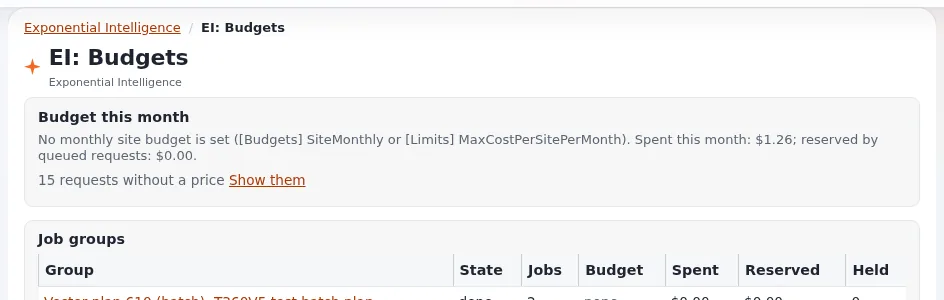
- Limits and budget (4 minutes). The dashboard's Limits show a bar for each limit set (per user, day, month, site, provider), with when it resets, or No limits configured. Budget this month shows the monthly site budget for queued work, if set, and what was spent and reserved. When a limit is reached, requests stop with a message until it resets.
- Habits (5 minutes):
- choose the cheaper model for routine work (the model list shows price classes such as $ to $$$);
- start a New conversation for a new topic; long conversations make every request larger;
- write clear briefs, so fewer rounds are needed;
- use Vector's plan for bulk work: its estimate shows the cost before anything runs;
- for large background work, administrators can use cheaper batch lanes.
- Fair use (3 minutes). Training accounts share the site's budget with real editors; keep experiments small.
Common questions
Why is the cost "< $0.01" or with "≈"? Very small amounts, and amounts priced with fallback prices, are marked.
Who sets limits? Administrators, in the extension's settings (module 7).
Is the cheapest model always fine? For short rewrites often yes; for long texts with structure, a stronger model may need fewer corrections. Compare on your own content.
Pitfalls
- Repeated clicking of the same field action until the text "feels right". Edit by hand instead.
- Huge scopes in Vector without reading the estimate.
- Forgotten queued work. Chains and alt text jobs run in the background and cost too.
Hands-on exercise
Use the training installation and your training account.
- Open the dashboard page Exponential Intelligence. Write down your estimated cost and requests for 7d.
- Read Limits and Budget this month: which limits apply to you?
- In Start writing, read the model list and its price classes. Write down the cheapest model that may write drafts (not marked "reads only").
- Open an article with Edit and read the defaults line's cost per click. Change your model where the site lets you choose one, and read it again.
- Open EI: Log and find your most expensive turn of this course. What made it expensive (many steps, a long conversation, a strong model)?
- Write your three cost-saving habits on a card.
Expected result
- The learner's notes have their period cost, the limits that apply, the cheapest writing model and their most expensive turn with a reason.
- Each card lists three habits.
- The trainer checks two cards.
Quiz
- Where do you see the cost of one click in the edit form?
- What happens when a usage limit is reached?
- Name three habits that save cost.
- True or false: the estimated cost is exactly what the provider bills.
- What does Vector show before bulk work runs? A. Nothing B. A plan with a cost estimate C. The invoice D. The provider's terms
Answers
- In the defaults line above the fields.
- Requests stop with a message until the limit resets.
- Any three of: a cheaper model for routine work; new conversations for new topics; clear briefs; plans for bulk work; batch lanes for large background work; editing by hand instead of repeated clicks.
- False. It is an estimate; the invoice is authoritative.
- B.
Further reading
- expai: For administrators
- The usage tracking, budgets and lanes pages under EI: Help.
Related pages
- Module 6: Responsible use
- Exponential Intelligence: course overview
- Trainers: start here
- Free documentation: this page is free to copy, translate and improve under the GNU FDL 1.3.
Become an Exponential Partner
Partners share their information, provide funding, contribute back and develop the products with us, and that is how Exponential grows. A partner website and dashboard are planned for mid-2027: please become a partner today to speed up our growth rate and land new features faster.