Intranet search
This page is for intranet owners who want staff to find the right page or document in seconds. It explains what the search that comes with Exponential does, when a larger search server pays off, and how to learn from what staff search for. The technical setup is in the Site search and Search with ezfind and Solr pages.
Contents
- Search shows only what a person may read
- The built-in engine
- When Solr is worth it
- Searching inside documents
- Helping search with structure and tags
- Learning from search statistics
- Editors and administrators
- Checklist
- Related pages
Search shows only what a person may read
The most important property for an intranet: search results follow permissions. A person finds only what they may read (Site search, The built-in engine). The HR department's confidential pages do not appear in a sales employee's results, and the search page needs no extra permission of its own (What visitors may see, Giving visitors more).
For the business this means one search box can serve the whole company. You do not need a separate search per department, and you do not risk leaking titles of restricted documents through results.
The built-in engine
Every installation has a search engine that keeps its index in the database
(site.ini [SearchSettings] SearchEngine=eZSearchEngine). It indexes the fields marked Searchable in each class
when content is published. It needs no extra server, so it costs nothing more to run.
Settings the intranet owner should know about (site.ini [SearchSettings], shipped values from the Site search page):
| Setting | Shipped | What it means for staff |
|---|---|---|
MaximumSearchLimit | 30 | at most 30 results on one page |
EnableWildcard | false | polic* does not find "policy" unless switched on; costly on large sites |
AllowEmptySearch | disabled | an empty search is refused |
DelayedIndexing | disabled | new content is searchable at once; enabled indexes by cronjob instead |
LogSearchStats | disabled | search phrases are not recorded |
When Solr is worth it
ezfind connects Exponential to an Apache Solr server. It is listed in composer.json and stays inactive until
switched on. The comparison from the ezfind page:
| Need | Built-in engine | Solr |
|---|---|---|
| Find pages by words | yes | yes |
| Relevance ranking and boosting | basic | yes |
| Facets (filter results by class, tag, date) | no | yes |
| Very large numbers of objects | slows down | built for it |
Solr is a separate Java server to install, run, monitor and back up
(Search with ezfind and Solr).
The console command exp:solr reports its status and starts or stops it
(Server control commands).
A practical rule for the decision: start with the built-in engine. Move to Solr when staff need filters ("only PDF
files from HR in 2026"), when the number of objects grows large, or when search inside many documents matters. The
change does not alter the search address (content/search keeps working).
Searching inside documents
Text inside PDF and Word files can be added to the index. settings/binaryfile.ini maps PDF to the ezpdf handler
(external tool pstotext) and Word to ezword (external tool wvWare); these programs must be installed on the
server (Files and downloads, Searching inside files).
With Solr, file contents can be indexed as well.
Helping search with structure and tags
- Mark only useful fields Searchable: titles, intros, bodies; not internal codes.
- Give documents clear titles; the title is what appears in results.
- Use tags across departments with
eztags; with Solr, tag clouds can be built from search (Tagging with eztags). - Keep retired documents out of reading sections, so search does not offer outdated versions.
Learning from search statistics
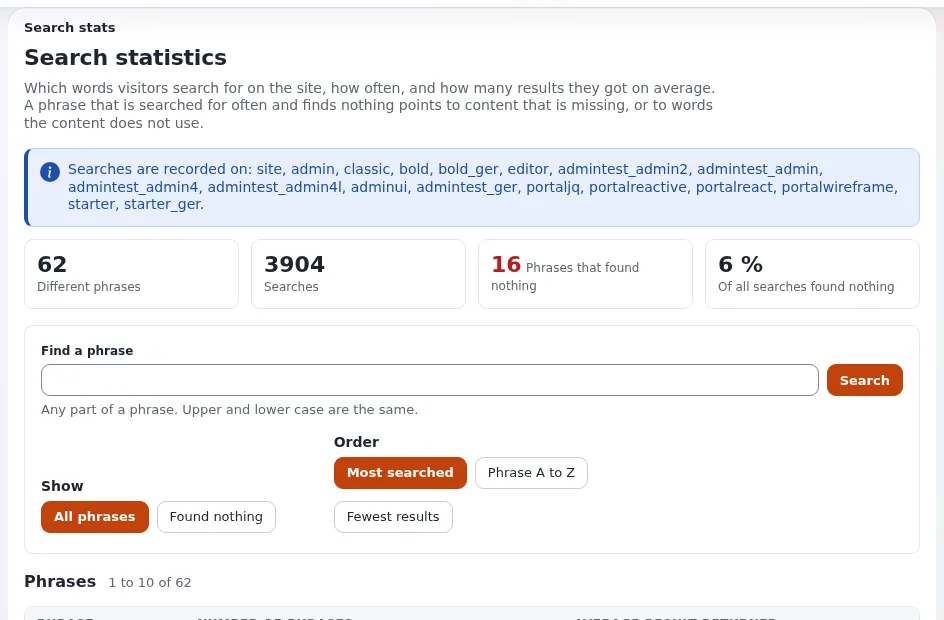
With LogSearchStats=enabled, Setup > Search statistics (/search/stats) lists every phrase, how often it was
searched and the average number of results. Phrases that found nothing show what content staff miss
(Site search, Search statistics).
Note
Search phrases can be personal data, which is why recording them is off by default. Decide with your data protection contact whether to switch it on, and for how long (GDPR basics).
Editors and administrators
Editors search in the administration as well (Searching, for editors). Administrators can find the object behind an object, node or version ID, a remote ID or a URL alias with the content finder (The content finder).
After a migration or a database move, the whole index is rebuilt with
php bin/php/updatesearchindex.php --clean (Site search, Indexing).
Checklist
- To do: Decided: built-in engine or Solr.
- To do: Searchable fields reviewed for each class used on the intranet.
- To do: Search tested while signed in as members of two different departments.
- To do: Text extraction tools installed if file contents must be searchable.
- To do: Decision on search statistics recorded, with a review date.
- To do: Index rebuild planned after the document migration.
Related pages
- Site search
- Search with ezfind and Solr
- Documents and file libraries
- Search hosting backends
- Free documentation: this page is free to copy, translate and improve under the GNU FDL 1.3.
Become an Exponential Partner
Partners share their information, provide funding, contribute back and develop the products with us, and that is how Exponential grows. A partner website and dashboard are planned for mid-2027: please become a partner today to speed up our growth rate and land new features faster.