Site search
This page is for website creators who add search to a site. Exponential has a built-in search engine that keeps its index in the database; it is enough for most sites. Large sites or sites that need facets and relevance tuning move to Solr (Search with ezfind and Solr).

Contents
The built-in engine
site.ini [SearchSettings] SearchEngine=eZSearchEngine indexes the attributes marked Searchable in each class when
content is published. Visitors only find what they may read.
The search box
A form that sends SearchText to content/search:
<form role="search" method="get" action={'content/search'|ezurl}>
  <label for="site-search">{'Search'|i18n( 'design/mysite' )}</label>
  <input type="search" id="site-search" name="SearchText">
  <button type="submit">{'Search'|i18n( 'design/mysite' )}</button>
</form>
content/advancedsearch offers more fields (phrase, class, date). Both are disallowed for crawlers in the shipped
robots.txt.
The results page
Override content/search.tpl in your design. It receives the results and the search text; show each hit with its line
view, the number of results and paging. Tell the visitor when nothing was found and what to try instead.
Settings that matter
site.ini [SearchSettings]:
| Key | Shipped | Meaning |
|---|---|---|
MaximumSearchLimit | 30 | the most results one page may ask for |
MaximumSearchTextWords, MaximumSearchTextLength | 16, 1024 | longer search texts are cut |
AllowEmptySearch | disabled | an empty search is refused (costly) |
EnableWildcard, MinCharacterWildcard | false, 3 | term* searches; costly on large sites |
StopWordThresholdPercent | 60 | words in more than this share of objects are ignored |
DelayedIndexing | disabled | enabled or classbased: index by cron instead of on publish |
LogSearchStats | disabled | record search phrases |
Mark only useful attributes Searchable: titles, intros, bodies; not internal codes.
Indexing
Content is indexed on publish, or by the default cron part (
indexcontent.php) with delayed indexing (10.8 Search).Rebuild the whole index after an import or a database move:
php bin/php/updatesearchindex.php --clean --allow-root-user
Search statistics
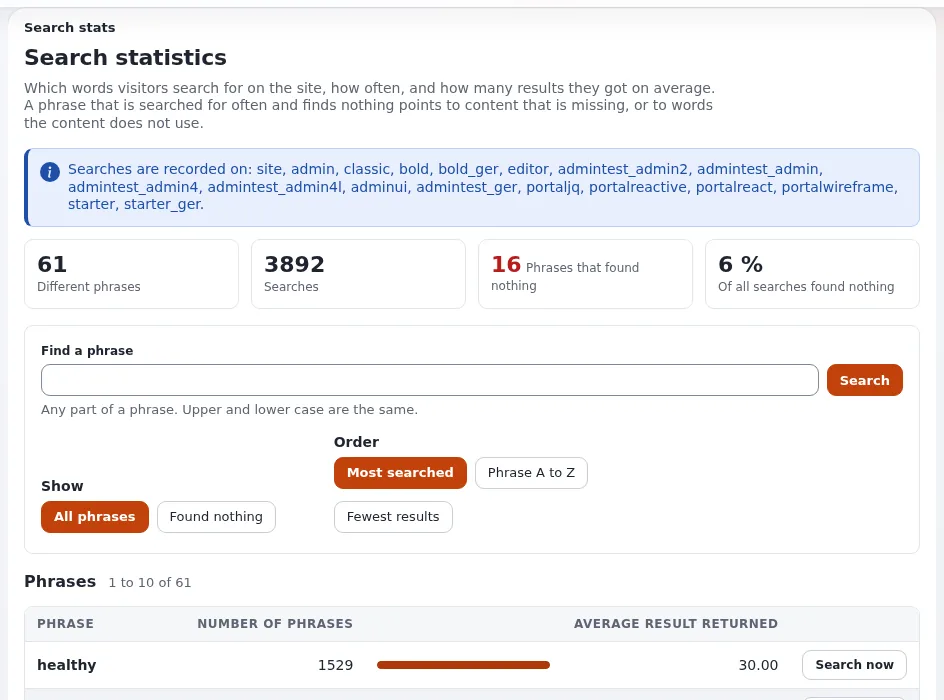
With LogSearchStats=enabled on the public siteaccess, Setup > Search statistics (/search/stats) shows every
phrase, how often it was searched and the average number of results; phrases that found nothing show what content is
missing (5. Search statistics). Phrases can be personal data,
which is why it is off by default.
Related pages
- Search with ezfind and Solr
- Searching (for editors)
- Tagging content with eztags
- Free documentation: this page is free to copy, translate and improve under the GNU FDL 1.3.
Become an Exponential Partner
Partners share their information, provide funding, contribute back and develop the products with us, and that is how Exponential grows. A partner website and dashboard are planned for mid-2027: please become a partner today to speed up our growth rate and land new features faster.