Importing a package
This page is for administrators who bring a package archive into an installation from their computer: a package downloaded from a package server, sent by a colleague or exported from another site. Importing puts the package into the local package repository; it does not install it.
Contents
- Before you upload
- Upload
- What is checked
- Where the package lands and what follows
- The limits
- When the import is refused
Before you upload
- You need the
package/importpolicy; without it the button says "You are not allowed to import packages (package/import)." - A site package is not used from here: the setup wizard, the kickstarter and
exp:installinstall site packages when a site is created. Upload a site package here only to look at it, compare it or keep it for an offline install. - For packages on a package server, ezupdate can fetch them directly (Fetching packages with ezupdate).
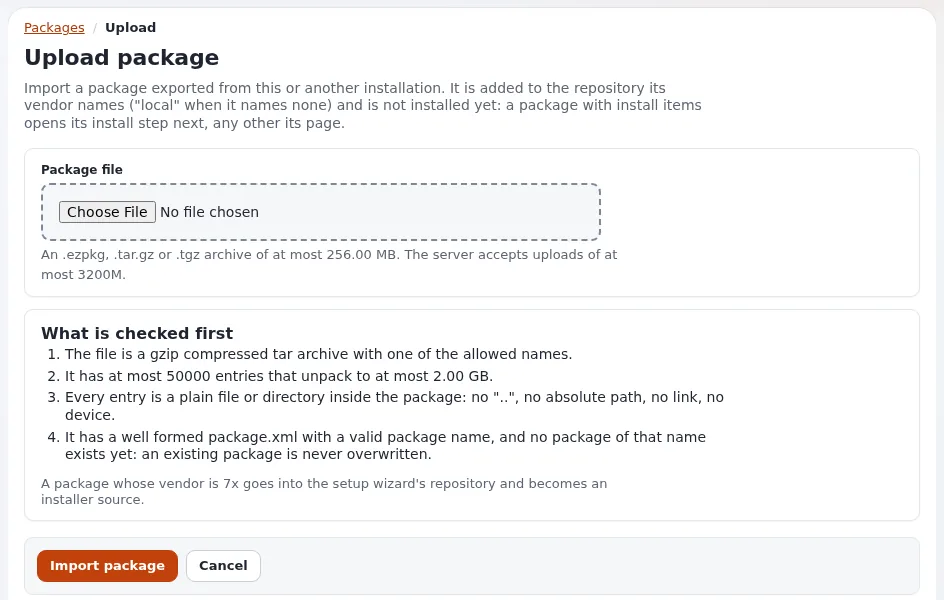
Upload
- Setup > Packages, then Import new package (
/package/upload). - Choose the file under Package file: "An .ezpkg, .tar.gz or .tgz archive of at most %size. The server accepts uploads of at most %server."
- Press Import package. Cancel returns to the list.
What is checked
Before anything is extracted, eZPackageUploadInspector reads the archive's table of contents and its package.xml;
the page lists the rules under What is checked first:
| Rule | Page text |
|---|---|
| gzip-compressed tar with an allowed name | "The file is a gzip compressed tar archive with one of the allowed names." |
| size limit | "It is not too large." |
| entries and unpacked size | "It has at most %entries entries that unpack to at most %size." |
| safe entries | "Every entry is a plain file or directory inside the package: no "..", no absolute path, no link, no device." |
| definition and name | "It has a well formed package.xml with a valid package name, and no package of that name exists yet: an existing package is never overwritten." |
Then the package's own validation runs on an extracted copy in a work directory (removed again): every document well
formed, and for a JSON package the schema and the checksums of package.json. A package that fails is refused with
the list of what failed ("did not pass the validation and was not imported").
The same archive checks run inside eZPackage::import(), so ezpm import, ezupdate's fetch and the setup wizard's
own upload refuse the same archives.
Where the package lands and what follows
The package is extracted into the repository its <vendor> names, turned into a directory name: a 7x package goes
to var/storage/packages/7x/, a package without a vendor to local/. Then:
| Package | Next page |
|---|---|
has install items (install_type="install") and you may install it | the install page (/package/install/<name>) with the validation result |
anything else, including site packages (install_type="import") | the package's page |
Nothing is installed until you press Install package there (Installing and uninstalling).
The limits
# settings/override/package.ini.append.php (the values shown are the defaults)
[UploadSettings]
MaxArchiveSize=268435456
MaxUnpackedSize=2147483648
MaxEntries=50000
AllowedSuffixes[]
AllowedSuffixes[]=ezpkg
AllowedSuffixes[]=tar.gz
AllowedSuffixes[]=tgz
That is 256 MiB per archive, 2 GiB unpacked and 50000 entries. PHP's upload_max_filesize and post_max_size apply
first; the page shows the server's limit. For an archive above them, copy it to the server and use
php ezpm.php import <file>, which runs the same checks.
When the import is refused
| Message | Means | What to do |
|---|---|---|
| "No file was uploaded, or it was larger than the server accepts (%size)." | PHP's upload limit | raise the PHP limits or use ezpm import |
| "Package %packagename already exists, cannot import the package" | a package of that name is in some repository | remove the old one first (The package list and package page) or compare with it instead |
| "The package name %packagename is invalid, cannot import the package" | the name has characters other than a-z, 0-9 and _ | fix <name> in package.xml and rebuild |
| an entry "points outside the package" or "is a link or a device" | the archive holds unsafe paths or links | rebuild the archive from the package folder |
| "not a well formed package definition" | package.xml is broken | xmllint --noout package.xml |
| "did not pass the validation and was not imported" | a document or checksum failed | the list under the message names each problem |
Related pages
- Packages in the administration
- Packages, section 6
- Validating a package before publishing
- Downloading a package by hand
- Import versus install
- Site packages: start here
- Free documentation: this page is free to copy, translate and improve under the GNU FDL 1.3.
Become an Exponential Partner
Partners share their information, provide funding, contribute back and develop the products with us, and that is how Exponential grows. A partner website and dashboard are planned for mid-2027: please become a partner today to speed up our growth rate and land new features faster.