Creating packages with the wizard
This page is for developers and designers who build the parts of a site package in the browser. The package wizard
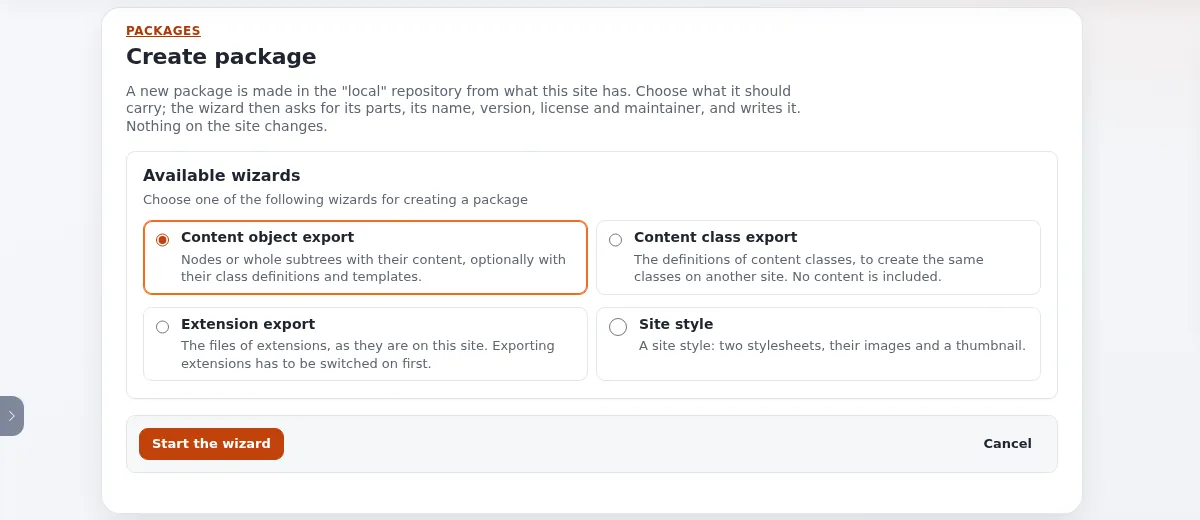
(Setup > Packages > Create new package, /package/create) exports classes, content, extensions or a site style
from a working installation into a new package. It is the easiest way to produce the packages your site package
requires; it does not produce the site package itself.
7x and the Exponential Foundation strongly encourage you to submit the finished site package by pull request to se7enxweb/exponential.packages.exponential.earth: see Contribute your site package.
Contents
- What the wizard can make
- What it cannot make
- Making a package
- The information step
- From the wizard to your source repository
What the wizard can make
package.ini [CreationSettings] HandlerList[] names the creators; each makes one package type
(kernel/classes/packagecreators/):
| Wizard | Creator | Package type | Install type | Use in a site package |
|---|---|---|---|---|
| Content class export | ezcontentclass | contentclass | install | your classes package, like sevenx_classes |
| Content object export | ezcontentobject | contentobject | install | your demo content package, like sevenx_multisite_democontent |
| Extension export | ezextension | extension | install | an extension shipped as a package |
| Site style | ezstyle | sitestyle | import | two stylesheets, images and a thumbnail |
The content object export can also be opened from the content tree (Advanced > Export), with the node and some
choices filled in: /package/create/(creator)/ezcontentobject/(node)/<node id>, optionally with (subtree)/1,
(classes)/0|1 and (versions)/current|all (kernel/package/module.php).
What it cannot make
None of the four creators writes a package of type site, and none writes <settings> or installer files. The site
package (its package.xml with <type value="site" />, its <requires> and its settings/ folder) is made by
forking one (Forking a site package) and edited by hand.
Making a package
- Open Setup > Packages > Create new package. Only the wizards your role may use are shown (
package/create, limited by type, creator and role; see Permissions for packages). - Choose one and press Start the wizard.
- Pick what goes in: classes in a table with a filter, nodes and subtrees through the content browser, extensions with their details. For content you also choose whether classes and templates go with it, which versions, which languages, and how node assignments and related objects are kept.
- Fill in the package information, the maintainer (left out when your role may give no maintainer role) and the changelog.
- Check the review on the last step and press Create package.
The step-by-step version with every field is The package creator wizard, step by step; the redesigned wizard itself is described on The package wizard.
Note
The extension export is off until it is switched on: list the extension in package.ini [ExtensionExportSettings] AllowedExtensions[] (or *) and, with RequirePolicy=enabled (the default), grant package/export_extension. An
extension that holds secret values or key material is refused either way
(The package secret check).
The information step
What the wizard checks before it goes on (validatePackageInformation() in kernel/classes/ezpackagecreationhandler.php):
| Field | Rule |
|---|---|
| Package name | required; "can only contain characters in the range a-z, 0-9 and underscore"; no package of that name may exist in any repository |
| Summary | required |
| Version | Semantic Versioning 2.0.0, MAJOR.MINOR.PATCH with optional -prerelease and +build, at most 24 characters; 1.0.0 is offered |
| License | one of package.ini [LicenseSettings] LicenseList[]; the default is GPL-2.0-or-later |
| Format | Classic XML (package.xml) or JSON (package.json) |
Choose the name the package will have in your index from the start: renaming later means editing package.xml, the
folder and every <require> that names it.
From the wizard to your source repository
Create package writes the package into the local repository (var/storage/packages/local/<name>/) and opens its
page. To bring it into your source repository:
- Press Download on the package's page: you get
<name>-<version>.ezpkg. - Unpack it into
packages/<name>/of your source repository and commit the files. - Set
<vendor>in itspackage.xml: the wizard writes none, which is why the package sits inlocal; with a vendor, an import puts it invar/storage/packages/<vendor>/. - Name it in your site package's
<requires>with amin-version, and list it in yourindex.xml. - Rebuild with
build.shlike every other folder (Rebuilding with build.sh).
Tip
Before you download, press Validate on the package's page: it checks the package as an upload would be checked, so a problem shows up on your test site and not on someone's new installation.
Related pages
- Making your own site package
- Contribute your site package
- The package wizard (administration)
- Creating packages with ezpm
- Package types
- Packages, section 8
- Site packages: start here
- Free documentation: this page is free to copy, translate and improve under the GNU FDL 1.3.
Become an Exponential Partner
Partners share their information, provide funding, contribute back and develop the products with us, and that is how Exponential grows. A partner website and dashboard are planned for mid-2027: please become a partner today to speed up our growth rate and land new features faster.