Lesson 1.2: The Exponential Intelligence dashboard
The dashboard page Exponential Intelligence is where editors see what the assistant did for them, what it cost and where to start a request. This lesson reads it from top to bottom, without sending a request yet.
At a glance
| Course | Exponential Intelligence |
| Module | Module 1: Introducing Exponential Intelligence |
| Duration | 45 minutes (20 presenting, 25 exercise) |
| Level | Beginner |
| Audience | Editors and administrators |
| Prerequisites | Lesson 1.1; a training account with the policy expai/write |
Learning objectives
After this lesson, learners can:
- open the page from the dashboard's left column and read its status line (Ready, the model, the approval workflow);
- switch the period (Today, 7d, 30d, Month) and, with the permission, Mine and Site;
- read the four figures: estimated cost, tokens, requests, drafts;
- find Start writing, the limits, the budget, the chart, the models and the recent drafts;
- find the block Exponential Intelligence: my drafts on the main dashboard.
Trainer's notes
How to present it
Source: the extension's dashboard documentation (extension/expai/doc/dashboard.md, under EI: Help).
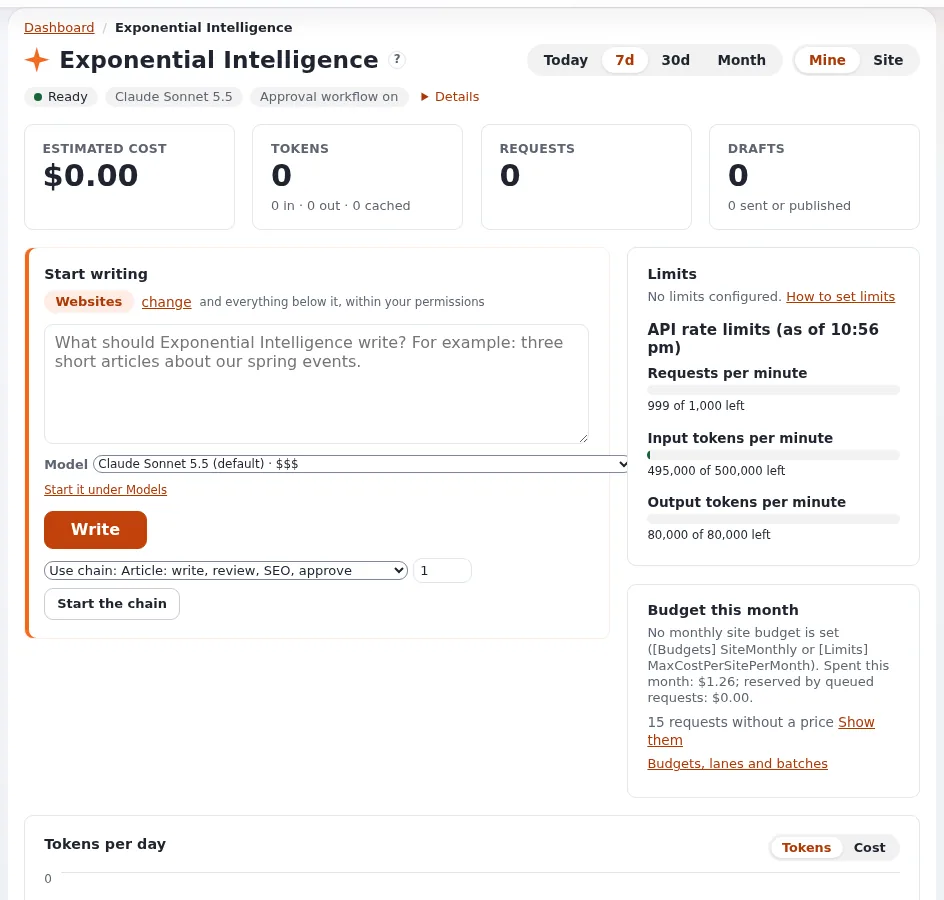
- Getting there (2 minutes). Dashboard tab, left column: Exponential Intelligence (shown only with
expai/write). The "?" next to the title opens its help page. - Header and status line (4 minutes). The period (Today, 7d, 30d, Month), and Mine / Site for roles that may see everyone's usage. The status line: Ready (or switched off, or not configured), the model in use, whether an approval workflow runs before publishing, and Details (the user's content access in words, the price table's date; the key is never shown).
- Four figures (4 minutes): Estimated cost, Tokens (in, out, cached), Requests, Drafts (how many were sent or published). Costs are estimates from a price table; the provider's invoice is authoritative.
- Start writing (3 minutes). A location (with change), the field What should Exponential Intelligence write?, the Model list (with price classes such as $ to $$$, and notes such as "read only"), Write, and, where chains are set up, Use chain, Items and Start the chain. Lesson 2.1 uses it.
- The rest (5 minutes). Limits (or No limits configured.), the API rate limits the provider reported, Budget this month, the chart (Tokens per day, or cost), Models (each model's track record), Recent drafts (the last five versions it wrote for you, with links). On the main dashboard, the block Exponential Intelligence: my drafts lists them too.
Common questions
Why does my colleague see Site and I do not? The Site view needs the policy expai/log.
Why is the cost shown with "≈" or "< $0.01"? Small amounts and amounts priced with fallback prices are marked; some requests may have no price at all, and the page says how many.
What does "read only" next to a model mean? That model may answer but may not write drafts (it did not pass the site's tool-calling probe, or it is not configured to write). Module 7 explains it.
Pitfalls
- Reading cost as an invoice. It is an estimate.
- Sending a request by accident. Write only fills the request into the Intelligence tab; the editor still presses Send there. In this lesson, do not press it.
- Different model lists. The list depends on the site's providers and the user's permissions.
Hands-on exercise
Use the training installation and your training account.
- On the Dashboard tab, open Exponential Intelligence in the left column.
- Read the status line and write down: the state, the model and whether an approval workflow runs.
- Switch the period to 30d and back to 7d. If Site is offered, switch to it and back to Mine.
- Write down the four figures.
- In Start writing, read the location and the model list. Write down which models are marked "read only" and which price classes appear. Do not press Write.
- Read Limits and Budget this month: are limits configured?
- Find Models and Recent drafts (they may be empty on a fresh account).
- Open the main Dashboard and find the block Exponential Intelligence: my drafts.
- Press the "?" next to the page title and skim the help page that opens.
Expected result
- The learner's notes list the status, model, approval state, the four figures, the price classes and the limits state.
- No request was sent.
- The trainer checks by asking a learner to explain the difference between Mine and Site.
Quiz
- Which policy is needed to see the page at all?
- Name the four figures.
- What does the status line tell you?
- True or false: the estimated cost is the provider's invoice.
- Where else are the drafts written by the assistant listed? A. Only in the trash B. On the main dashboard's block Exponential Intelligence: my drafts and under My drafts C. On the public site D. Nowhere
Answers
expai/write.- Estimated cost, tokens, requests, drafts.
- Whether it is ready, the model in use, and whether an approval workflow runs before publishing.
- False. It is an estimate from a price table.
- B. They are ordinary drafts, so My drafts lists them too.
Further reading
- expai: Exponential Intelligence
- The dashboard and usage pages under EI: Help (
extension/expai/doc/dashboard.md,extension/expai/doc/usage-tracking.md).
Related pages
- Module 1: Introducing Exponential Intelligence
- Exponential Intelligence: course overview
- Trainers: start here
- Free documentation: this page is free to copy, translate and improve under the GNU FDL 1.3.
Become an Exponential Partner
Partners share their information, provide funding, contribute back and develop the products with us, and that is how Exponential grows. A partner website and dashboard are planned for mid-2027: please become a partner today to speed up our growth rate and land new features faster.