Lesson 1.1: What Exponential Intelligence is, and what it never does
Exponential Intelligence (the extension expai) is the writing assistant of the administration: editors ask in plain language for new content or changes, and it writes drafts. Before anybody types a request, learners need the three promises that make it safe to use, and the limits that follow from them.
Note
Use a training installation for every exercise of this course, with a provider account meant for training (or a local model). Requests to a hosted provider cost money and send text to that provider.
At a glance
| Course | Exponential Intelligence |
| Module | Module 1: Introducing Exponential Intelligence |
| Duration | 30 minutes (20 presenting, 10 exercise) |
| Level | Beginner |
| Audience | Editors who will use the assistant; administrators who decide about it |
| Prerequisites | Editors 101 or experience as an editor |
Learning objectives
After this lesson, learners can:
- explain what Exponential Intelligence does and name the places it appears;
- state the three promises: drafts only, as the editor, never publishing on its own;
- name what it does not do (upload images, set relations, publish, delete);
- explain that requests go to a model provider, and that the site decides which.
Trainer's notes
How to present it
Sources: expai: Exponential Intelligence and the extension's FAQ
(extension/expai/doc/faq.md, also shown in the administration under EI: Help).
- What it does (5 minutes). Editors ask in plain language ("write two short articles about spring planting below
this folder"); the assistant looks up what it needs and writes drafts. It appears in several places:
- the Intelligence tab of an item's page (a conversation per user and item);
- the edit form (field actions such as Write, Rewrite, Shorten, Translate; presets; an Improve menu; alt text for images);
- Vector, a workspace of threads for controlled and bulk work;
- AI chains, which write in steps (write, review, revise) with a human checkpoint;
- the dashboard pages Exponential Intelligence, EI: Log and EI: Help.
- Three promises (5 minutes). Write them on the board:
- It writes drafts, never published versions. Publishing happens only when an editor sends a draft, through the normal publish operation, so approval workflows apply.
- It works as the signed-in editor, with that editor's permissions, for every lookup and every write. There is no service account.
- It never publishes on its own; there is no setting for that.
- What it does not do (3 minutes). It cannot upload images, files or relations; it says so, and the editor sets them. It cannot delete, move, change permissions or send mail.
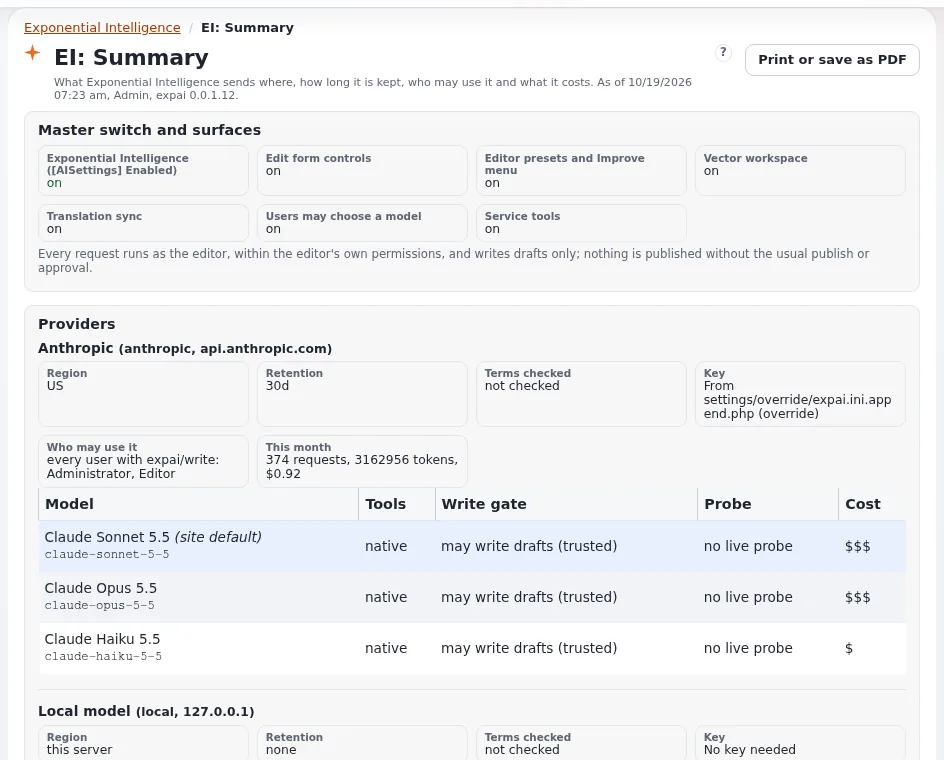
- Providers (4 minutes). Requests go to a model provider the site configured: Anthropic, an OpenAI-compatible service, or a local model on the server. Each hosted request is billed to the account of the site's key. The site's data policy can keep sections or classes away from some providers. Module 6 covers privacy; module 7 the settings.
- Labels (3 minutes). Versions it wrote carry a label, so reviewers and approvers know.
Common questions
Is it switched on everywhere? No. It is an extension that stays inactive until an administrator activates and configures it, and it can be switched off per siteaccess.
Can it see everything on the site? Only what the model asks for through its tools, as the editor, within limits, and only what the data policy lets go to that provider.
Does it learn from our content? That depends on the provider's terms; the site records each provider's region and retention (module 6). Ask your administrator.
Pitfalls
- Overselling. It drafts; editors decide. Say it in every module.
- "The AI published it." It cannot. If something was published, an editor sent it.
- Real content in training. Use a training installation and neutral topics.
Hands-on exercise
Use the training installation and your training account (no request is sent in this exercise).
- Sign in and open the dashboard. In the left column, find Exponential Intelligence, EI: Log and EI: Help (and EI: Vector, EI: Chains if your role has them).
- Open EI: Help and read the first table of the documentation index. Write down three topics.
- Open any item in Content structure and find the Intelligence tab next to the other tabs. Do not send anything.
- Open any article with Edit, look for the Exponential Intelligence area and the buttons on the fields, and leave with Discard draft.
- Write the three promises on a card in your own words.
Expected result
- The learner found the menu entries, the tab and the edit form area (as far as their role allows).
- The card lists: drafts only; as the editor; never publishes on its own.
- The trainer checks two cards.
Quiz
- What does Exponential Intelligence write? A. Published pages B. Drafts C. Templates D. E-mails
- Whose permissions does it use?
- True or false: there is a setting that lets it publish automatically.
- Name two things it cannot do.
- Where can an editor read its documentation inside the administration?
Answers
- B. (expai).
- The signed-in editor's; there is no service account.
- False.
- Any two of: upload images or files, set relations, publish, delete, move, change permissions, send mail.
- Under EI: Help (
expai/help), and the "?" link on each of its pages.
Further reading
- expai: Exponential Intelligence: what it does for editors, administrators and developers.
- The extension's FAQ and security pages, under EI: Help in the administration (
extension/expai/doc/faq.md,extension/expai/doc/security.md).
Related pages
- Module 1: Introducing Exponential Intelligence
- Exponential Intelligence: course overview
- Trainers: start here
- Free documentation: this page is free to copy, translate and improve under the GNU FDL 1.3.
Become an Exponential Partner
Partners share their information, provide funding, contribute back and develop the products with us, and that is how Exponential grows. A partner website and dashboard are planned for mid-2027: please become a partner today to speed up our growth rate and land new features faster.