Lesson 5.6: Uploading and installing packages
A package is made on one installation to be installed on another. This lesson closes the loop: learners upload the package they made in lesson 5.3 to a second training installation, read what the upload checks, install it as drafts to review, and learn the settings that keep the browser installer from timing out.
Note
Install only on a training installation. An install writes content, and Uninstall cannot be undone.
At a glance
| Course | Multisite and site packages |
| Module | Module 5: Site packages |
| Duration | 55 minutes (15 presenting, 40 exercise) |
| Level | Advanced |
| Audience | Administrators |
| Prerequisites | Lesson 5.3: the archive of clubb_content; a second training installation (a neighbour's lab, or one made with exp:install in another directory) |
Learning objectives
After this lesson, learners can:
- upload a package and explain each check the upload makes before writing anything;
- read the install page, including what the install meets on this site;
- install content as drafts for review, and know when to install in the background;
- set
InstallBatchMaxItemsandInstallBatchTimeBudgetSecondsfor a slow host; - recover from a stopped install.
Trainer's notes
How to present it
Sources: Packages, 6. Uploading and 7. Installing and A package installer that survives big packages.
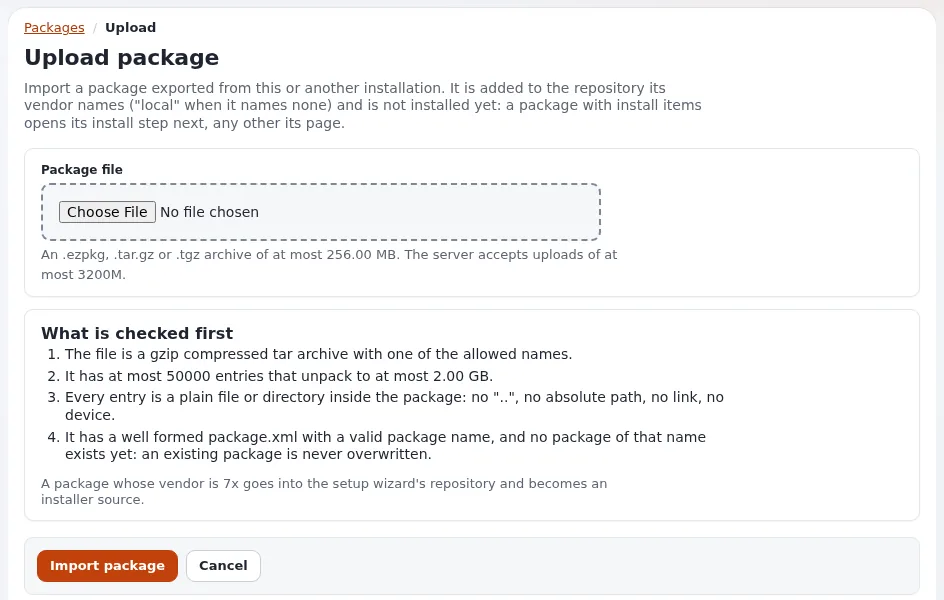
- The upload (4 minutes). Import new package on the list opens Upload package. The page lists What is
checked first: a gzip compressed tar with an allowed name; at most 50000 entries that unpack to at most 2 GB;
every entry a plain file or directory inside the package (no
.., no absolute path, no link, no device); a well formedpackage.xmlwith a valid name, and no package of that name yet. A package whose vendor is7xgoes into the setup wizard's repository and becomes an installer source. The limits arepackage.ini [UploadSettings]. - The install page (4 minutes). Install package or Skip installation; the page shows what the install
meets here, each object looked up by remote ID: new, existing, a conflict, or without its class. Install as
drafts writes content objects as drafts: nothing is published, and classes, settings and design files are not
installed. Install in the background runs the install as a content job; the page suggests it above
[ContentJobSettings] SynchronousLimitobjects. - Batches (4 minutes). Each item installs in its own transaction; the browser installs a few items, then
redirects to itself and continues.
package.ini [InstallerSettings]:InstallBatchMaxItems(12) andInstallBatchTimeBudgetSeconds(6). For a slow shared host: 4 items and 3 seconds. - When it stops (3 minutes). The error page names the item type and name. Fix the cause, then reload the install step: the position of the current item is kept between requests. There is no "Retry" button.
Common questions
Why was my upload refused with "already exists"? A package of that name is in some repository; remove the old one first or give the new one another name. An existing package is never overwritten.
Does the upload size limit come from Exponential or PHP? Both: PHP's upload_max_filesize and post_max_size
apply first; the page shows the server's limit.
Can I install from the shell instead? Yes: php ezpm.php import <file> then php ezpm.php install <name>, with
the same archive checks (lesson 5.3).
What does Uninstall remove? What uninstalling removes from the site, content included; it cannot be undone.
Pitfalls
- Installing on the source installation. The objects exist already; the install page shows them as existing. Use a second installation.
- Forgetting the review. Drafts from Install as drafts wait for an editor; publish or discard them.
- Settings without clearing the INI cache. After changing
[InstallerSettings], clear it.
Hands-on exercise
Work in pairs: each learner installs the neighbour's clubb_content archive (from var/tmp/course/) on their own
installation, or on a second installation made with exp:install in another directory.
Copy the classic
.ezpkgfrom your neighbour (shared folder or USB stick) to your computer.In the administration, open Setup > Packages and press Import new package.
Read What is checked first and the size limit shown under Package file.
Choose the file and press Import package.
The install step opens. Read the list of what will be installed and what the install meets here.
Choose Install as drafts and run it. Read the report: each object with what the install did and where its main location went.
Open My drafts on the dashboard and review two drafts. Publish one, discard the other.
Set smaller batches for a slow host and clear the INI cache:
php bin/php/console exp:ini set package.ini/InstallerSettings/InstallBatchMaxItems 4 global
php bin/php/console exp:ini set package.ini/InstallerSettings/InstallBatchTimeBudgetSeconds 3 global
Open the package's page again and read the install state and the actions it now offers.
Put the batch settings back (
exp:ini rem ... globalfor both) at the end.
Expected result
- Step 4: the upload passes and the install step opens, because the package has install items.
- Step 6: the report lists the folder Site B and its sub items as drafts, with their places.
- Step 7: one draft published, one discarded.
- Step 8:
exp:ini where package.ini/InstallerSettings/InstallBatchMaxItemsshows4in the global override. - The trainer checks step 6 on one lab.
Quiz
- Name three checks the upload makes before anything is written.
- What does Install as drafts not install? A. Content objects B. Classes, settings and design files C. Nothing D. Only images
- Which two settings decide the size of an install batch in the browser?
- An install stops with an error on item 37. What do you do after fixing the cause?
- A package's vendor is
7x. What happens when you upload it?
Answers
- Any three of: gzip tar with an allowed name; size, entries and unpacked size within the limits; every entry a
plain file or directory inside the package; a well formed
package.xmlwith a valid name; no package of that name exists (Packages, 6). - B.
InstallBatchMaxItemsandInstallBatchTimeBudgetSecondsinpackage.ini [InstallerSettings].- Reload the install step; the position of the current item is kept.
- It goes into the setup wizard's repository and becomes an installer source.
Further reading
- Packages: what they carry, where they live, and how to handle them safely.
- A package installer that survives big packages.
- The JSON package format: install as drafts.
- Installing your package on a test site.
- My drafts and my pending items.
Related pages
- Module 5: Site packages
- Multisite and site packages: course overview
- Trainers: start here
- Free documentation: this page is free to copy, translate and improve under the GNU FDL 1.3.
Become an Exponential Partner
Partners share their information, provide funding, contribute back and develop the products with us, and that is how Exponential grows. A partner website and dashboard are planned for mid-2027: please become a partner today to speed up our growth rate and land new features faster.