Lesson 5.4: Creating a package with the wizard
The administration has four wizards that make a package from what the site has: content, content classes,
extensions and a site style. Every package names a license from a strict list and a Semantic Versioning version. This
lesson walks through the content class wizard, step by step, and ends with a package in the local repository that
can be downloaded and installed elsewhere.
At a glance
| Course | Multisite and site packages |
| Module | Module 5: Site packages |
| Duration | 50 minutes (15 presenting, 35 exercise) |
| Level | Intermediate |
| Audience | Administrators and developers |
| Prerequisites | Lesson 5.2; a role with package/create (the Administrator role) |
Learning objectives
After this lesson, learners can:
- choose the right wizard for a task among the four;
- move through the wizard's steps with Continue, Back and Cancel, and correct an error at its field;
- choose a license from the list and write a valid Semantic Versioning version;
- review a package before Create package writes it;
- add a license to the list in
package.ini.
Trainer's notes
How to present it
Sources: The package wizard and Package licenses and Semantic Versioning. The labels are those of the admin4 design.
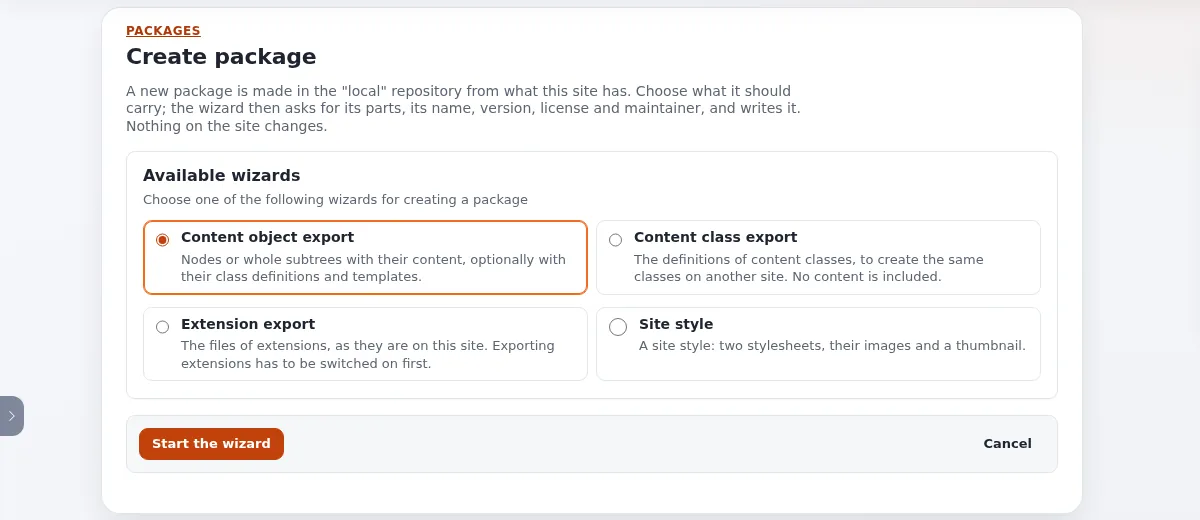
- The four wizards (4 minutes). Setup > Packages > Create new package opens Create package, which
lists Content object export (nodes or whole subtrees with their content), Content class export (the
definitions of content classes, no content), Extension export (the files of extensions; exporting has to be
switched on first in
package.ini [ExtensionExportSettings]) and Site style (two stylesheets, their images and a thumbnail). Choose one and press Start the wizard. - The steps (4 minutes). Each step shows the list of steps, "Step n of m" and its name. Continue checks the
step; errors are listed at the top with links to their fields and shown under each field. Back keeps valid
input; Cancel writes nothing. The last step shows the Review; Create package writes the package into
localand opens its page. - Licenses (4 minutes). The License drop-down is grouped (software, documentation, Creative Commons, public
domain, proprietary). The default is
GPL-2.0-or-later, the license of Exponential itself. The server accepts only a configured SPDX identifier or an alias such asGPL. Add a license insettings/override/package.ini.append.phpunder[LicenseSettings] LicenseList[]with a[License_<identifier>]block. - Versions (3 minutes). New packages start at
1.0.0. The wizards acceptMAJOR.MINOR.PATCHwith an optional-prereleaseand+build, at most 24 characters.
Common questions
Which license for course material? Documentation: GFDL-1.3-or-later is offered under documentation licenses.
Code: GPL-2.0-or-later unless there is a reason for another.
Is 1.0 accepted? Not for a new package: it must be 1.0.0. Existing packages with 1.0 are read as 1.0.0
and never rewritten.
Why is the Maintainer step missing? It is left out when your role may give no maintainer role.
Can I choose the format? Yes: Classic XML or JSON, on the Package information step.
Pitfalls
- Extension export disabled. Every extension is listed but cannot be chosen, with the reason; switching it on is a settings change, not part of this lesson.
- Real names and addresses. The maintainer and changelog fields go into
package.xmland travel with the package. In class, use a role name and an address atexample.invalid. - Pressing Enter. Enter in a field is Continue, never Back.
Hands-on exercise
Use your training installation and an administrator account.
- Open Setup > Packages and press Create new package.
- Read the four wizards, choose Content class export and press Start the wizard.
- On the content classes step, filter the list by
folder, tick Folder, clear the filter and tick Article too. Note "2 of n selected". Press Continue. - On Package information, leave the name empty and press Continue. Read the error summary and follow its link to the field.
- Enter the name
course_classes, a summary, the version1.0and press Continue. Read the version error. - Correct the version to
1.0.0. Open License and findGPL-2.0-or-laterandGFDL-1.3-or-later. Keep the default. Choose the format Classic XML. Press Continue. - On the maintainer step (if shown), enter
Course trainerand[email protected]. Press Continue. - On the changelog step, write "Course package of lesson 5.4" and read the Review.
- Press Back once, then Continue again: your input is kept.
- Press Create package. The package's page opens.
- On the page, press Validate, then Download.
Expected result
- Step 4 and step 5 stay on their step with an error summary and the error under the field.
- After step 10 the page of
course_classesopens in thelocalrepository, version1.0.0, license GNU General Public License v2.0 or later, carrying two content classes. - Step 11: validation passes and the browser saves
course_classes-1.0.0...ezpkg. - The trainer checks the Review of step 8 on one screen.
Quiz
- Which wizard exports the definitions of classes without content? A. Content object export B. Content class export C. Extension export D. Site style
- Which version does the wizard accept:
1.0,1.0.0or1.0.0.1? - What is the default license, and why?
- Where do you add a license that is not in the list?
- What does Cancel write?
Answers
- B.
1.0.0: strict Semantic Versioning 2.0.0,MAJOR.MINOR.PATCH(Package licenses and Semantic Versioning).GPL-2.0-or-later, the license of Exponential itself and what "GPL" always meant.- In
settings/override/package.ini.append.php:[LicenseSettings] LicenseList[]=<identifier>and a[License_<identifier>]block withName,URLandGroup; then clear the INI cache. - Nothing; it returns to the package list.
Further reading
- The package wizard.
- Package licenses and Semantic Versioning.
- Package creator wizard step by step and Package licenses in the wizard.
- Extension list and downloads: switching extension export on.
Related pages
- Module 5: Site packages
- Multisite and site packages: course overview
- Trainers: start here
- Free documentation: this page is free to copy, translate and improve under the GNU FDL 1.3.
Become an Exponential Partner
Partners share their information, provide funding, contribute back and develop the products with us, and that is how Exponential grows. A partner website and dashboard are planned for mid-2027: please become a partner today to speed up our growth rate and land new features faster.