Lesson 2.4: Choosing searchable attributes
The search engine only indexes attributes marked Searchable in their class. That one checkbox decides whether a word in a field can ever be found. Too few searchable fields and visitors miss content; too many and results fill with matches in internal codes. This lesson teaches learners to read and choose the flag.
Note
Changing a class affects every object of that class. Do it only on your own training installation.
At a glance
| Course | Search |
| Module | Module 2: Indexing |
| Duration | 30 minutes (10 presenting, 20 exercise) |
| Level | Intermediate |
| Audience | Site administrators and developers who maintain classes |
| Prerequisites | Lesson 2.3; an administrator account with access to Setup > Classes |
Learning objectives
After this lesson, learners can:
- find the flags Is searchable and Is not searchable on a class's page in Setup > Classes;
- explain that some datatypes cannot be searchable and the checkbox is then disabled;
- choose which attributes of a class should be searchable, with reasons;
- make an attribute searchable and rebuild the index so that existing objects are found by it.
Trainer's notes
How to present it
Source: Site search, The content model and editing content and the class edit form (admin4).
- Where the flag is (3 minutes). Open Setup > Classes, a class group, and the class Article. Under Attributes every field shows its flags, for example Is required, Is searchable, Does not collect information. In the edit form the checkbox is called Searchable; its tooltip says it specifies "whether the contents of the attribute should be indexed by the search engine". When the datatype does not support indexing, the checkbox is disabled.
- What to choose (4 minutes). The website creator's guide gives the rule: mark useful attributes searchable (titles, intros, bodies), not internal codes. Discuss examples: keywords yes, a product's internal number perhaps (staff search for it), a free text "notes for editors" field no.
- Changing it (3 minutes). The flag applies to new indexing. Objects already indexed keep their old entries until they are republished or the index is rebuilt (lesson 2.3).
Common questions
Does making a field not searchable hide its content? No. It only stops the words being found by search. The content is still shown wherever templates show it.
Why is the checkbox greyed out for an image field? Its datatype does not support search indexing; the tooltip names the datatype.
Does it change the editor's form? No. Editors see no difference.
Pitfalls
- Editing the class without a rebuild. Learners change the flag and search at once: nothing changes for existing objects. Let them see it, then rebuild.
- Leaving a class in edit. An unfinished class edit stays as a temporary version. Make sure learners press OK or Cancel at the end, as the form offers.
- Changing classes on a shared training server. Every learner shares the class. Do this exercise on one installation per learner only.
Hands-on exercise
Use your own training installation, signed in as an administrator, and a terminal in its root.
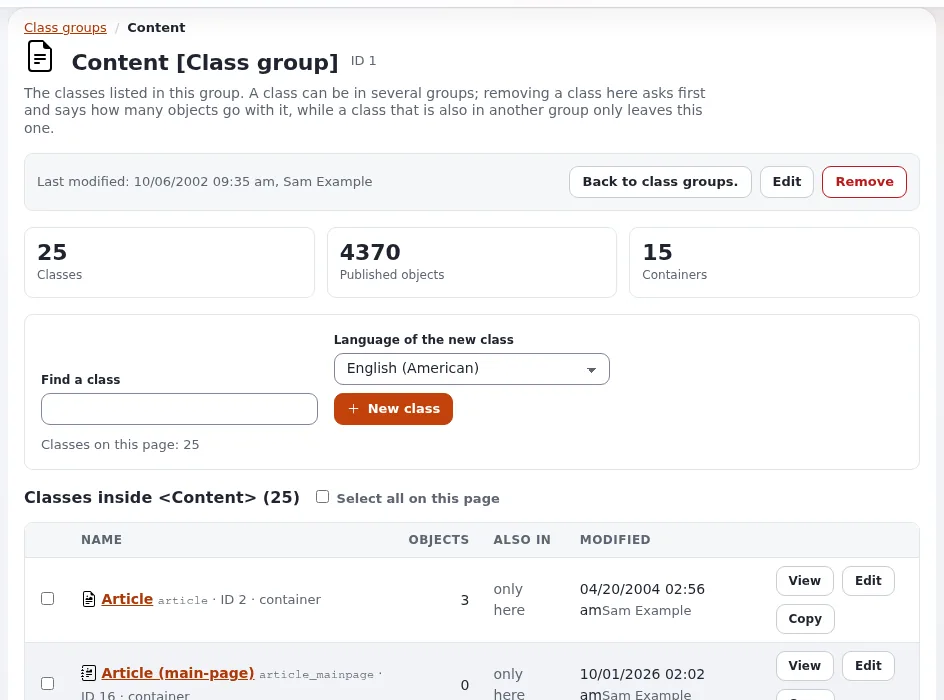
Open Setup > Classes, the group that holds Article, and click Article.
Under Attributes, write down which fields show Is searchable and which Is not searchable.
Create and publish an Article whose Short title (or another text field that is searchable) contains the word
kumquat, and whose title does not. Search forkumquat.Back on the class page, press Edit. Find that field and clear its Searchable checkbox. Save the class with OK.
Search for
kumquatagain.Rebuild the index:
php bin/php/updatesearchindex.php -s <siteaccess> --cleanSearch for
kumquata third time.Edit the class again, tick Searchable for the field, press OK, and rebuild the index once more so the class is as shipped.
Expected result
- Step 3 finds the article.
- Step 5 still finds it: the old index entries are still there.
- Step 7 finds nothing: after the rebuild the field is no longer indexed.
- After step 8 the class shows Is searchable again for the field, and
kumquatis found again. - The trainer checks the class page of two learners at the end.
Quiz
- Where do you see whether an attribute is searchable without opening the edit form?
- You make an attribute searchable. When are existing objects found by its content? A. at once B. after a rebuild of the index or a new publish C. after clearing the template cache D. never
- Why is the Searchable checkbox disabled for some attributes?
- Name two attributes of an article that should be searchable and one kind of field that usually should not.
- True or false: clearing Searchable hides the field's content from visitors.
Answers
- On the class's page in Setup > Classes, under Attributes (Is searchable or Is not searchable).
- B. The flag applies when an object is indexed again.
- The datatype does not support search indexing.
- For example the title and the body (or intro); internal codes or editor notes usually should not (Site search).
- False. It only stops the words from being found by search.
Further reading
- Site search: which attributes to mark searchable.
- The content model and editing content: classes and their attributes.
- Class groups: finding a class in Setup > Classes.
Related pages
- Module 2: Indexing
- Search: course overview
- Trainers: start here
- Free documentation: this page is free to copy, translate and improve under the GNU FDL 1.3.
Become an Exponential Partner
Partners share their information, provide funding, contribute back and develop the products with us, and that is how Exponential grows. A partner website and dashboard are planned for mid-2027: please become a partner today to speed up our growth rate and land new features faster.