Lesson 10.5: Packages
Packages move content classes, content, extensions and settings between installations, and they are what the setup
wizard builds new sites from. An administrator must be able to find out what a package carries before installing it,
and must know that removing a package is not the same as uninstalling it. This lesson teaches Setup > Packages
and the command line tool ezpm.php, with actions that change nothing.
At a glance
| Course | Site administration |
| Module | Module 10: Upgrades, extensions and packages |
| Duration | 35 minutes (15 presenting, 20 exercise) |
| Level | Intermediate |
| Audience | Site administrators |
| Prerequisites | Lesson 10.4; an administrator account and a shell |
Learning objectives
After this lesson, learners can:
- explain what a package is: installed, imported or exported;
- find a package by search, repository, type and state on Setup > Packages;
- read a package's page and validate it without installing it;
- export a package to an
.ezpkgfile withezpm.php; - explain what Installer source means and why removing a package does not uninstall it.
Trainer's notes
How to present it
Source: Packages: what they carry, where they live, and how to handle them safely.
- What a package is (3 minutes). A directory with a
package.xmland the files it names. It can be installed (its items are created on the site), imported (only kept) or exported (written as one.ezpkgfile). - Where packages live (2 minutes). In repositories below
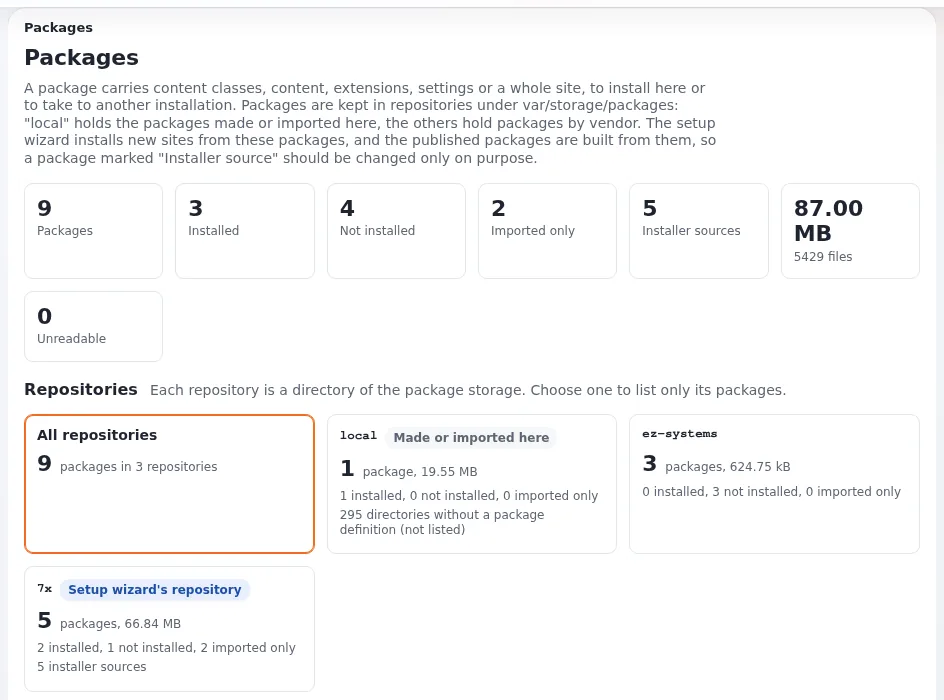
var/storage/packages/:localfor packages made or imported here, and one directory per vendor. The setup wizard's repository is marked. - The list (3 minutes). Setup > Packages: figures, Repositories, Find packages (search, repository, type, state, sort) and one card per package with View and Download.
- A package's page (3 minutes). Read-only until a button is pressed: details, what it carries, the changelog, the package contents (each file viewable) and Validate, which checks it as an upload is checked.
- Installer sources and removal (3 minutes). A package the installer takes as a source is marked Installer source; removing one needs its own confirmation. Removing a package deletes its directory; what it installed stays on the site.
- Uploads (1 minute). An upload is inspected before anything is written; a path outside the package, a link or a device is refused. An existing package is never overwritten.
Common questions
Can a package uninstall what it installed? Its page offers Uninstall when the package can do it and your role allows it. Remove is something else: it deletes the package's directory only.
Where does a downloaded package come from? Download writes the package's .ezpkg; the shell does the same with
ezpm.php export.
Are packages and Composer packages the same? No. Exponential packages (.ezpkg) carry classes, content and
settings; Composer packages carry code. Lesson 10.3 covered Composer.
Pitfalls
- Removing an installer source. New installations from the setup wizard depend on it. The page asks separately; read it.
- Installing in class to "see what happens". Installing creates classes and content on the site. Use Validate and the page's contents instead.
- Exporting into the installation. Write exports to a directory outside the web root, or to
var/tmp, and clean up afterwards.
Hands-on exercise
Use your own training installation, in the browser and in a terminal at the installation root. Nothing is installed or removed.
Open Setup > Packages. Read Overview and Repositories: which repository is the setup wizard's?
In Find packages, choose the state installer sources (or type
sevenxin Search) and apply. Note the cards marked Installer source.Press View on one package. Read Details and What it carries.
Open Package contents and view the package definition and one content class file.
Run Validate and read what was checked.
In a terminal, list the packages:
php ezpm.php listExport the package you viewed to a file (this only reads the package):
mkdir -p var/tmp/packages-training
php ezpm.php export <package name> -d var/tmp/packages-training
ls -l var/tmp/packages-training
Explain to your neighbor, in two sentences, what Remove selected on the list would do to this package and to the site.
Clean up the export directory of step 7 as your trainer shows.
Expected result
- Step 2 shows the packages the setup wizard installs sites from, marked Installer source.
- Step 5 reports the checks the package passed, or each problem.
- Step 7 writes one
.ezpkgfile. - Step 8: the package's directory would be deleted; what it installed stays on the site; for an installer source, new installations from the wizard would lose it.
- The trainer checks the answer of step 8 with two learners.
Quiz
- What is the difference between installing and importing a package?
- Where are packages kept on disk?
A.
extension/B.var/storage/packages/C.settings/packages/D.vendor/ - You remove a package that was installed. What happens to the classes it created?
- What does Installer source on a card mean?
- How do you see what a package carries without installing it?
Answers
- Installing creates its items on the site; importing only keeps the package (Packages, In short).
- B. In repositories such as
localand one per vendor. - They stay: removing a package deletes its directory; it does not uninstall it.
- The setup wizard takes it as a source for new installations; removing it needs its own confirmation.
- Its page (View): What it carries, Package contents and Validate.
Further reading
- Packages: every page, the checks of an upload and troubleshooting.
- Package compare and import.
- The ezpm package manager on the command line.
- Site packages for hosts.
Related pages
- Module 10: Upgrades, extensions and packages
- Site administration: course overview
- Trainers: start here
- Free documentation: this page is free to copy, translate and improve under the GNU FDL 1.3.
Become an Exponential Partner
Partners share their information, provide funding, contribute back and develop the products with us, and that is how Exponential grows. A partner website and dashboard are planned for mid-2027: please become a partner today to speed up our growth rate and land new features faster.