Lesson 7.1: The theme's metadata
A theme that others install must say who it is: its name, version, copyright, license and website. Exponential reads
that from two small files, ezinfo.php and extension.xml, and shows it on the About page and in Setup >
Extensions. In this lesson learners complete the files the wizard wrote and make them agree with each other and with
the LICENSE file.
At a glance
| Course | Theme design |
| Module | Module 7: Packaging a theme |
| Duration | 45 minutes (15 presenting, 30 exercise) |
| Level | Intermediate |
| Audience | Designers and developers who publish themes |
| Prerequisites | Lesson 2.1: training_theme created with the wizard |
Learning objectives
After this lesson, learners can:
- name the keys of
ezinfo.phpand the elements ofextension.xml, and which must be equal; - explain why
extension.xmlwins when the two disagree; - check both files (
php -l,xmllint --noout) and see the result on the About page; - write a README that says what the theme is and how to switch it on.
Trainer's notes
How to present it
Sources: ezinfo.php, extension.xml and Keeping every version field in sync.
- ezinfo.php (4 minutes). The class is the folder name followed by
Info,info()isstatic, and it returnsName,Version(without av),Copyright,License(exactly whatLICENSEsays) andInfo_url, optionallyAuthor. - extension.xml (4 minutes).
<software><metadata>with<name>,<version>,<copyright>,<license>,<info_url>. The About page reads it first when it has a<metadata>block, so a wrong value here wins over a correct one inezinfo.php. - Values never to write (2 minutes).
//autogentag//ordev-masteras the version, a license that differs fromLICENSE, a website that is not the theme's own. - The rule for releases (3 minutes). Every release raises the version in both files to exactly the release's version, in a commit before the tag; module 8 shows why tags are permanent.
Common questions
Which license should my training theme have? The one you chose in the wizard; module 8 discusses the choice. The
wizard wrote the LICENSE file for it.
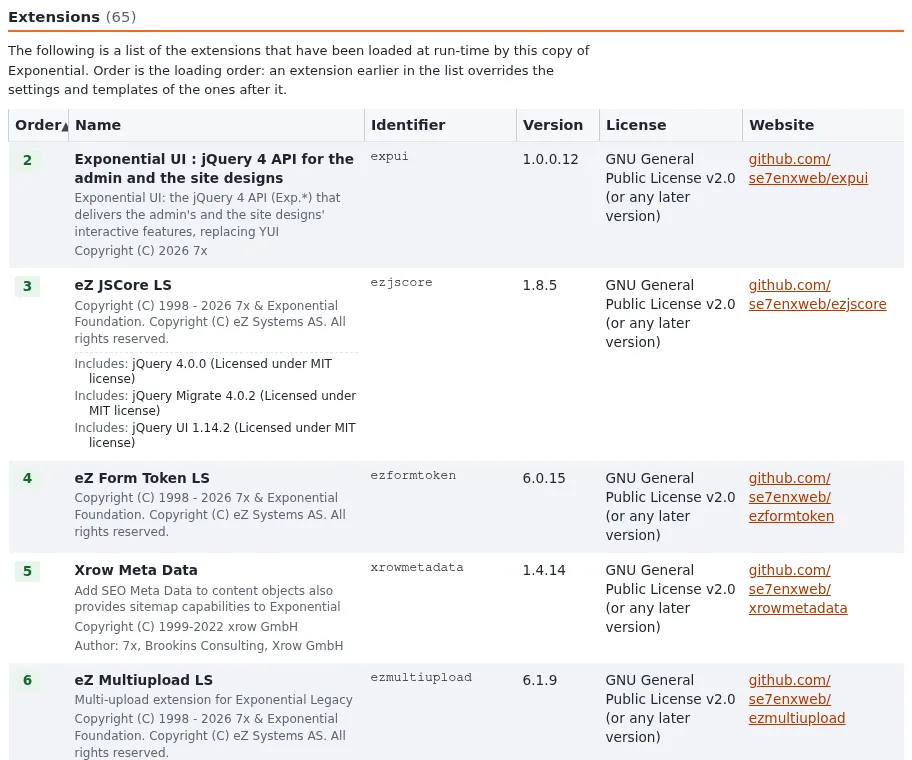
Where does the About page show it? In the extensions table of /ezinfo/about (columns Order, Name,
Identifier, Website and the version and license), and on the extension's card in Setup > Extensions.
What if the theme needs another extension? A <dependencies> block in extension.xml
(Declaring dependencies).
Pitfalls
- Two versions.
ezinfo.phpsays 1.0.1,extension.xml1.0.0: the About page shows 1.0.0. Search both. - A class name that does not match the folder.
training_themeInfoforextension/training_theme. - Copyright of someone else's work left out. If the theme contains third-party files, their holders belong in the copyright line or the credits (module 8).
Hands-on exercise
On your training installation, in extension/training_theme/.
Open
ezinfo.phpandextension.xml. Write the five values of each side by side on a sheet.Mark every value that differs between the two files, and any value that is empty or a leftover of a build script.
Set the version in both files to
0.1.0, the copyright toCopyright (C) 2026 <your name>, and the website to the address where you would publish the theme (for a course, a repository address of your own organization).Compare the license in both files with the first lines of
LICENSE; make them identical.Check both files:
php -l extension/training_theme/ezinfo.php
xmllint --noout extension/training_theme/extension.xml
Open the README the wizard wrote. Make sure it says, in this order: what the theme is, a short description of the look, how to activate it, the
SiteDesignline for a siteaccess, and the license.Open
/ezinfo/aboutin the administration and findtraining_themein the extensions table.Change the version in
extension.xmlonly to0.1.1, reload the About page, then set it back to0.1.0.
Expected result
- Step 5:
No syntax errors detected in extension/training_theme/ezinfo.php, and no output fromxmllint. - Step 7: the row shows the name, version
0.1.0, the license and the website. - Step 8: the About page showed
0.1.1, proving thatextension.xmlis read first. - The trainer checks two learners' rows on the About page.
Quiz
- Which file does the About page read first when it has a
<metadata>block? - What is the class name in
ezinfo.phpfor the extensiontraining_theme? - Which of these is an acceptable version?
A.
//autogentag//B.dev-masterC.v0.1.0D.0.1.0 - Which command checks that
extension.xmlis well formed? - Which three places must name the same license?
Answers
extension.xml(extension.xml).training_themeInfo.- D. Without a
v, never a value left by a build script. xmllint --noout extension/training_theme/extension.xml.ezinfo.php(License),extension.xml(<license>) and theLICENSEfile (andcomposer.jsonwhen the theme has one).
Further reading
- ezinfo.php: what the About page reads.
- extension.xml: the packaged description.
- A README that explains and sells and A README for a theme.
- The LICENSE file.
Related pages
- Module 7: Packaging a theme
- Theme design: course overview
- Trainers: start here
- Free documentation: this page is free to copy, translate and improve under the GNU FDL 1.3.
Become an Exponential Partner
Partners share their information, provide funding, contribute back and develop the products with us, and that is how Exponential grows. A partner website and dashboard are planned for mid-2027: please become a partner today to speed up our growth rate and land new features faster.