Lesson 7.2: Activating a theme and the loading order
Whoever installs a theme switches it on, chooses which siteaccess uses it, and sometimes combines it with another theme. The theme author decides how easy and safe that is: which settings the theme ships, which it leaves to the installation, and how it declares its relation to other extensions. This lesson takes both sides.
At a glance
| Course | Theme design |
| Module | Module 7: Packaging a theme |
| Duration | 45 minutes (15 presenting, 30 exercise) |
| Level | Intermediate |
| Audience | Designers and developers who publish themes; administrators who install them |
| Prerequisites | Lesson 7.1 |
Learning objectives
After this lesson, learners can:
- activate and deactivate an extension on Setup > Extensions, reading the review before saving;
- choose between
ActiveExtensions[](the installation) andActiveAccessExtensions[](one siteaccess); - split settings between the theme and the installation, and document
SiteDesigninstead of setting it; - make a theme load before a base theme with
<extends>inextension.xml.
Trainer's notes
How to present it
Sources: Activating a theme, Loading order and which theme wins, The design settings a theme ships and The Extensions page.
- Two switches (3 minutes).
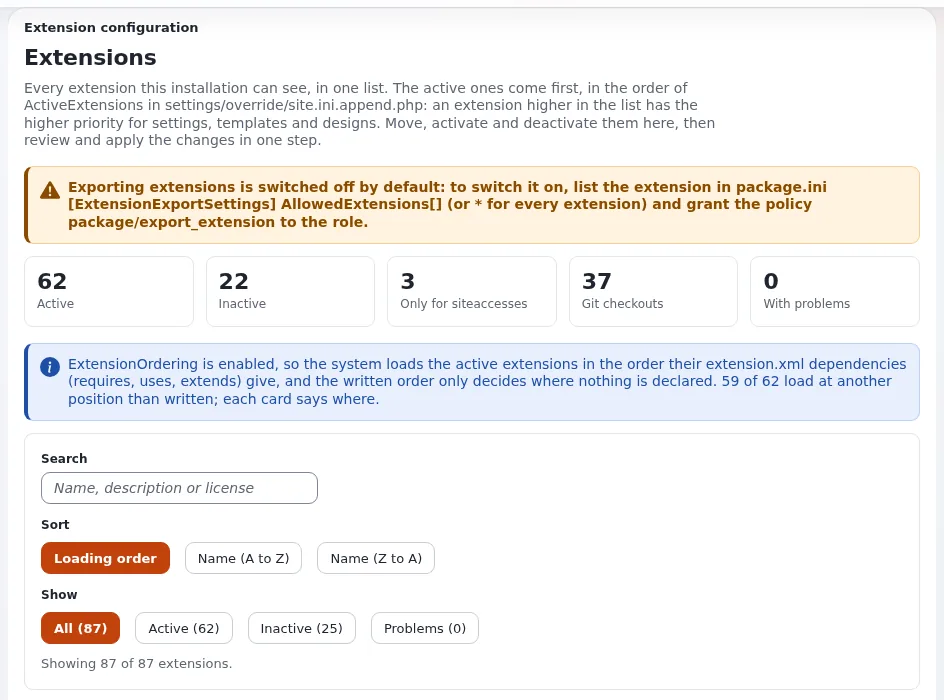
site.ini [ExtensionSettings] ActiveExtensions[]for the whole installation (the usual case);ActiveAccessExtensions[]in one siteaccess's settings, when the theme must not touch other siteaccesses at all. - The page (4 minutes). Setup > Extensions: each extension's card with Activate or Deactivate; the changes are written only after Review changes, which shows the resulting lines; the save keeps a backup copy. The page can also Regenerate autoload arrays.
- What the theme ships (4 minutes). In the theme:
DesignExtensions[], its stylesheet and script lists, the defaults of its own settings. In the installation:SiteDesignfor the siteaccess that uses the theme, site name, URLs, mail and database. A theme that setSiteDesignglobally would change the administration and every other site. A theme that comes with its own siteaccess may set it insettings/siteaccess/<siteaccess>/of the extension. - Who wins (4 minutes). An extension loaded earlier wins for settings and templates. With
ExtensionOrdering=enabled(the default),<extends>in yourextension.xmlmakes your theme load before the base theme;<requires>and<uses>make it load after the named extension.
Common questions
Why does my theme still draw after I deactivated it? The INI cache. Clear it, and restart Velocity on a Velocity lab.
Can I order extensions by hand? Yes, in the list on Setup > Extensions, reviewed and then written; but a declared dependency is more robust.
Does deactivating delete files? No. The folder stays; only the setting changes.
Pitfalls
- Deactivating on a shared lab. Every learner works on their own installation for this lesson.
- Reading the card before the cache is cleared. The card shows where the extension loads after the save; reload.
- Setting
SiteDesignin the theme'ssettings/folder. That is global for every siteaccess the theme is active in.
Hands-on exercise
On your own training installation, signed in to the administration with your training administrator.
- Open Setup > Extensions. Find the card of
training_themeand read its state and position. - Press Deactivate on it, then Review changes. Read the lines the page would write. Apply the change with the button the review offers.
- Clear the INI cache (
php bin/php/ezcache.php --clear-tag=ini; on Velocity alsophp bin/php/console exp:velocity restart) and reload a page of<site>. - Note what the site looks like now, and why (
SiteDesign=training_themenames a design that is no longer searched). - Back on Setup > Extensions, activate
training_themeagain, review and apply; clear the INI cache; reload. - Read where
SiteDesignis set:php bin/php/console exp:ini where site/DesignSettings/SiteDesign <site>. It is in the installation's siteaccess settings, not in the theme: good. - In the theme's README, add a section "Switching it on" with the two lines an installer needs: the
ActiveExtensions[]line and theSiteDesignline for their siteaccess. - Write in your notes the
<dependencies>block that would make your theme win over a base theme calledbase_theme, without adding it to your file (there is no such extension on the lab).
Expected result
- Step 2: the review lists the change of
ActiveExtensions[]; the save names the file and its backup copy. - Step 4: the site falls back to the standard design's templates (an unstyled page) while the theme is inactive.
- Step 5: the theme draws the site again.
- Step 7: the README tells an installer how to switch the theme on without reading the code.
- The trainer checks one learner's README section and their
<dependencies>note:<dependencies><extends><extension name="base_theme" /></extends></dependencies>.
Quiz
- Which setting activates a theme for only one siteaccess?
- Why does a theme not set
SiteDesignin itssettings/site.ini.append.php? - Your theme must override templates of
base_theme. What do you declare inextension.xml? A.<requires>B.<uses>C.<extends>D. nothing - What does Review changes on Setup > Extensions do?
- Does deactivating an extension delete its folder?
Answers
ActiveAccessExtensions[]in that siteaccess's settings (Activating a theme).- It would apply to every siteaccess where the theme is active, including the administration.
- C.
<extends>makes the theme load beforebase_theme, so it wins (Loading order and which theme wins). - It shows the resulting
ActiveExtensions[]lines and the risks before anything is written. - No; only the setting changes.
Further reading
- The Extensions page: every part of Setup > Extensions.
- Declaring dependencies in extension.xml.
- Siteaccess settings inside a theme: when the theme ships its own site.
- Settings files in an extension.
Related pages
- Module 7: Packaging a theme
- Theme design: course overview
- Trainers: start here
- Free documentation: this page is free to copy, translate and improve under the GNU FDL 1.3.
Become an Exponential Partner
Partners share their information, provide funding, contribute back and develop the products with us, and that is how Exponential grows. A partner website and dashboard are planned for mid-2027: please become a partner today to speed up our growth rate and land new features faster.