Logs and error references
This page is for managers who run customer support and for the administrators who answer error reports. It explains how an error page leads to the exact log lines of the failed request, which logs exist and what each is for, and how logs are kept small and free of customers' personal data. The technical guides are Finding an error by its reference and The log viewer.
Contents
- From a customer's report to the cause
- What support staff should ask
- The logs and what each is for
- Reading logs without a shell
- Logs stay small
- Personal data in logs
- Checklist
From a customer's report to the cause
When a page fails, Exponential's error page shows a reference such as ERR-0123456789, and writes the same
reference to error.log next to the details of the failure
(Finding an error by its reference).
The path from report to cause is short:
- The customer tells support the reference, roughly when it happened, and what they were doing.
- An administrator opens Setup > Log files, pastes the reference into Error reference and presses Search.
- The page shows the entry and every line of the same request (same address and client, within two seconds) from all kernel logs, in time order.
- The audit of this moment opens the audit trail at the same time: an edit, a publish or a settings change just before the error is often the cause.
The same from a shell: php bin/php/console exp:logs --reference=ERR-0123456789. Exit code 1 means it was not found.
Tip
Put a line in your customer service script: "If you see an error page, please send us the reference that starts with ERR-". It turns a vague complaint into a fix.
What support staff should ask
| Ask for | Why |
|---|---|
| The reference shown on the error page | Finds the exact request in the logs |
| The time, as exact as possible | Without a reference, search by time instead |
| The address of the page (copy from the browser) | Narrows the search to one page |
| What they did just before (submitted a form, paid, signed in) | Points to the part of the site involved |
| Whether it happens again when they retry | Tells a one-off from a lasting fault |
Do not ask customers for passwords, and do not paste unmasked log lines into a ticket: they can hold customers' e-mail and IP addresses (Finding an error, share what you found).
If the reference is not found, the log may have rotated away, or the failure happened on another server: each server
keeps its own var/log (Finding an error, find it).
The logs and what each is for
Exponential separates real faults from noise, so that error.log stays worth reading
(Request logs):
| Log | What it holds | Who should care |
|---|---|---|
error.log | Real faults only: a database error, a template that does not compile, a PHP error | The operator, every week |
404.log | Pages not found, with the reason | The web team: broken links, moved content |
security.log | Requests that look like probes or attacks, with any status | The operator, monthly; look for bursts and attacks that got a 200 |
deprecated.log | Code that a later PHP version will refuse | Developers, before the next PHP upgrade (Operating a site) |
| Cronjob logs | Output of the scheduled jobs | The operator, when a job did not happen |
| The audit trail | Who did what: sign-ins, content, settings, orders | Managers, security, compliance (Audit trail for operations) |
Reading logs without a shell
Setup > Log files (policy setup/logs) shows every log of the installation in the administration: the kernel
logs, each site's logs, the logs extensions write, and their rotations. It has a navigator of every file, filters by
time, level and address, a search, and a permalink for every view that you can send to a colleague
(The log viewer).
Two summary pages save time (Monitoring overview):
- Log health: disk used by logs, the fastest growing logs, files the web server cannot write.
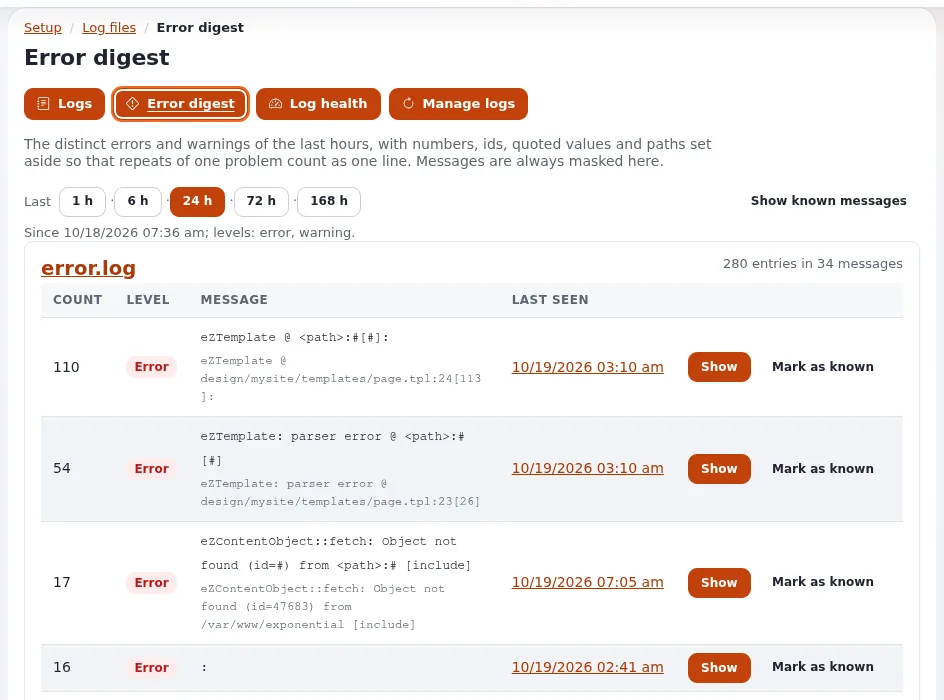
- Error digest: the distinct errors and warnings of the last 24 hours, grouped and counted.
Logs stay small
A log that fills the disk can take a site down. Exponential rotates every log for you (Log rotation):
- When a log grows beyond
site.ini [FileSettings] LogFileMaxSize(2 MB shipped), it is rotated to.1,.2,.3. LogFileRotateCount(3 shipped) is how many archives are kept. With the defaults a log takes at most 8 MB on disk (Operating a site).- Rotation on demand:
php bin/php/console exp:logs --apply --rotate-all; old archives:--prune; both with--dry-run.
Decide with your operator how long logs must be kept for your business and your legal obligations, and set the rotation to match. The hosting section covers retention: Log and data retention.
Personal data in logs
Logs can contain personal data, such as IP and e-mail addresses. Exponential masks them on screen by default:
- The log viewer and its downloads mask e-mail and IP addresses and tokens. Only a user with the policy
setup/unmasklogscan switch that off, for themselves only, and a permalink never carries the unmasked switch (Finding an error). - The audit trail truncates addresses, hashes sessions and never records passwords or tokens (Audit trail).
This is a technical safeguard, not legal advice. For your obligations, see GDPR basics and ask your data protection officer or lawyer.
Checklist
- To do: Support staff know to ask for the
ERR-reference, the time and the page address. - To do: At least two people can search Setup > Log files by reference.
- To do: Someone reads the error digest every week and
security.logevery month. - To do: Log rotation and retention match your business and legal needs.
- To do: Only the people who need it hold
setup/unmasklogs.
Related pages
- Health checks and monitoring
- Incident response for small teams
- Log viewer and rotation (hosting)
- Free documentation: this page is free to copy, translate and improve under the GNU FDL 1.3.
Become an Exponential Partner
Partners share their information, provide funding, contribute back and develop the products with us, and that is how Exponential grows. A partner website and dashboard are planned for mid-2027: please become a partner today to speed up our growth rate and land new features faster.