Uptime practice
This page is for managers who need to know what "keeping the site up" involves, and for the person who does it. It lays out one routine, from daily to quarterly, with the shipped tools for each step. Nothing here needs extra software: the commands and pages come with Exponential. The technical detail is in Operating a site and the hosting operations pages.
Contents
- Availability is a habit
- Who does what
- Every day
- Every week
- Every month
- Every quarter
- Before and after every change
- Writing it down
Availability is a habit
Most outages are not caused by a dramatic failure. They come from small things nobody noticed: a full disk, a certificate that expired, a cronjob that stopped running, a backup that never completed, a change made on a Friday without a way back. A short routine catches these early.
Note
This page does not set an availability target. The figures of such a promise are a business decision, and the project publishes none (Health checks and uptime). Decide your own target with your hosting partner, then use this routine to keep it.
Who does what
Name a person for each role, and a deputy. In a small organization one person may hold several roles.
| Role | Responsible for |
|---|---|
| Site owner | Decides when the site may be offline, approves upgrades, talks to customers during an incident |
| Operator | Runs the checks below, takes backups, applies upgrades |
| Hosting partner | The server, the network, the operating system and PHP, if they are not yours |
| Editors | Report anything strange they see in the administration |
If your hosting partner runs the server, agree in writing which of the checks below they do and how they tell you the result (Contracts and SLAs basics).
Every day
Automate these; a person only needs to read the alerts.
- An external monitor requests the front page and the administration login page over HTTPS, and alerts a person when either fails (Health checks and monitoring).
- The scheduled backup runs and its success or failure is reported (Backups that restore).
- The cronjobs run on their schedule (Cronjobs and background jobs).
- Where Exponential Velocity serves the site, its watchdog restarts the server after a crash (Velocity for businesses).
Every week
The weekly checklist of the operations guide takes a few minutes (Operating a site, a weekly checklist):
php bin/php/cache.php status --allow-root-userends inPASS.php bin/php/audit.php status --allow-root-usershows every chainintact.tail -n 50 var/log/error.logshows nothing new that you do not understand.php bin/php/console crontab:liststill shows your cron entries.- A backup from the last seven days exists and has been restored at least once on another machine.
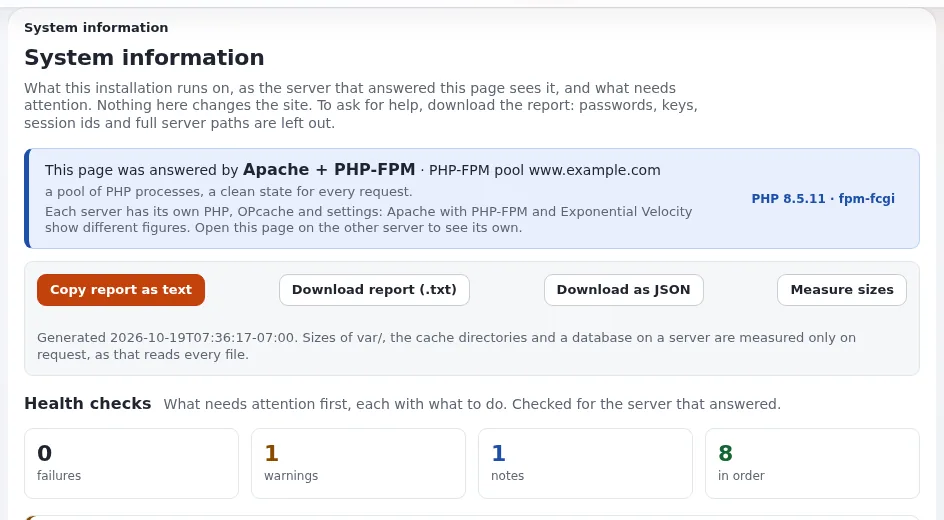
Add one look at Setup > System information (/setup/info): its health checks list failures and warnings first,
each with what to do (System information), and at
Setup > Log files > Error digest, which groups and counts the errors of the last 24 hours
(Monitoring overview).
Every month
The hosting section's monthly operations checklist is a good model. In short:
- To do: New Exponential releases are known; security fixes among them are applied or scheduled.
- To do: Operating system and PHP security updates are applied, and the PHP version is still supported.
- To do: One backup was restored on another machine (Restore drills).
- To do: Disk use of the storage, caches, logs and database is within plan.
- To do:
security.logand the audit trail show nothing unexpected; leavers' accounts are removed. - To do: Certificates are valid for longer than the renewal margin.
- To do: A short report goes to the site owner: availability from the external check, incidents, updates, disk growth.
The business version, ready to copy, is the Monthly operations checklist template.
Every quarter
- Score your operations with the Reliability scorecard and compare with last quarter.
- Rehearse an incident with the Incident response for small teams plan.
- Review who holds administrator rights (Access reviews).
- Check your peak dates for the next quarter and plan for them (Peak traffic planning).
- Review the risk register with your project lead (Risk management).
Before and after every change
Most incidents follow a change. Make these steps a rule for every upgrade, deploy, import or settings change:
| Before | After |
|---|---|
| Take a backup | Open the front page, a deep page and the administration |
| Read the release notes (Upgrades without surprises) | Look at var/log/error.log and Setup > System information |
| Run the upgrade check for an upgrade (Upgrade check and file consistency) | Clear the caches in the right order (Graceful deploys) |
| Open a maintenance window when the database or many files change (Maintenance mode and planned work) | Close the window and tell the site owner |
| Know how you would undo it | Write one line in the change log |
Tip
Avoid changes just before a weekend, a holiday or a sales peak. A change made when the team is present can be fixed while it is small.
Writing it down
Keep a short operations log: date, what was checked or changed, by whom, and the result. It costs a minute per entry and pays back on the first bad day. The audit trail already records many actions for you, such as settings writes, cache clears, deploys and maintenance (Audit trail for operations), but it does not record what you checked and found to be fine.
Related pages
- Health checks and monitoring
- Health checks and uptime
- Operating a site
- Free documentation: this page is free to copy, translate and improve under the GNU FDL 1.3.
Become an Exponential Partner
Partners share their information, provide funding, contribute back and develop the products with us, and that is how Exponential grows. A partner website and dashboard are planned for mid-2027: please become a partner today to speed up our growth rate and land new features faster.