Log viewer and rotation
This page is for support staff who read customer logs and for system administrators who keep log files from filling disks. It answers: where the logs of a site are read, who may read them and what is masked, how to find the lines of one failed request, and how rotation, compression and pruning work on a host where several users write the same logs.
The full references are The log viewer and Log rotation and pruning.
Contents
- Setup > Log files
- Who may read logs
- Finding the lines of one request
- The web server's logs in the viewer
- The same from a shell
- How the kernel rotates its logs
- Pruning and compressing
- With the system's logrotate
- Checklist
Setup > Log files
Setup > Log files (/setup/logs) shows every log of the installation: error.log, warning.log, notice.log,
debug.log, deprecated.log, auth.log, the request logs 404.log and security.log, the cronjob logs, the logs of
each site and of extensions, and their rotations (.gz read only). A navigator groups them as Kernel, Site,
Extensions, Web server and Rotated archives, with size, last write and lines a minute.
- Each view has a permalink without a query string, such as
/setup/logs/view/error, safe to paste into a ticket. - A file is followed live with short requests; nothing holds a server process open.
- Search covers a file, every kernel log or every file, optionally with rotations, by text or bounded regular expression, level, time range, siteaccess, request, client or error reference.
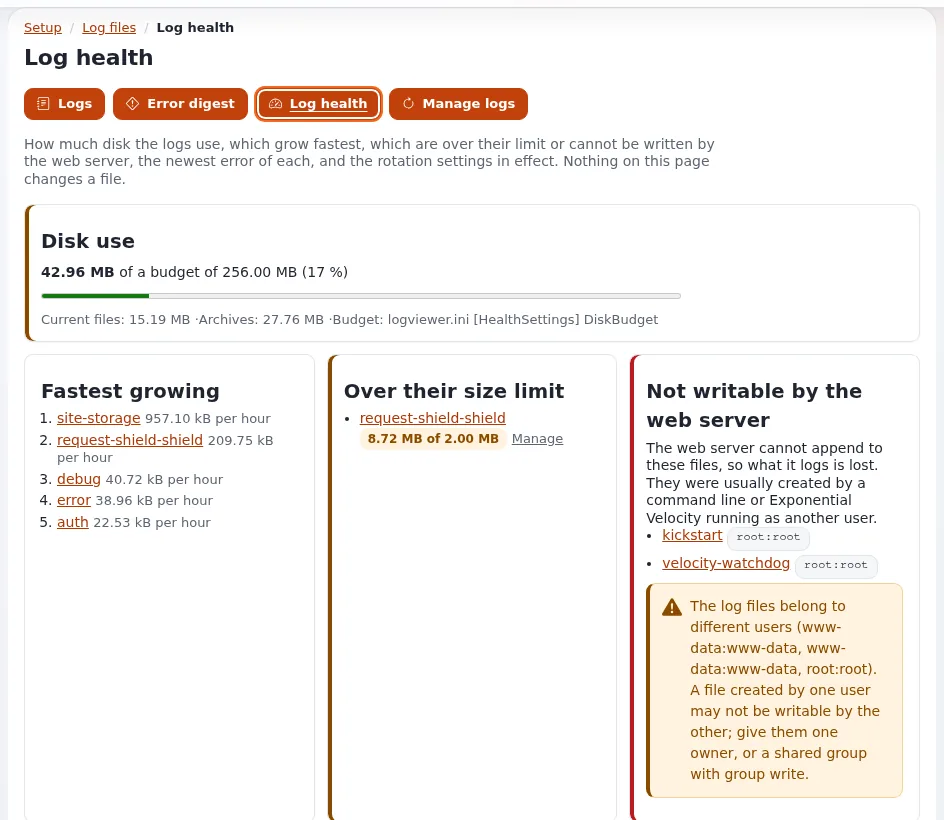
- Log health (
/setup/logshealth) shows disk use against[HealthSettings] DiskBudget(shipped 256 MB, a warning from 80 %), the fastest-growing logs, files the web server cannot write and mixed owners. - Error digest (
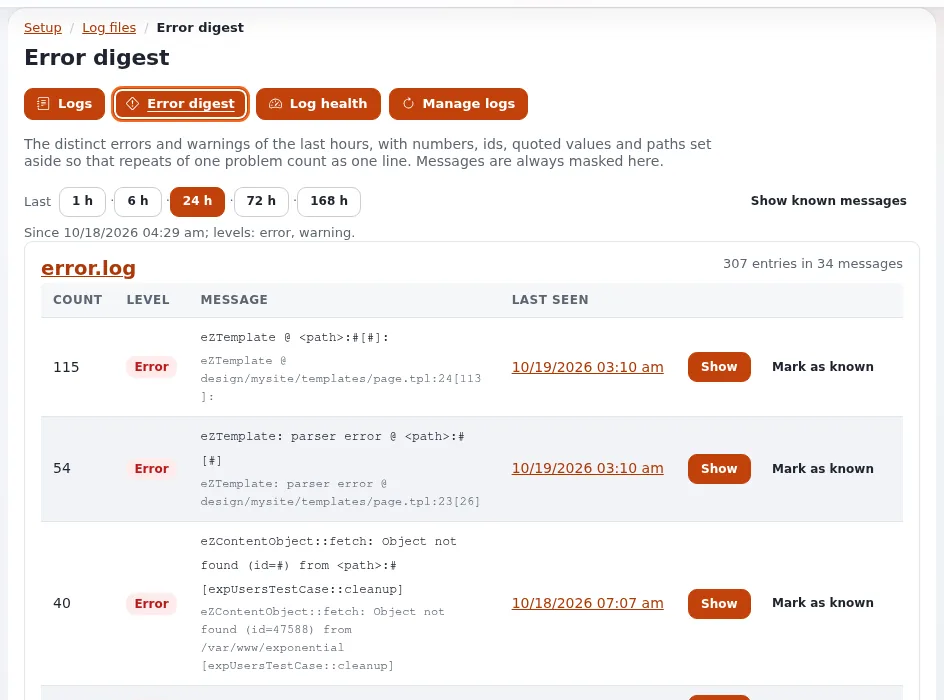
/setup/logsdigest) lists the distinct errors and warnings of the last 24 hours, grouped and counted.
Who may read logs
Three policies of the setup module, held by the Administrator role only in a new installation:
| Policy | Allows |
|---|---|
setup/logs | open the viewer, follow and search, download a range |
setup/managelogs | rotate, empty, remove an archive, each only when switched on in [ActionSettings] |
setup/unmasklogs | show e-mail addresses, IP addresses and secrets as written, for this viewer only |
Privacy is on by default: e-mail addresses, IP addresses ([RedactionSettings] MaskIPs=enabled), passwords, tokens,
keys, session ids and cookies are masked, and "the values of secret settings are never shown". The viewer is
read-only by default: in settings/logviewer.ini [ActionSettings] only Download=enabled ships on; Rotate,
Truncate, DeleteArchives and Compress ship disabled. Every view and action is audited.
Tip
When a customer's own administrator asks for log access, give setup/logs to a role of theirs and keep
setup/unmasklogs and setup/managelogs with your support staff. Logs of other customers are never visible: each
installation shows only its own files.
Finding the lines of one request
An error page shows a reference such as ERR-0123456789, and the same reference is in error.log
(Finding an error by its reference):
- Ask the customer for the reference and roughly when it happened.
- Setup > Log files, field Error reference, Search; or open
/setup/logs/view/error/(reference)/ERR-0123456789/(scope)/kernel/(rotations)/1. - The entry is shown with Same request: the warnings, notices and debug lines of that request, and a link to the audit records of the same minute.
Not found? The log may have rotated away, or the request was served by another node: "each server keeps its own
var/log".
The web server's logs in the viewer
The web server's access and error logs can be shown in the same viewer. They are "off by default and never guessed":
name them by key in settings/override/logviewer.ini.append.php:
[LogViewerSettings]
LogList[]=webserver-access
LogList[]=webserver-error
LogPath[webserver-access]=/var/www/vhosts/<domain>/logs/access_ssl_log
LogPath[webserver-error]=/var/www/vhosts/<domain>/logs/error_log
The paths above are those of a Plesk server; use your panel's or your virtual host's paths. Logs configured this way
are never rotated or pruned by Exponential: "the program that writes them owns their rotation". Velocity writes its
own access and error logs under var/vc/qbix/log/ and rotates them by date
(8.3.12 Logs).
The same from a shell
./console exp:logs (bin/php/explogs.php) uses the same settings, files, masking and limits:
./console exp:logs --list                                   # files by group, size, time, lines a minute
./console exp:logs --tail=var/log/error.log --lines=50      # the last 50 entries
./console exp:logs --tail=var/log/error.log --follow        # follow it (Ctrl-C ends)
./console exp:logs --search=timeout --file=var/log/error.log --rotations --level=error,warning
./console exp:logs --reference=ERR-0123456789               # the reference and its request
How the kernel rotates its logs
One rotation serves the whole kernel (expLogRotator): when a log outgrows site.ini [FileSettings] LogFileMaxSize,
the next write rotates it to .1, older archives move up, and archives beyond LogFileRotateCount are removed.
Setting (site.ini [FileSettings]) | Shipped | Meaning |
|---|---|---|
LogFileMaxSize | 2097152 (2 MB) | size at which the next write rotates the log |
LogFileRotateCount | 3 | archives kept; 0 switches rotation by size off |
LogFileCompress | disabled | enabled compresses archives from .2 on (.1 never: a request may still write to it) |
LogFileMaxAge | 0 | days after which a prune removes an archive; 0 is no age limit |
LogFilePermissions | 0666 | mode of a newly created log |
The constants EZPUBLISH_LOG_MAX_FILE_SIZE, CUSTOM_LOG_MAX_FILE_SIZE, EZPUBLISH_LOG_ROTATE_FILES and
CUSTOM_LOG_ROTATE_FILES in config.php win over these settings.
Safe with two writers. "On a host where Velocity runs as root and PHP-FPM as the site's user, both write the same logs." A rotation takes an exclusive lock, checks the size again under it, and creates the new log "with the owner, group and mode of the old one", so neither user ends up with a log the other cannot write.
Limits per log go in settings/logviewer.ini [RotationSettings] by the log's key (MaxSize[debug], Keep[debug],
Compress[error], MaxAgeDays[error]); a log without an entry uses the site.ini values.
Pruning and compressing
./console exp:logs --archives                    # each log, its archives, sizes and limits
./console exp:logs --rotate-all --dry-run        # what would be rotated
./console exp:logs --prune --dry-run             # archives beyond the limits
./console exp:logs --apply --prune                       # remove them
./console exp:logs --apply --compress                    # compress plain archives from .2 on
Exit codes: 0 done, 1 nothing to do, 2 an unknown name or a failure. Rotations and prunes are recorded in the
audit trail (system.log.rotate, system.log.delete). For a nightly job, schedule the cronjob part logs, which is in
no default part:
15 3 * * * cd /path/to/installation && php runcronjobs.php -q logsWith the system's logrotate
If the system's logrotate manages var/log instead, set LogFileRotateCount=0 so the kernel does not rotate as
well, and use copytruncate or create <mode> <owner> <group> there. Your own cron output files (cron-*.log) always
need logrotate, since the kernel does not write them (10.10).
Warning
Never leave [DebugSettings] DebugOutput=enabled on in production: it shows internals to visitors and writes a lot.
Checklist
- To do: Support staff have
setup/logs;setup/unmasklogsandsetup/managelogsare limited to those who need them. - To do: The rotation limits fit the disk: with the shipped values a log takes at most about 8 MB with its archives.
- To do: Either the kernel or logrotate rotates
var/log, not both. - To do: The cronjob part
logsor a scheduledexp:logs --pruneenforces age limits. - To do: Log health shows no files the web server cannot write.
- To do: Web server logs are configured in the viewer where support staff need them.
Demo mode in Setup > Log files. security.log groups the lines of processes running in demo mode as demo/mode; one line per process, so a busy demo adds a line per new worker, not per request. Demo mode for hosts.
Related pages
- Request logs, Security log
- Monitoring overview
- Disk full (runbook)
- Log and data retention
- The log viewer (feature reference)
- Free documentation: this page is free to copy, translate and improve under the GNU FDL 1.3.
Become an Exponential Partner
Partners share their information, provide funding, contribute back and develop the products with us, and that is how Exponential grows. A partner website and dashboard are planned for mid-2027: please become a partner today to speed up our growth rate and land new features faster.