Stale cache
This runbook is for administrators, and for web managers who must explain why a correction is not yet visible. A public site has several caches; clear the smallest one that fixes the problem, and clear caches that hold finished pages last. Reference: Caches and Operating a site, section 2.
Contents
First, look
php bin/php/cache.php status --allow-root-user
php bin/php/cache.php list --sizes --allow-root-user
status shows the caches in front of PHP (static, HTTP, query, Velocity, OPcache, APCu) and ends in PASS.
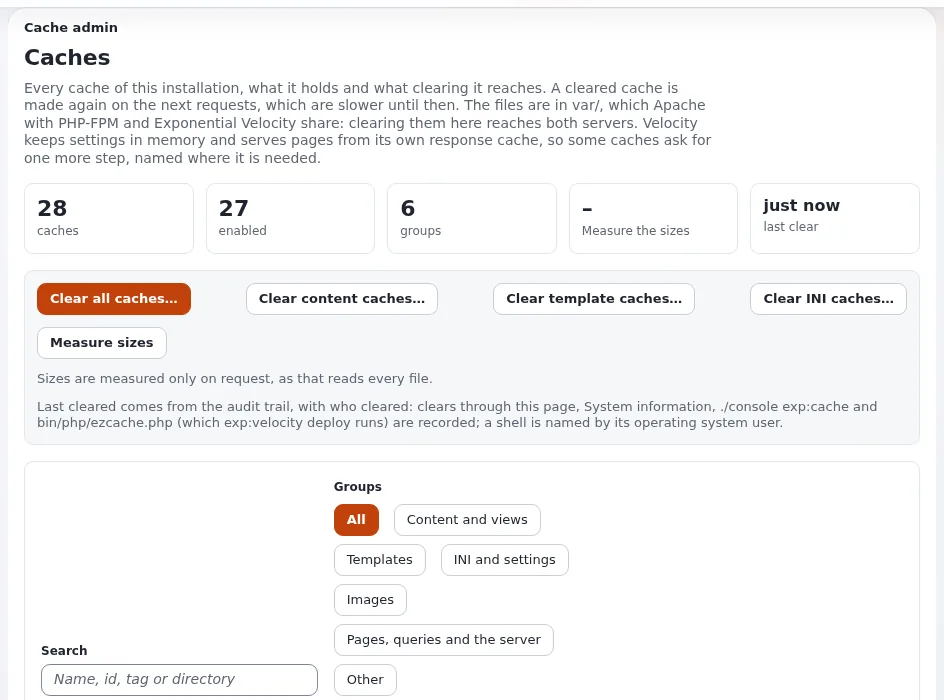
In the administration: Setup > Cache management (/setup/cache).
Check the page as an anonymous visitor in a private window and as an editor: the HTTP cache is role-aware, so the two can differ.
Which cache?
| What is stale | Clear |
|---|---|
| One page's content after publishing | normally cleared automatically; if not: php bin/php/ezcache.php --clear-tag=content --allow-root-user |
| Every page's look after a template change | ./console exp:cache clear --id=template --allow-root-user |
| A new template or extension is not picked up | php bin/php/ezcache.php --clear-id=template-override --allow-root-user and --clear-id=design_base |
| A settings change has no effect | php bin/php/ezcache.php --clear-tag=ini --allow-root-user, then reload PHP or deploy |
| Pages served by Velocity | ./console exp:velocity cache clear --apply --allow-root-user |
| The role-aware HTTP cache | php bin/php/cache.php httpcache clear --allow-root-user |
Static cache files (when StaticCache=enabled) | regenerate, or php bin/php/cache.php static clear --allow-root-user |
| Unsure | php bin/php/ezcache.php --clear-all --allow-root-user (then the caches in front, then warm) |
Every cache command has a --dry-run that shows what it would do.
The order matters
Clear the caches that hold finished pages (HTTP cache, Velocity's response cache) after PHP-FPM and Velocity run the
new code; otherwise a page rendered by the old code in between is stored again and the change "did not work". After a
code or settings change, ./console exp:velocity deploy --allow-root-user does every step in the right order
(Deploying, section 7). Then warm the site:
php bin/php/preload.php --apply --siteaccess=site --allow-root-user.
Outside Exponential
- CDN or reverse proxy: purge it with its own tool after the caches above.
- Browsers: a hard reload; the site's service worker, if a design installs one, can replay old pages.
- Search engines and feeds: they refresh on their own schedule; for urgent corrections publish a visible correction note.
Related pages
- Clear caches after a settings change
- Clear caches after a template change
- Velocity response cache and HTTP cache
- Cache clearing and warming (hosting)
- Free documentation: this page is free to copy, translate and improve under the GNU FDL 1.3.
Become an Exponential Partner
Partners share their information, provide funding, contribute back and develop the products with us, and that is how Exponential grows. A partner website and dashboard are planned for mid-2027: please become a partner today to speed up our growth rate and land new features faster.