Lesson 4.4: Upgrading customer sites
A host keeps many installations on current releases. Doing that safely is a routine: know what every site runs, test customized sites on a copy, take a backup right before the window, follow the steps in order and check the result. This lesson teaches the routine for upgrades within the 6.0 line, as chapter 11 and the upgrading guide describe it.
Note
Practise on a copy of a training installation. Never run an installer over an existing site, and never upgrade a customer site in class.
At a glance
| Course | Hosting and operations |
| Module | Module 4: Deploying and cron |
| Duration | 45 minutes (20 presenting, 25 exercise) |
| Level | Intermediate to advanced |
| Audience | System administrators and support managers |
| Prerequisites | Lesson 4.3; Module 3 for backups |
Learning objectives
After this lesson, learners can:
- state the rules that come before any upgrade: no installer over a site, a backup first, the site's user, forward only;
- record a site's release, PHP version, database engine and server;
- choose the part of the upgrading guide that applies to a site's version;
- list the steps of an upgrade within the 6.0 line in order;
- check the result with
exp:checkdbfiles, System information and the Upgrade check page.
Trainer's notes
How to present it
Source: Upgrading customer sites, Upgrading and Chapter 11: Upgrading.
- Rules first (4 minutes). The setup wizard, the kickstarter and
exp:installcreate a new database; an upgrade replaces the code and updates the existing database in place. Never add--forceon a live site. The database step cannot be undone by putting files back, so back up first, every time. A published release cannot be changed; the way to get a fix is the next version. - Inventory (3 minutes). Setup, System information, or
./console exp:systeminfo --json. Which part of the guide applies follows from the version: Part A from 3.10 to 5.3, Part B from 5.4 or 5.90, Part C from an earlier 6.0.x. - Plan (3 minutes). PHP version, customizations, a staging copy restored from the latest backup, an announced window and a rollback plan. Group customers by release and by how customized they are.
- The steps (6 minutes). Maintenance on and a fresh backup; new code; autoloads and caches; the database update
file of the line, once, whole, in order (
update/database/<engine>/6.0/); the data scripts once per var directory; the unique-login check; the checklists of every period passed;exp:checkclasses; deploy; maintenance off. - Check (4 minutes). Caches clear without error,
exp:checkdbfilesmarks nothing missing, the front page loads, System information shows the new version, a test publish works, Upgrade check lists only intended differences.
Common questions
A SQL file failed half way. Can I fix it by hand? No. Restore the backup and apply the file again from the start.
What about MongoDB and Oracle? MongoDB needs no SQL update file; Oracle's files come with the ezoracle extension.
Can a site on PHP 7.4 upgrade? Yes, from 6.0.15: the current line is usable on PHP 7.4 without support, without Velocity, Layouts and a few extensions that need PHP 8 (Why Exponential supports PHP 7.4).
Is there automation? The ezupdate extension can apply updates; see
Automated updates with ezupdate.
Pitfalls
- Overwriting settings. Keep
settings/override/,settings/siteaccess/, extensions and designs out of any command that replaces files. - Running as root. Files created by root in
var/break the site later. - Skipping the period checklists. The changes people meet most (sign-in without an
ezuser_settingrow, override priority, security headers) are listed there.
Hands-on exercise
Use a copy of your training installation (for example a second install made with exp:install), never a customer
site.
Record the inventory:
php bin/php/console exp:systeminfo --json | head -40. Note the release, PHP version, database engine and server.In the administration, open Setup, System information and compare with step 1.
Open Upgrading, Which part do I read? and note which part applies to your training site.
Switch maintenance mode on with a message and a duration:
php bin/php/maintenance.php on --message="Upgrade practice" --until=30mTake a database backup as in lesson 3.4.
List the database update files for your engine:
ls update/database/sqlite/6.0/(ormysql,postgresql).Check accounts that share a login:
php bin/php/console exp:user-login-check.Check own extensions:
php bin/php/console exp:checkclasses.Check the update chain:
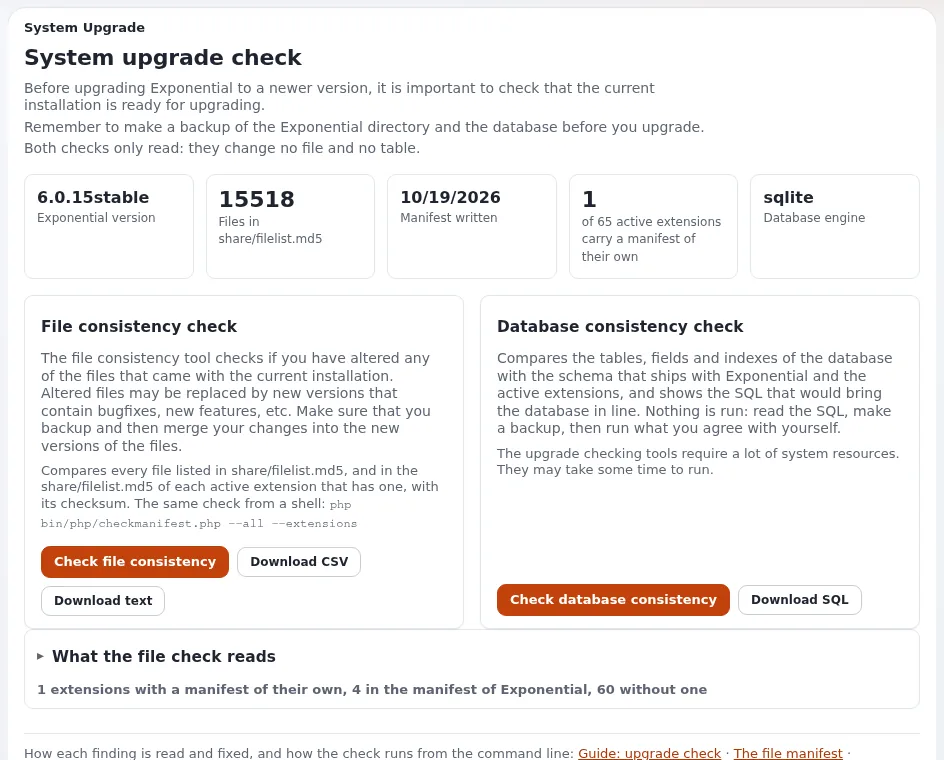
php bin/php/console exp:checkdbfiles.Open Setup, Upgrade check and read the two checks it offers (File consistency check and Database consistency check); run them on your training copy only.
Switch maintenance mode off:
php bin/php/maintenance.php off.Write a one-page upgrade plan for an imagined customer site: release, path, staging, window, backup, rollback time.
Expected result
- Steps 1 and 2 agree on the release and the PHP version.
- Step 6 lists the update file of the line for the engine.
- Steps 7 to 9 report no problem on a clean training installation, or name exactly what to fix.
- Step 10: the checks list only files changed on purpose, if any.
- Step 12: the plan names every item of the checklist in Upgrading customer sites.
- The trainer checks two plans against that checklist.
Quiz
- Why must you never run
exp:installover an existing site to upgrade it? - Which step cannot be undone by putting files back? A. new code B. clearing caches C. the database update D. maintenance mode
- A site runs 5.4. Which part of the upgrading guide applies?
- A database update file stopped half way with an error. What do you do?
- Name two checks that prove an upgrade worked.
Answers
- The installers create a new database; an upgrade updates the existing database in place.
- C. That is why the backup comes first, every time.
- Part B (5.4 or 5.90 to 6.0.0), then the 6.0 line.
- Restore the backup and apply the file again from the start; never repair by hand and re-run (Upgrading customer sites).
- Any two of: caches clear without error;
exp:checkdbfilesmarks nothing missing; System information shows the new version; a test publish works; the Upgrade check lists only intended differences.
Further reading
- Upgrading customer sites: the routine for hosts.
- Upgrading: every path, with the period checklists.
- The upgrade check: what the two checks compare.
- PHP upgrade: the runbook when PHP changes too.
Related pages
- Module 4: Deploying and cron
- Hosting and operations: course overview
- Trainers: start here
- Free documentation: this page is free to copy, translate and improve under the GNU FDL 1.3.
Become an Exponential Partner
Partners share their information, provide funding, contribute back and develop the products with us, and that is how Exponential grows. A partner website and dashboard are planned for mid-2027: please become a partner today to speed up our growth rate and land new features faster.