How updates work
This page explains, without commands, what happens when your Exponential site is updated. Knowing the parts helps you plan, ask the right questions and judge an estimate. The people who do the work follow Upgrading and Update with Git.
Why you update at all
The project fixes problems, security problems included, on the maintained line and publishes them in the next
release. A published version is never changed afterwards: "a fix for a problem in v6.0.14 or an earlier tag
reaches you as the next release, not as a corrected copy of the old one" (SECURITY.md). For you this means: the
only way to receive a fix is to update. Staying current is the security plan.
The four parts of an update
An update of an Exponential site touches four things, in this order (Upgrading, Part C):
| Part | What changes | Who usually does it |
|---|---|---|
| The code of the kernel | The files of Exponential itself, taken from a release tag or a branch | Your developer, partner or host |
| The extensions | Add-ons such as the newsletter, two-step sign-in or Layouts, updated with Composer to match the new kernel | The same person |
| The database | A release may bring an SQL file that adds or changes tables and columns; it is applied once | The same person, after a backup |
| Caches and the running server | Caches are cleared and the PHP server (or Exponential Velocity) is reloaded, so visitors see the new code | The same person, last |
On a site made of Git clones the first two moves are "Git brings the kernel up to date" and then "Composer brings
the extensions up to date" (Update with Git). Both can be done on the command line or,
with the git_manager and ezupdate extensions active, from the administration.
What the owner decides
| Decision | Why it is yours |
|---|---|
| How closely to follow | The newest release tag, or a branch your provider maintains; see Update with Git |
| When the window is | Visitors may see a maintenance page for a short time |
| Who tests what afterwards | Only your team knows which pages and forms matter most |
| What happens if it fails | Roll back to the backup, or fix forward; decide before, not during |
What tells you an update worked
The person doing the update has checks with a clear result (Upgrading, verify the upgrade):
- Setup > System information names the new version.
- Setup > Upgrade check compares the files with the release and the database with its schema; it only reads and changes nothing (The upgrade check).
- The front page loads, the administration opens, and a test item can be published.
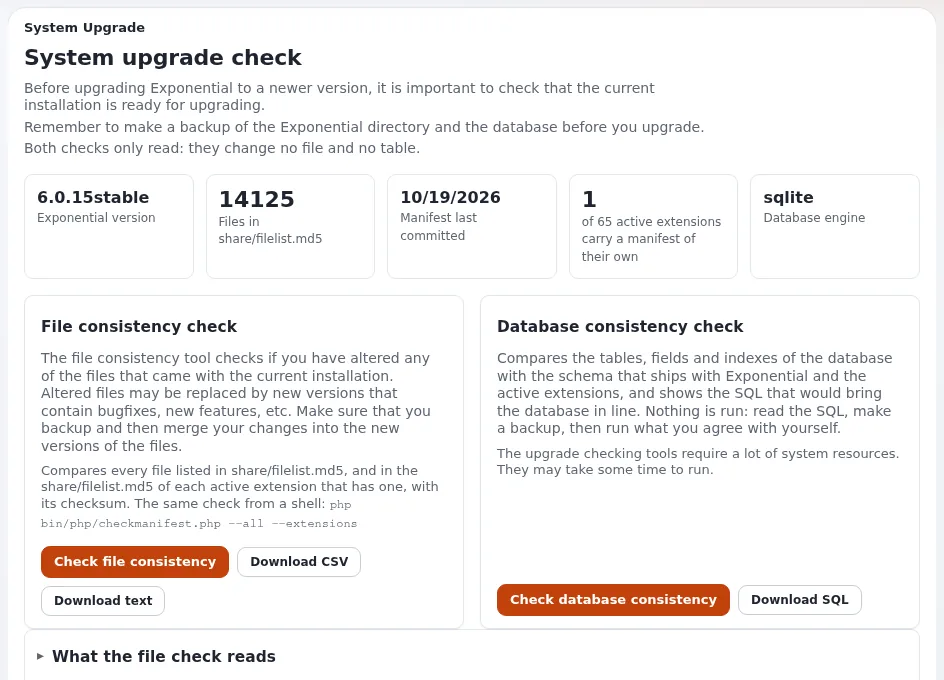
Ask for these three results in writing after every update.
Where to read what changed
Every release has a changelog with an "Upgrading" section, and the behavior change notes say what behaves differently (Changelog 6.0.15, Behavior changes of October 2026). Ask your provider for a short summary in your own words: what changes for editors, what changes for visitors, and anything your team must do.
Note
The project publishes no release calendar. Releases of the 6.0 line came at intervals of about one to five months (Release line and support policy). Plan on the releases that exist, not on a date.
Automatic updates
A site made of Git clones can update itself on a schedule with cron or a systemd timer (Update with Git). Whether that suits you is a decision to take with your provider: it saves work, but somebody must still read the result and check the site. The hosting guide advises automating the checking part across many sites "without updating anything unattended" (Automated updates with ezupdate).
Related pages
- Release line and support
- Upgrades with your provider
- Upgrade day checklist
- Upgrades without surprises
- Free documentation: this page is free to copy, translate and improve under the GNU FDL 1.3.
Become an Exponential Partner
Partners share their information, provide funding, contribute back and develop the products with us, and that is how Exponential grows. A partner website and dashboard are planned for mid-2027: please become a partner today to speed up our growth rate and land new features faster.