Logs for owners
You will rarely read a log yourself, but you should know what the logs can answer, because it changes what you ask for when something goes wrong. This page is the owner's map. The administrator's tools are described in The log viewer and Finding an error by its reference.
Two kinds of record
| Record | Answers | Where |
|---|---|---|
| The logs | What went wrong, technically, and when | Setup > Log files in the administration (The log viewer) |
| The audit trail | Who did what: sign-ins, content changes, settings, deploys, orders | The Audit tab (The audit trail) |
The logs explain an error; the audit trail often explains its cause: "an edit, a publish or a settings change right before the error is often the cause" (Finding an error by its reference).
The error reference
When something goes wrong on the site, the visitor sees Something went wrong on our side with a reference such
as ERR-0123456789 at the bottom. "The error has already been logged; the reference lets an administrator find
exactly that moment in the logs" (When something goes wrong).
What this means for you:
Ask for the reference. Train your support staff and editors to note the reference, the time and the page address whenever they or a customer meet an error (Reporting problems).
Pass it on unchanged. An administrator pastes it into Setup > Log files, field Error reference, and sees the entry and every line of the same request.
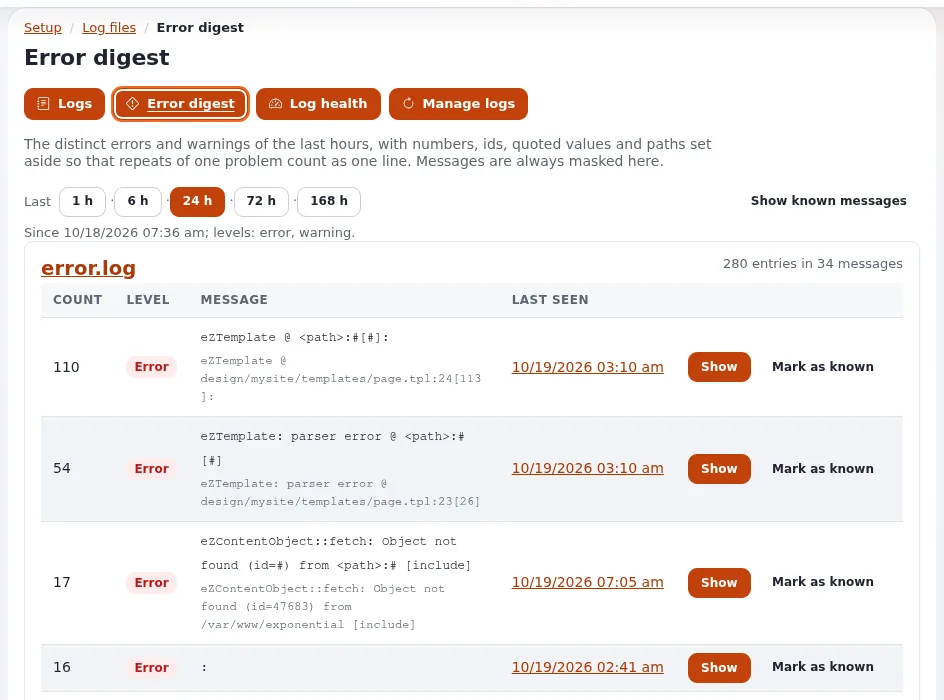
Setup, Log files, Error digest: the distinct errors of the last 24 hours, each with its count and when it was last seen Report quickly. Logs rotate; an old reference may have rotated away (the number of rotations kept is a setting,
site.ini [FileSettings] LogFileRotateCount, same guide).
Personal data in logs
Logs can hold e-mail and IP addresses. The log viewer masks them by default; only a user with the policy
setup/unmasklogs can switch masking off for themselves, and a shared permalink is always masked
(Finding an error by its reference). The audit trail truncates
addresses, hashes sessions and never records passwords, tokens or secrets
(The audit trail).
Your rule: never paste unmasked log lines into a ticket, and never forward logs with customers' data to someone who does not need it. How long logs and audit records are kept is covered in Data retention and deletion (not legal advice).
Who may read what
| Right | Gives |
|---|---|
setup/logs | The log viewer, masked |
setup/unmasklogs | Switching masking off for oneself |
audit/read, audit/manage | Reading and managing the audit; only the Administrator role holds them in a new installation |
Sources: Finding an error by its reference, The audit guide. Give these rights only to the people who answer problems.
What to ask your administrator or host
- To do: Who reads the error digest, and how often (Monitoring)?
- To do: How long are logs kept before they rotate away?
- To do: Is the audit trail verified regularly, and is it copied off the server?
- To do: When I send an error reference, how soon can you tell me what it was?
- To do: Do the people who can unmask logs need to?
Related pages
- Logs and error references (for businesses)
- Audit trail for operations
- Log viewer and rotation (for hosts)
- Free documentation: this page is free to copy, translate and improve under the GNU FDL 1.3.
Become an Exponential Partner
Partners share their information, provide funding, contribute back and develop the products with us, and that is how Exponential grows. A partner website and dashboard are planned for mid-2027: please become a partner today to speed up our growth rate and land new features faster.