Administration interface languages
This page is for administrators and managers who must offer the administration in the languages their staff work in.
The interface texts are in translation files, share/translations/<locale>/translation.ts, and each extension's
translations/ directory (Translations and languages).
Contents
- What ships
- Support levels
- Machine-assisted translations
- How staff choose
- Checking and completing a translation
What ships
share/translations/ holds a directory per translation (and untranslated, the template). The completeness of each
one, measured against the strings the kernel and its designs use today, is in a table in
Languages in Exponential, section 4. Do not plan on a
figure from memory: check that table for the current release.
Support levels
From Languages in Exponential, section 2:
| Level | Meaning |
|---|---|
| Full: interface and content | the administration speaks the language almost completely; content, dates, numbers follow the locale |
| Partial interface, full content | an older translation covering part of today's strings; the rest shows in English |
| Content only | no administration translation; the interface stays English, content and formats work |
A country without a translation of its own falls back to its language's main translation (for example the
German-speaking countries to ger-DE), see "Interface translation fallbacks".
Machine-assisted translations
The project states that several translations are machine-assisted, at least in part, and asks for review by native speakers before a site relies on them. Extensions release their own catalogues; some extensions show English texts in languages they do not cover yet. A public body with language services can review its official languages and give the corrections back.
How staff choose
Each person chooses in the box Interface of the right toolbar, list Interface language, then Apply. The
list shows the most used languages first and then all from A to Z, with each language's completeness. The choice
changes menus, buttons, messages and date formats, nothing in the content, and lasts until sign-out
(Languages (for editors)). A siteaccess can also have a default interface language through its
Locale.
Checking and completing a translation
php bin/php/ezchecktranslation.php fre-FR    # statistics of one translation
./console exp:i18n fallbacks --locale=fre-CA # which translation a locale really shows
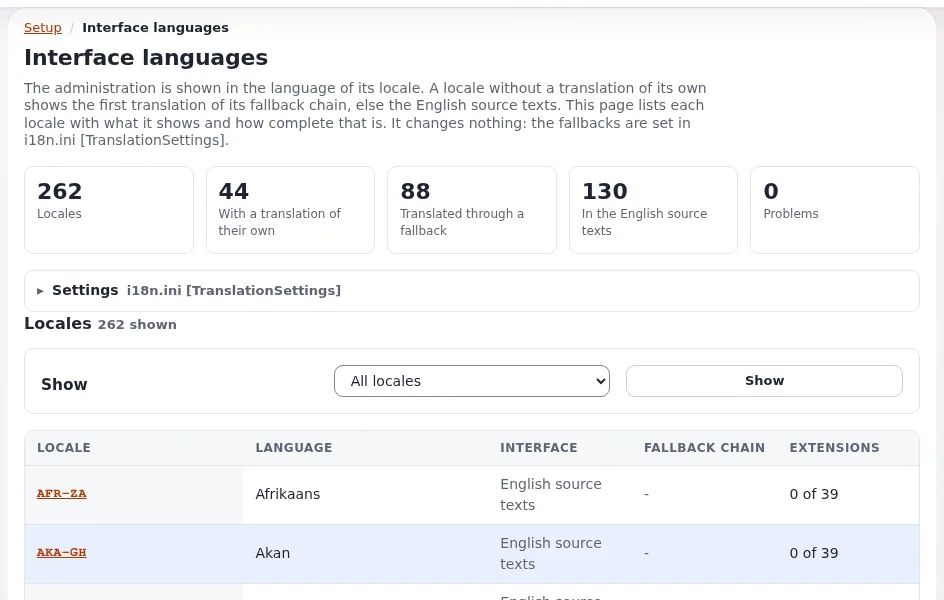
Setup > Interface languages (/setup/languages) shows every locale with the translation it shows and its
coverage. Translations are edited with Qt Linguist or any XML editor; the steps are in
Languages in Exponential, section 8.
Related pages
- Right-to-left in the administration
- Interface language list
- Languages in Exponential
- Free documentation: this page is free to copy, translate and improve under the GNU FDL 1.3.
Become an Exponential Partner
Partners share their information, provide funding, contribute back and develop the products with us, and that is how Exponential grows. A partner website and dashboard are planned for mid-2027: please become a partner today to speed up our growth rate and land new features faster.