Migrations: run, dry run and rollback
The pages of Setup > Migrations that change something: the dry run (which changes nothing, but can simulate a
run), the run, resuming a failed run, and the rollback. They do what the console commands do
(exp:migration:dry-run, exp:migration:migrate --apply, exp:migration:resume --apply,
exp:migration:rollback --apply) and have the same safeguards. Looking at migrations and runs is explained on
The status and the history.
Who may do what:
| Page | Policy | "Verify it's you" |
|---|---|---|
| Dry run | migration/read | only for Simulate |
| Run, Resume | migration/run (also needed for Simulate) | yes |
| Rollback | migration/rollback | yes |
In a new installation only the Administrator role has these policies. "Verify it's you" asks for your password (or
a passkey) again before the action, and not again for some minutes; see Verify it's you.
The rules are in site.ini [ReauthGroup_system].
Contents
- Dry run
- Run
- A long run in parts
- Resume a failed run
- Roll back
- How a run started here goes on
- When a run cannot start
- Related pages
Dry run
Dry run (/migration/dryrun) shows what a run would do now and changes nothing:
- The migrations: each pending migration with what its plan says it would change;
- Before and after the run: whether a caption is taken before the run (Caption before) and after it (Caption after), and what would be committed, tagged and pushed.
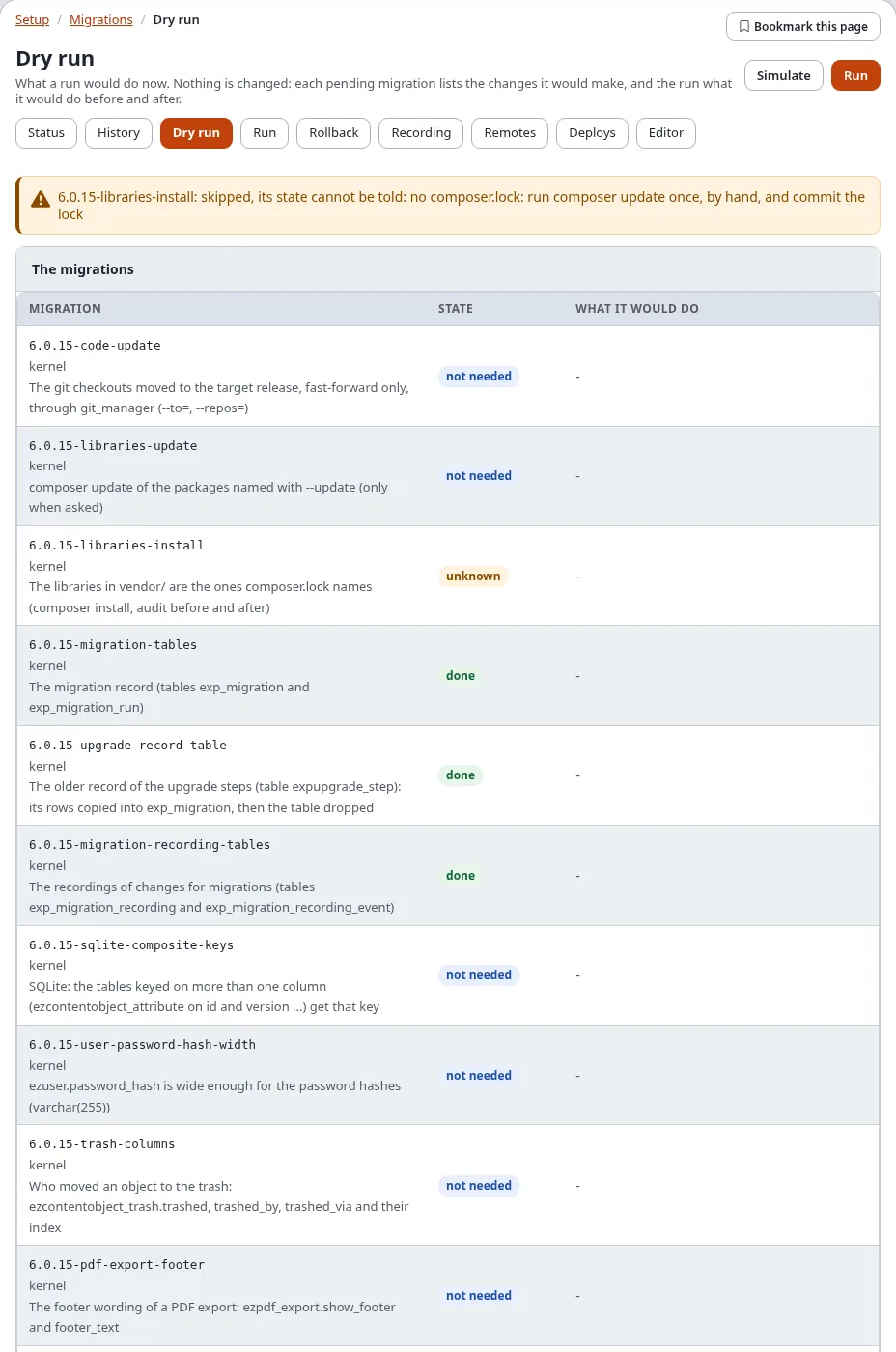
Simulate (with migration/run) goes further: the pending migrations really run, in a transaction that is rolled
back afterwards, and the page lists what each one changed in the database. Nothing is kept. A simulation needs
PostgreSQL or SQLite, whose schema changes can be rolled back; on MySQL/MariaDB, Oracle and MongoDB the page shows
the plan instead and says so. While a run is going on, wait for it to end before you simulate.
Run
Run (/migration/run, or Run N pending on the status) is a form:
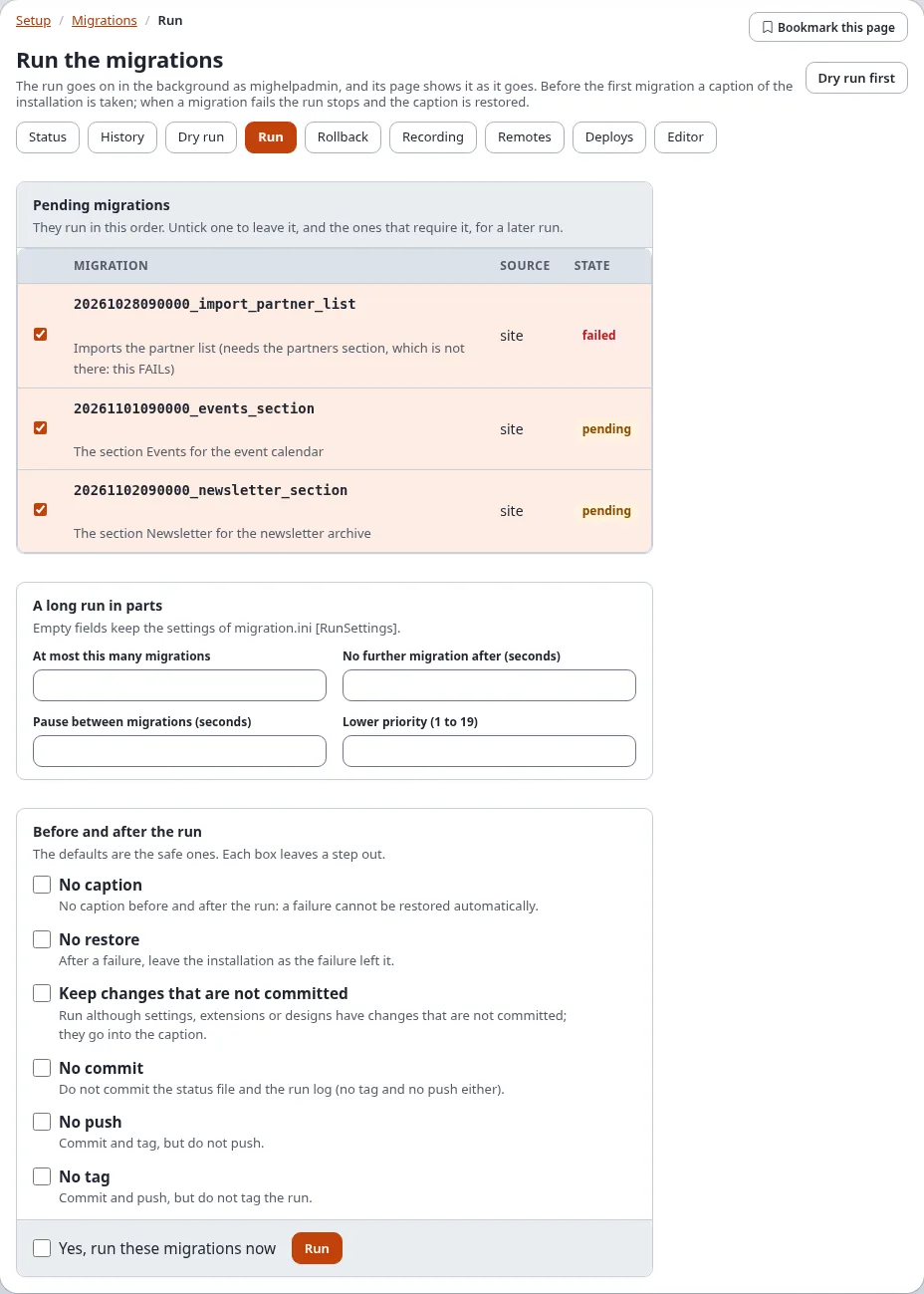
Pending migrations: every pending or failed migration, all ticked, in the order they run. Untick one to leave it, and the ones that require it, for a later run. A migration that Switches maintenance mode on while it runs says so.
Changed after they were applied (only when there are some): migrations whose file is not the one that was applied. The run refuses them unless you tick Accept the changes and write Why (at most 500 characters). They are not run again; the new checksum is recorded and the reason kept in the audit log.
A long run in parts (optional): limits for a long run, see A long run in parts. Empty fields keep the settings of
migration.ini [RunSettings].Before and after the run: the defaults are the safe ones. Each box leaves a step out:
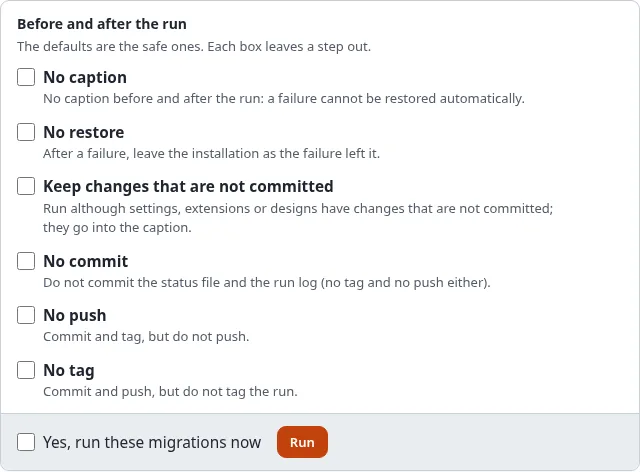
Before and after the run: No caption, No restore, Keep changes that are not committed, No commit, No push, No tag Box Leaves out No caption the captions before and after the run; a failure cannot be restored automatically No restore the restore of the caption after a failure Keep changes that are not committed the refusal of uncommitted changes in settings, extensions and designs (they go into the caption) No commit the commit of the status file and the run log (no tag and no push either) No push the push (commit and tag still happen) No tag the tag (commit and push still happen) Tick Yes, run these migrations now and press Run. After "Verify it's you", the run starts and its page opens, where you follow it (The page of a run).
The run takes a caption of the installation first. When a migration fails the run stops and the caption is restored. A run that passed takes a caption after it and commits, tags and pushes its record. Dry run first opens the dry run.
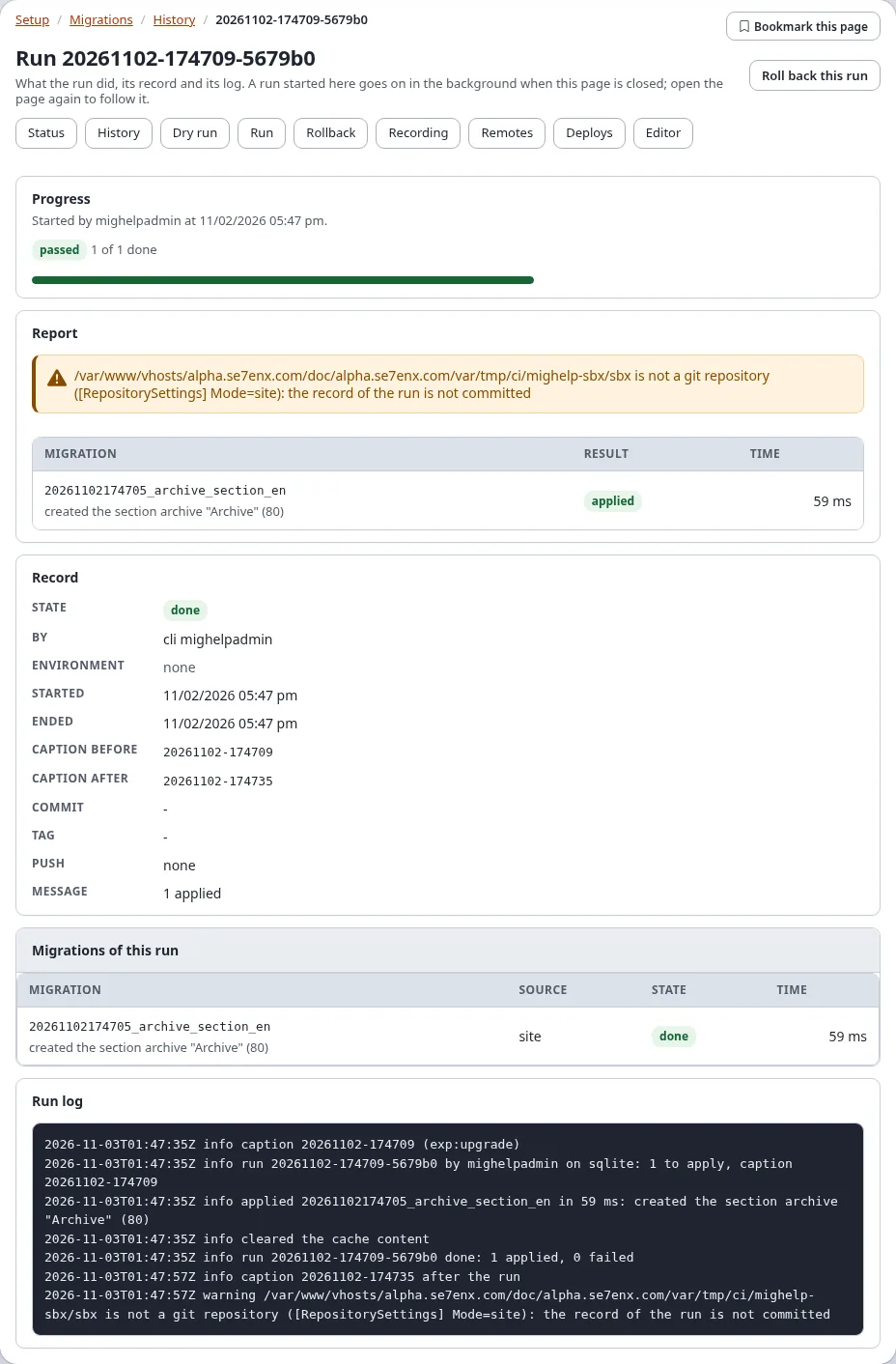
What you see after Run: the run's page with Progress: the phase (first "Checking the code and taking a caption before the run", then "Running ... (n of m)"), a bar and the run log, which grow without a reload.
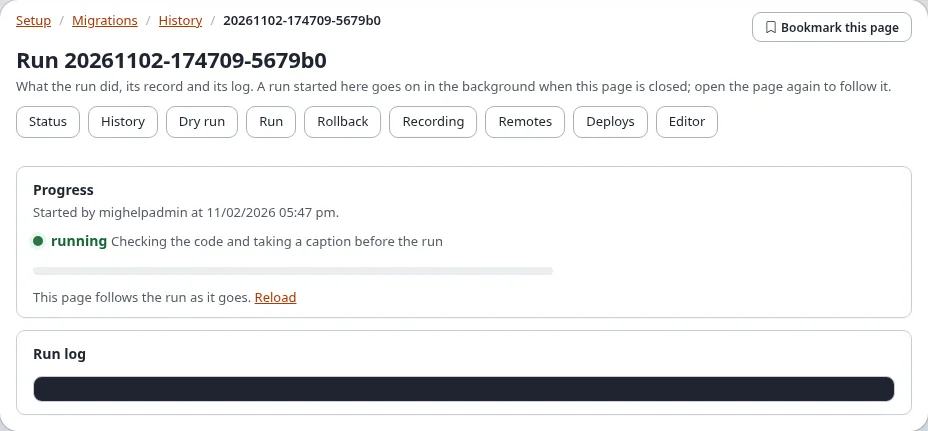
When it has ended, the page reloads itself with the report, the record and the run log:
A long run in parts
The card A long run in parts of the run form splits and paces a run of many migrations, or of one that changes many objects:

| Field | Option | What it does |
|---|---|---|
| At most this many migrations | --max-migrations | applies at most this many; the rest stay pending ("postponed") |
| No further migration after (seconds) | --max-time | starts no further migration after this time; the one running is finished |
| Pause between migrations (seconds) | --throttle | a pause between two migrations and between the batches of a PHP migration (0.5 is half a second, at most 60) |
| Lower priority (1 to 19) | --nice | runs the background process at a lower priority, as nice(1) |
An empty field keeps the setting of migration.ini [RunSettings], shown as the field's placeholder. A run that stops
at a limit ends without an error; the migrations it left stay pending for the next run or a resume. The first
migration of a run always starts. Details: Long runs.
Resume a failed run
A run that failed or was interrupted can be resumed: Resume in the history, or Resume this run on the run's
page. It is a new run of what the failed one left pending (exp:migration:resume) and starts in the same way, with
"Verify it's you".
Roll back
Rollback (/migration/rollback) lists what can be taken back:
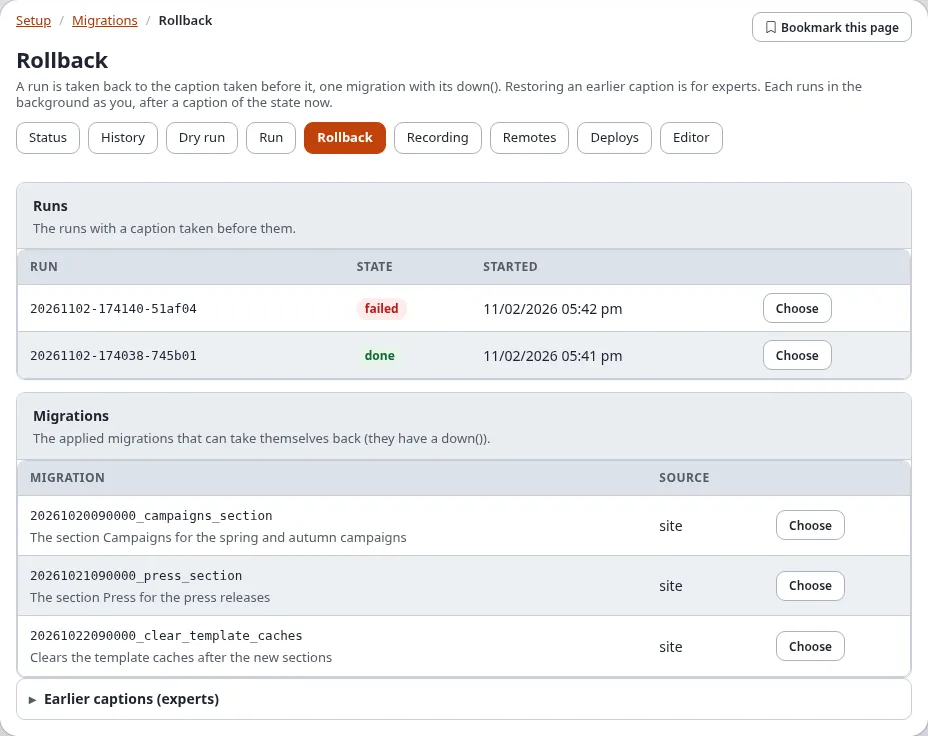
| Section | What Choose takes back |
|---|---|
| Runs | a run with a caption taken before it: that caption is restored |
| Migrations | one applied migration that has a down(): its down() runs |
| Earlier captions (experts) | any earlier caption, restored |
To go back to how the site was before a run, step by step:
- Open Rollback. Find the run under Runs (the newest first) and press Choose.
- Choose the Parts to restore (the defaults are usually right).
- Tick Yes, take it back and press Roll back; confirm "Verify it's you".
- The rollback's page opens and follows it. Afterwards the status shows the run's migrations as pending again, and the history lists the rollback under Started here. You may have to sign in again.
Choose opens the confirmation (/migration/rollback/<run, migration or caption id>; Roll back in the history
and Roll back this run on a run's page open it too):
- A run: choose the Parts to restore (The database, The storage files (var/), The settings
(settings/override); the defaults come from
migration.ini [CaptionSettings] RestoreParts), tick Yes, take it back and press Roll back. - One migration: tick Yes, take it back and press Roll back.
- An earlier caption: choose the parts, tick I know what this restores and type the caption's id again.
A caption of the state now is taken first, so a rollback can itself be taken back. Restoring the database takes it back to the time of the caption, the sessions included: you may be asked to sign in again afterwards, and everything changed since then is lost. A run without a caption before it cannot be taken back as a whole: take its migrations back one by one, or restore an earlier caption.
The rollback runs in the background like a run, and its page opens. It is listed under Started here in the history.
How a run started here goes on
A run, a resume or a rollback started on these pages runs on the server as a console process of its own, as the signed-in user, so a long run never holds the page open:
- it goes on when the page is closed; open its page again to follow it;
- one at a time: while one is going on, or while another run or an upgrade holds the installation lock, a new one is refused with the reason;
- its files are in
var/<site>/migration/jobs/: the job, its progress, what the command printed and its process id. The newest 50 jobs keep their files (migration.ini [AdminSettings] JobHistory); a job that is still running is always kept; - it uses the PHP command line binary:
migration.ini [AdminSettings] PhpCliPath, elsecronjob.ini [AdminSettings] PhpCliPath, else the usual places.
The console commands behind it are the ones you can run yourself. The administration passes the run's id with
--run-id and a progress file with --progress, so the run, its record and its log share one id.
When a run cannot start
| Message | What to do |
|---|---|
| A run started here is still going on | wait for it to end; follow it from the status |
| Another run holds the lock of the installation | an upgrade or a console run is going on; wait for it |
| No php command line binary was found | set migration.ini [AdminSettings] PhpCliPath to the full path of the PHP command line binary (never the php-fpm binary) |
| proc_open is disabled, so a run cannot be started here | PHP of the web server cannot start processes: run ./console exp:migration:migrate --apply on the server |
| The folder of the runs cannot be written | let the web server write var/<site>/migration/jobs/ |
| The run was started but did not report its process id | look at the job's .err file in that folder |
| A migration changed after it was applied | put the file back, or tick Accept the changes and give the reason |
More on errors of the runner: Troubleshooting migrations.
Related pages
- Migrations: the hub, All recipes, Frequently asked questions
- The guide, the tutorial, PHP migrations, Rollback and captions, The migrations repository
- In the administration, Commands, Settings, Policies, views and events
- The file format, The feature
- When a migration fails, Troubleshooting messages
- Migrations versus migrating a site
- The status and the history
- migration.ini [AdminSettings]
- The views of the module migration and its policies