Migrations in the website sidebar
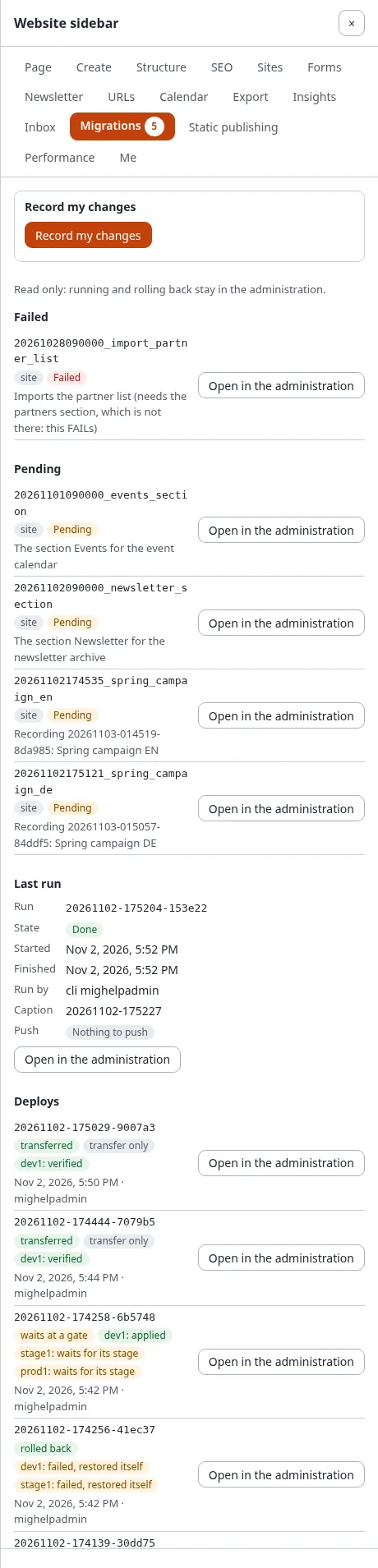
The website sidebar (the extension expwt) has a Migrations panel: the state of the installation's migrations on every page of the site, without going to the administration. Running, resuming, rolling back and deploying stay in Setup > Migrations (Run, dry run and rollback, Deploy step by step); the only thing the panel starts is a recording of your own changes.
Who sees the panel: users who may use the sidebar (expwt/use) and have migration/read. Without that policy,
or on a kernel without migrations, there is no Migrations tab.
Open the panel
- Sign in and open any page of the site.
- Open the website sidebar and choose the tab Migrations. The number on the tab counts the pending, failed and recorded-without-file migrations.
- Open in the administration next to an item opens its page in Setup > Migrations.
Record your changes from the sidebar
With migration/edit, the panel starts with Record my changes. Press it, make your changes on the site (with the
sidebar's editing tools or in the administration), then press Stop recording in the panel. While it runs, the
panel says "Your changes are recorded for a migration."; when a site-wide window is open it says "A site-wide recording
is open: every change is recorded.". Generate the migration from the recording in the administration
(Recording changes).
What the panel shows
- A run that is active now: the installation lock, what it does, who started it and since when;
- the failed migrations, each with its source and description;
- the pending migrations (id, source, description; the first 50, the rest counted);
- the migrations recorded, but whose file is gone (the orphans of the status);
- the last run: its state, when it started and finished, who ran it, its caption, tag and push state, and the message of a failed run;
- the deploys: the latest deploys to remotes, each with its state (deployed, transferred, waits at a gate, rolled back ...), every remote with its state, when and by whom; Open in the administration opens the deploy's page, where a gate is approved (Deploy step by step).
Each item has Open in the administration: the status, or the page of its run (The status and the history).
The number of pending, failed and recorded-without-file migrations is a badge on the panel's tab, counted at most once a minute.
Related pages
- Migrations: the hub, All recipes, Frequently asked questions
- The guide, the tutorial, PHP migrations, Rollback and captions, The migrations repository
- In the administration, Commands, Settings, Policies, views and events
- The file format, The feature
- When a migration fails, Troubleshooting messages
- Migrations versus migrating a site
- The status and the history
- The website sidebar