Lesson 7.2: Creating a mapping
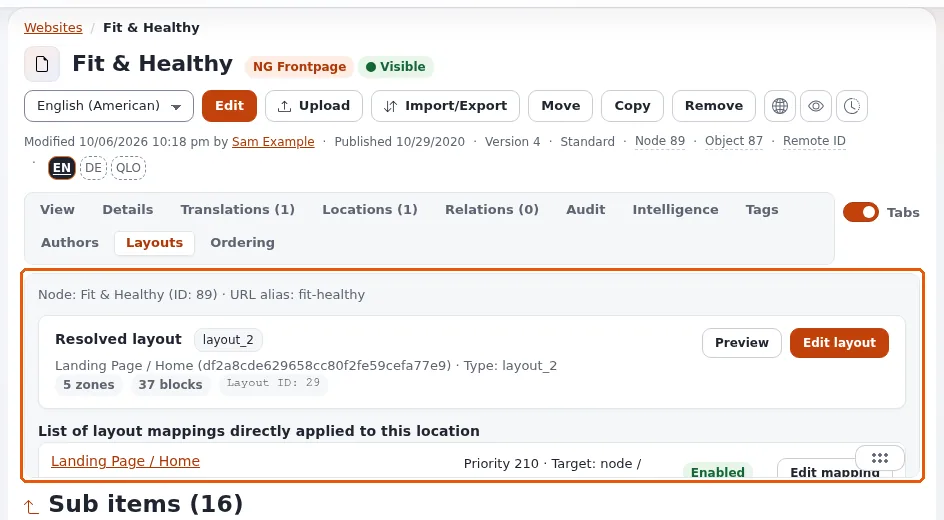
Learners now point their course layout at a page of their own. They create a mapping with a node target, give it a priority above the broader mappings, enable it and check the page. Every learner uses their own test page, so no mapping touches another learner's page.
At a glance
| Course | Exponential Layouts |
| Module | Module 7: Mapping rules |
| Duration | 60 minutes (20 presenting, 40 exercise) |
| Level | Intermediate |
| Audience | Site builders and senior editors |
| Prerequisites | Lesson 7.1; a published course layout (module 6, or published by the trainer) |
Learning objectives
After this lesson, learners can:
- create a mapping with New mapping, choose the layout and add a node target;
- add a condition (for example a siteaccess) where needed;
- set a priority that beats broader mappings, and enable the mapping;
- check the result on the page and with View in CMS;
- use the mapping's quick actions to disable, copy or delete it.
Trainer's notes
How to present it
Sources: explayouts_ui: Map a layout to a page and Layout rules: Recipes.
- New mapping (4 minutes). On Layout mappings, New mapping opens a panel; a new mapping starts with a priority that actually resolves. Choose the layout, add a target and, if needed, conditions. Enable it.
- Node target (3 minutes). For one page, a node target: the page's location. It follows the page when it is renamed or moved.
- Conditions (3 minutes). A siteaccess condition limits the mapping to one site of a multisite installation;
a time condition with
fromandtomakes a campaign layout for a period. - Checking (3 minutes). View in CMS on a node target opens the node; load the page on the site signed out. If nothing changes: a higher-priority mapping matches first, the layout is not published, or a cached page is shown.
- Quick actions (2 minutes). More actions on a mapping: enable, disable, unlink layout, copy, delete, and a cache clear for that mapping. Copying a mapping is the quickest way to build a family of similar ones.
Common questions
What priority should I choose? Higher than any broader mapping that would also match the page. Read the list (lesson 7.1) before choosing.
Do I have to publish a mapping? Enable it; the layout it points at must be published to be shown.
Can I map the same layout to many pages? Yes, with several targets or a subtree target.
Pitfalls
- Mapping a learner's layout to a shared page. Each learner maps only their own test page.
- Forgetting the layout is a draft. A mapping to a never-published layout shows nothing new.
- Cached pages. If the page does not change, clear its cache with the mapping's cache clear or ask the trainer.
Hands-on exercise
Use the training installation. Each learner has a published test page Layout test - <first name> in their course
folder (created by the learner in Editors 101 style, or by the trainer), and a published course layout.
- Open Layouts > Layout mappings and press New mapping.
- Choose your course layout
Training - <your first name>. - Add a target of the node type and choose your test page.
- Read the priority the panel proposes. Compare it with the priority of the broader mapping that serves pages of your course folder (find it as in lesson 7.1) and make sure yours is higher.
- If the training installation has several siteaccesses, add a siteaccess condition for the public site.
- Enable the mapping and save it.
- Use View in CMS and then open your test page on the public site in a private window. Your course layout should frame it.
- Open More actions on your mapping and disable it. Reload the page: it is back to its previous look (after the cache is renewed).
- Enable it again.
Expected result
- The learner's test page shows the course layout on the site (header and footer from the shared layout, the blocks of modules 3 and 4, and the page's own content in the Full view block).
- Disabling the mapping returned the page to its previous look; enabling it brought the layout back.
- The trainer checks by opening two learners' test pages in a private window on the projector.
Quiz
- Which target type do you use for one page?
- Why must your mapping's priority be higher than the broader mapping of the folder?
- What does a time condition do?
- Your mapping is enabled but the page has not changed. Name three things to check.
- Which quick action is the fastest way to build a similar mapping for another page? A. Delete B. Copy C. Disable D. Unlink layout
Answers
- A node target (Layout rules).
- The first match by priority wins; otherwise the broader mapping catches the page first.
- It limits the mapping to a period (
fromandto). - A higher-priority mapping matches first; the layout is not published; the page's cached copy is still served.
- B.
Further reading
Related pages
- Module 7: Mapping rules
- Exponential Layouts: course overview
- Trainers: start here
- Free documentation: this page is free to copy, translate and improve under the GNU FDL 1.3.
Become an Exponential Partner
Partners share their information, provide funding, contribute back and develop the products with us, and that is how Exponential grows. A partner website and dashboard are planned for mid-2027: please become a partner today to speed up our growth rate and land new features faster.