Lesson 7.1: Reading layout mappings
A layout appears on a page only when a mapping (rule) points that page at it. Before learners make mappings, they must read them: the question "why does this page look like this?" is answered on the Layout mappings screen.
At a glance
| Course | Exponential Layouts |
| Module | Module 7: Mapping rules |
| Duration | 45 minutes (20 presenting, 25 exercise) |
| Level | Intermediate |
| Audience | Editors and site builders |
| Prerequisites | Module 2 |
Learning objectives
After this lesson, learners can:
- read a mapping: its priority, layout, Enabled state, Targets and Conditions;
- name the target types (location, subtree, path ...) and condition types (class, siteaccess, query parameter, time ...);
- apply the rule the first enabled mapping by priority whose targets and conditions match wins;
- work out which mapping serves a given page.
Trainer's notes
How to present it
Sources: Layout rules: which page gets which layout and explayouts_ui: Map a layout to a page.
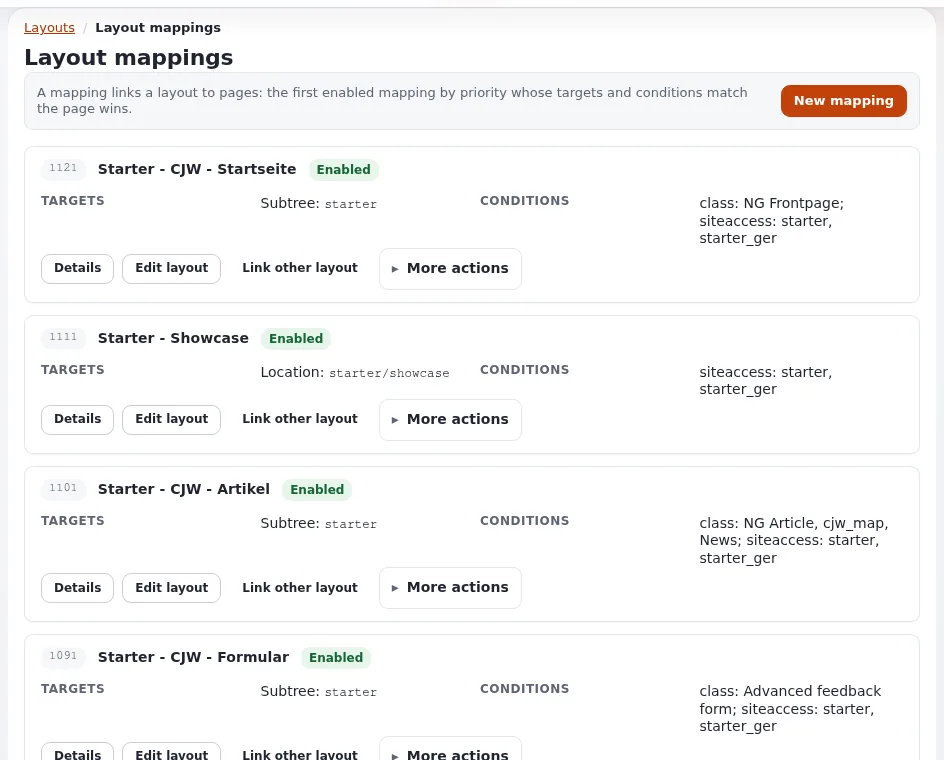
- The screen (4 minutes). Layouts > Layout mappings: A mapping links a layout to pages: the first enabled mapping by priority whose targets and conditions match the page wins. Each mapping shows a number (its priority), the layout's name, Enabled, TARGETS, CONDITIONS, and Details, Edit layout, Link other layout and More actions. A mapping without a layout says No mapped layout and offers Link layout.
- Targets (4 minutes): a node (shown as Location), a subtree, a path, a path prefix, a path pattern. Prefer node and subtree: they follow content when editors rename or move it; a path breaks.
- Conditions (4 minutes): class (the content type), siteaccess, query parameter, route parameter, time. Class and siteaccess are chosen from lists. Without values, a parameter condition only requires the parameter.
- Priority (4 minutes). Higher wins when several match. The most common confusion: a layout does not appear because a broader mapping with a higher priority catches the page first. Give specific mappings (one node) a higher priority than general ones (a subtree, a class).
- Reading example (4 minutes). Read two real mappings aloud from your training site, for example "Subtree: X, class: Article, siteaccess: site" means "every article below X on the site siteaccess".
Common questions
What does a page without any matching mapping show? It is shown by the site's templates, without a layout.
Is an unknown condition safe? No: an unknown condition type matches, so a typo widens a rule instead of disabling it (Layout rules).
Is there a "route" target? It is declared but not implemented and never matches; do not use it.
Pitfalls
- Reading only the first page of mappings. The list is paged; use the pager.
- Ignoring disabled mappings. A disabled mapping does nothing, however high its priority.
- Path targets. They break when content is renamed; replace them with node or subtree targets.
Hands-on exercise
Use the training installation and your layouts training account. Nothing is changed.
- Open Layouts > Layout mappings and read the line under the title.
- Write down the three mappings with the highest priority: their layout, targets and conditions.
- Find a mapping with a Subtree target and a class condition. Write it as a sentence ("every ... below ... gets ...").
- Press Details on one mapping and read its panel.
- Open the training site's front page in another tab. Using the list, work out which mapping serves it. Write down your reasoning.
- Do the same for an article page of the training site.
- Find a mapping with No mapped layout, if there is one, and say what it does (nothing until a layout is linked).
- Compare your answers for steps 5 and 6 with a neighbor; the trainer confirms with the layout preview.
Expected result
- The learner's notes have three mappings, one sentence, and a reasoned answer for the front page and an article page.
- The answers agree with the trainer's check.
- The trainer checks by working through step 5 on the projector.
Quiz
- Complete the rule: the first enabled mapping by ... whose ... and ... match the page wins.
- Why are node and subtree targets better than path targets?
- A specific mapping for one page does not take effect. What is the most likely cause? A. A typo in the layout's name B. A broader mapping with a higher priority matches first C. The page is too long D. The layout has too many blocks
- What happens with an unknown condition type?
- What does a page show when no mapping matches?
Answers
- Priority; targets; conditions.
- They follow content when it is renamed or moved; a path breaks (Layout rules).
- B.
- It matches, so it widens the rule.
- The site's normal templates, without a layout.
Further reading
Related pages
- Module 7: Mapping rules
- Exponential Layouts: course overview
- Trainers: start here
- Free documentation: this page is free to copy, translate and improve under the GNU FDL 1.3.
Become an Exponential Partner
Partners share their information, provide funding, contribute back and develop the products with us, and that is how Exponential grows. A partner website and dashboard are planned for mid-2027: please become a partner today to speed up our growth rate and land new features faster.