Layout rules: which page gets which layout
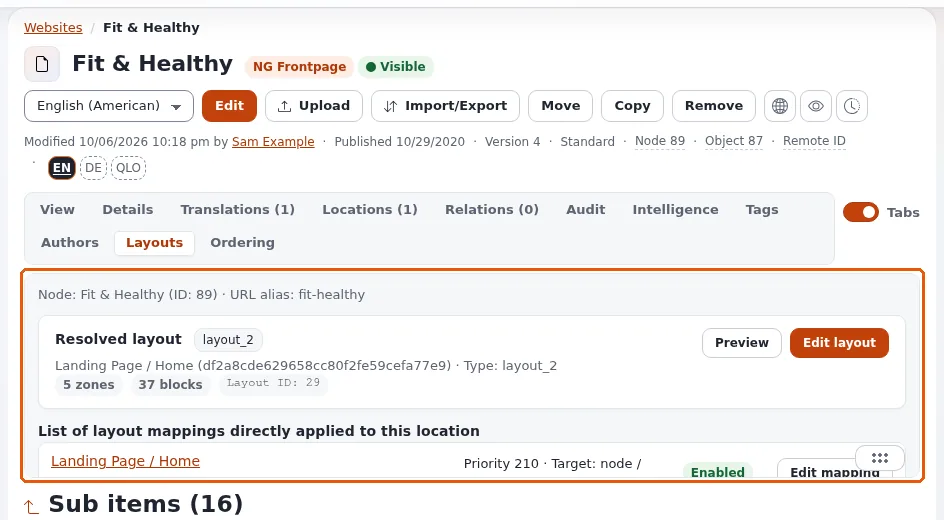
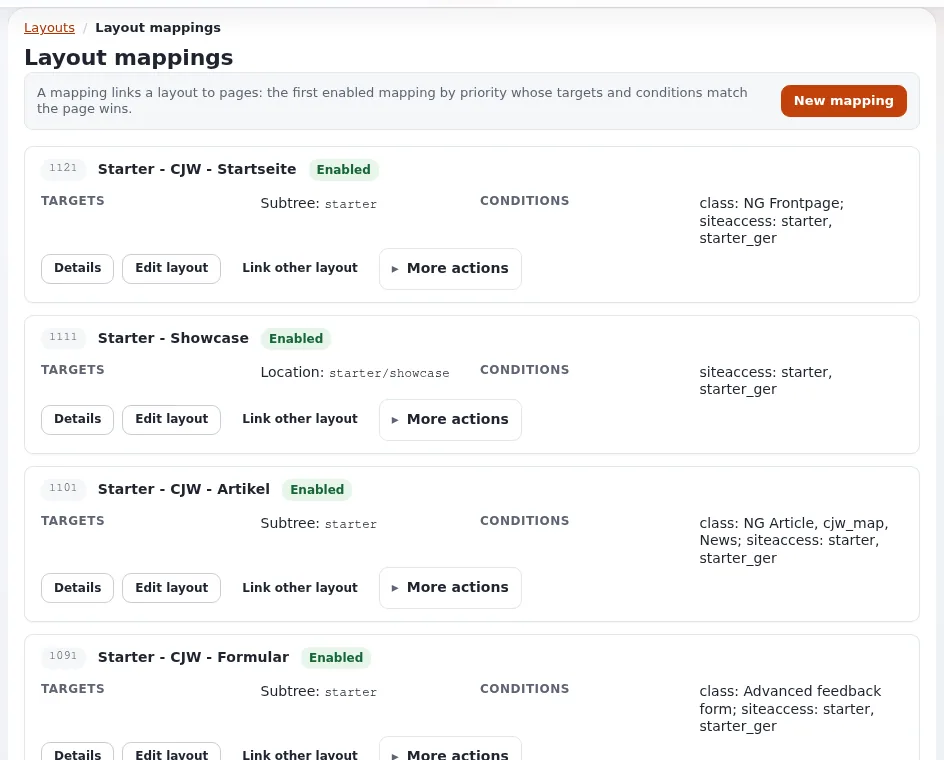
This page is for website creators who decide which pages use which layout. A layout does nothing until a rule points requests at it. Rules live under Mappings in the layouts editor and rule_list in the form-based screens. Source: Rules.
Contents
What a rule has
| Part | Meaning |
|---|---|
| Layout | what to show |
| Targets | which requests it applies to |
| Conditions | extra restrictions that must also hold |
| Priority | higher wins when several rules match |
| Enabled | a switch to park a rule without deleting it |
Targets
| Type | Matches when |
|---|---|
node | the request resolves to this content node |
subtree | the request's node lies beneath this location |
path | the path equals the value |
path_prefix | the path starts with the value |
path_info_prefix | the same, normalized to a leading / |
path_regex | the path matches a regular expression |
A route target type is declared but not implemented and never matches; do not use it. Prefer subtree and node:
they follow content when editors rename or move it, while a path breaks.
Conditions
| Type | Restricts by | Value |
|---|---|---|
siteaccess | the siteaccess serving the request | JSON array of names |
content_type / class | the class of the node | JSON array of class identifiers |
query_parameter | ?name=value in the address | JSON with parameter_name, optional parameter_values |
route_parameter | a user parameter in the path | the same |
time | the current time | JSON with from and/or to |
Without values, a parameter condition only requires the parameter to be present. An empty time range always matches. An unknown condition type matches: a typo widens the rule instead of disabling it.
Priority: the first match wins
Rules are evaluated by priority and the first match wins. The most common confusion: a layout does not appear because a broader rule with a higher priority catches the request first. Give specific rules (one node) a higher priority than general ones (a subtree, a class).
Recipes
| Goal | Target | Conditions | Priority |
|---|---|---|---|
| Front page layout | node = the root node | siteaccess = ["site"] | high |
| All articles in the News folder | subtree = News | content_type = ["article"] | medium |
| A campaign layout for October | node = the landing page | time = {"from":"2026-10-01","to":"2026-10-31"} | higher than the page's normal rule |
| A preview variant | node = the page | query_parameter = {"parameter_name":"variant","parameter_values":["b"]} | high |
| A site-wide default | subtree = the root | lowest |
Copying a rule is the quickest way to build a family of similar rules.
Troubleshooting
| Symptom | Check |
|---|---|
| The page shows the old layout | a higher-priority rule matches first; the layout is not published; the page cache still holds the old page |
| A rule applies to too many pages | a misspelled condition type matches everything; the target is a broad subtree |
| A rule stopped working after a rename | it uses a path target; switch to node or subtree |
| Nothing changes after publishing | clear the content view cache and, with Velocity, its response cache |
Note
The resolver caches which layout a request gets. When rules or layouts were changed outside the editor (an import, a script), clear the caches of the extension as its documentation says, then the content caches.
Related pages
- Landing pages with the layouts editor
- explayouts_ui: map a layout to a page
- View cache and cache blocks
- Free documentation: this page is free to copy, translate and improve under the GNU FDL 1.3.
Become an Exponential Partner
Partners share their information, provide funding, contribute back and develop the products with us, and that is how Exponential grows. A partner website and dashboard are planned for mid-2027: please become a partner today to speed up our growth rate and land new features faster.