Add a view type
A view type is one look of a block type. The List block offers list, grid, list_numbered, list_zigzag,
list_accordion and grid_featured. This page adds a seventh, list_compact: a plain list of links with dates.
Contents
1. Declare it
extension/mysite/settings/explayouts.ini.append.php:
# A new view type for the List block: a compact list of links
[BlockDefinition_list]
ViewTypes[]=list_compact
*/ ?>Without a reset line (ViewTypes[] alone) the value is added to the six view types of
extension/explayouts/settings/explayouts.ini.append.php. Check it:
$ ./console exp:ini where explayouts.ini/BlockDefinition_list/ViewTypes site
...
In effect:
      ViewTypes[]=list_compact
      ViewTypes[]=list
      ViewTypes[]=grid
      ViewTypes[]=list_numbered
      ViewTypes[]=list_zigzag
      ViewTypes[]=list_accordion
      ViewTypes[]=grid_featured
2. Write its template
The media design renders a List block with explayouts/block/list.tpl, which includes
explayouts/block/list/<view type>.tpl. So the new template is
extension/mysite/design/media/templates/explayouts/block/list/list_compact.tpl:
if $block.values.items|count|gt( 0 )
<ul class="list-compact">
foreach $block.values.items as $lc_item
<li class="list-compact-item">
<a href=$lc_item.url_alias|ezurl>$lc_item.name|wash</a>
<time datetime="$lc_item.object.published|datetime( 'custom', '%Y-%m-%d' )">$lc_item.object.published|l10n( 'shortdate' )</time>
</li>
/foreach
</ul>
/if$block.values.items holds the content nodes of the block's collection, manual or dynamic.
3. Clear the caches
./console exp:cache clear --tag=template,content,ini4. Choose it in the editor
Select a List block, Design tab, View type: list_compact is offered. Choosing it hides the options that
belong to the other view types (columns, item view type).

Note: before explayouts_ui_api 1.3.29, changing only the view type to one like this, which leaves no item view
type to choose, did not save the block; the change was stored together with the next change of another field (on the
test copy a key typed and deleted in CSS class). From 1.3.29 the change is saved at once. Check the block header:
it shows the saved view type in capitals, here LIST_COMPACT.
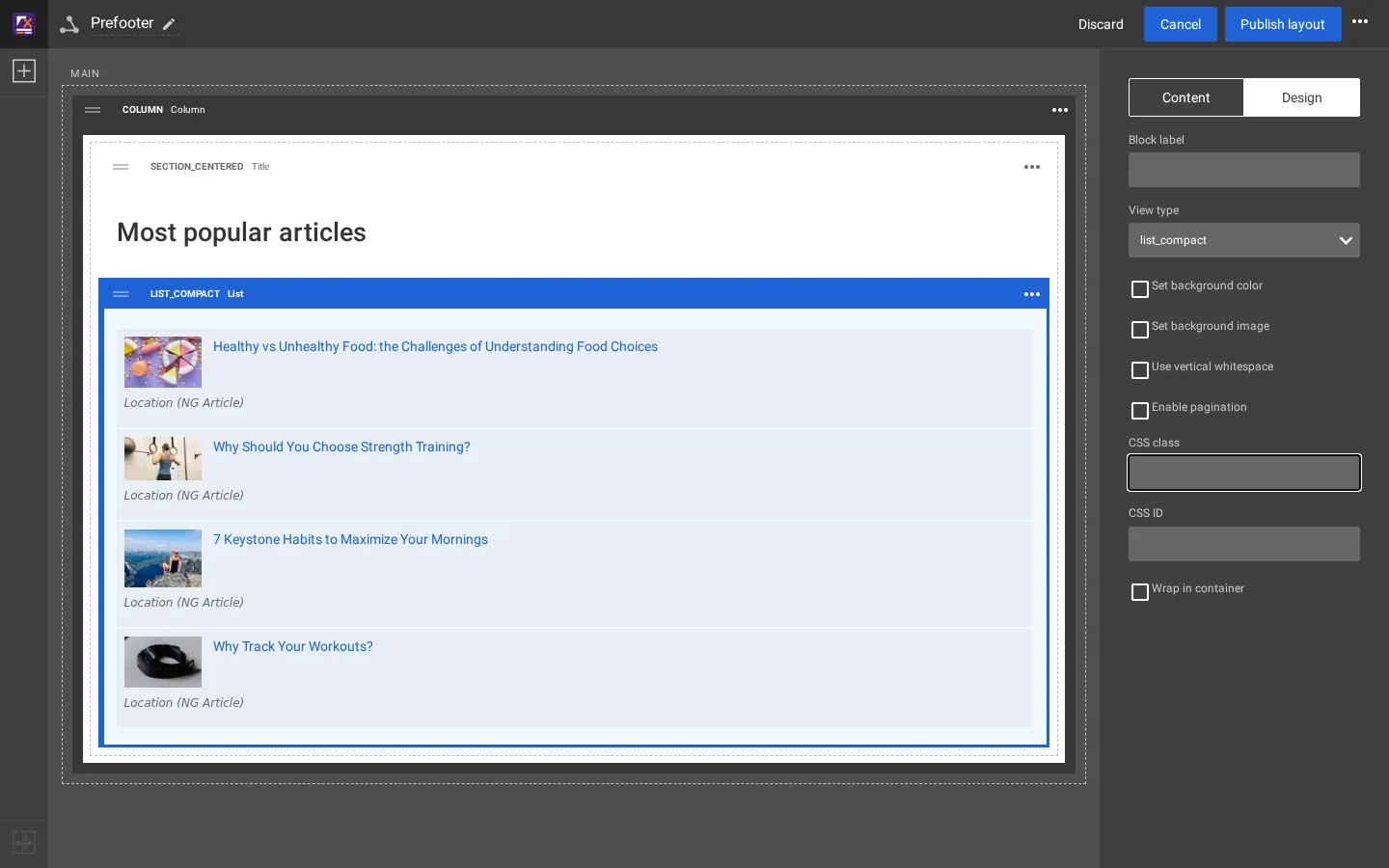
5. The result
After Publish layout the prefooter of the article pages shows the compact list:

Style .list-compact in your design's stylesheet (Styling your blocks).
Related pages
- How a block maps to its templates
- Add a block type
- Your own design extension
- Free documentation: this page is free to copy, translate and improve under the GNU FDL 1.3.
Become an Exponential Partner
Partners share their information, provide funding, contribute back and develop the products with us, and that is how Exponential grows. A partner website and dashboard are planned for mid-2027: please become a partner today to speed up our growth rate and land new features faster.