Manual and dynamic collections
A block that lists content (List, Grid, the gallery blocks) has a collection. The collection is either:
| Type | Items | Typical use |
|---|---|---|
| Manual collection | picked by hand in the content browser, each one a node ID, in the order you set | "Most popular articles", a curated teaser row |
| Dynamic collection | the result of a query on the content tree, run when the page is rendered (and kept in the page caches like the rest of the page) | "The newest articles of Fitness", "everything tagged Running" |
Contents
Switch the type
Select the block, then on the Content tab press Change next to Collection type. The panel warns: Changing the collection type will remove existing manual items. Choose Dynamic collection, then the Query type, and press Apply.

The query types offered on this installation are Exponential (exponential_content_search, a search below a parent
location) and Topics (content_by_topic, content with a tag).
The options of a dynamic collection
For Exponential the panel shows:
| Option | Means |
|---|---|
| Use current location as parent | list below the page being viewed instead of a fixed parent |
| Parent location | the node below which to search; the folder button opens the content browser, View in CMS opens it in the administration |
| Sort type | Published, Modified, Alphabetical, Priority, Defined by parent |
| Sort direction | Descending, Ascending |
| Advanced options | filters (content types, sections, object states) |
| Offset & number of items | skip the first items, limit how many |
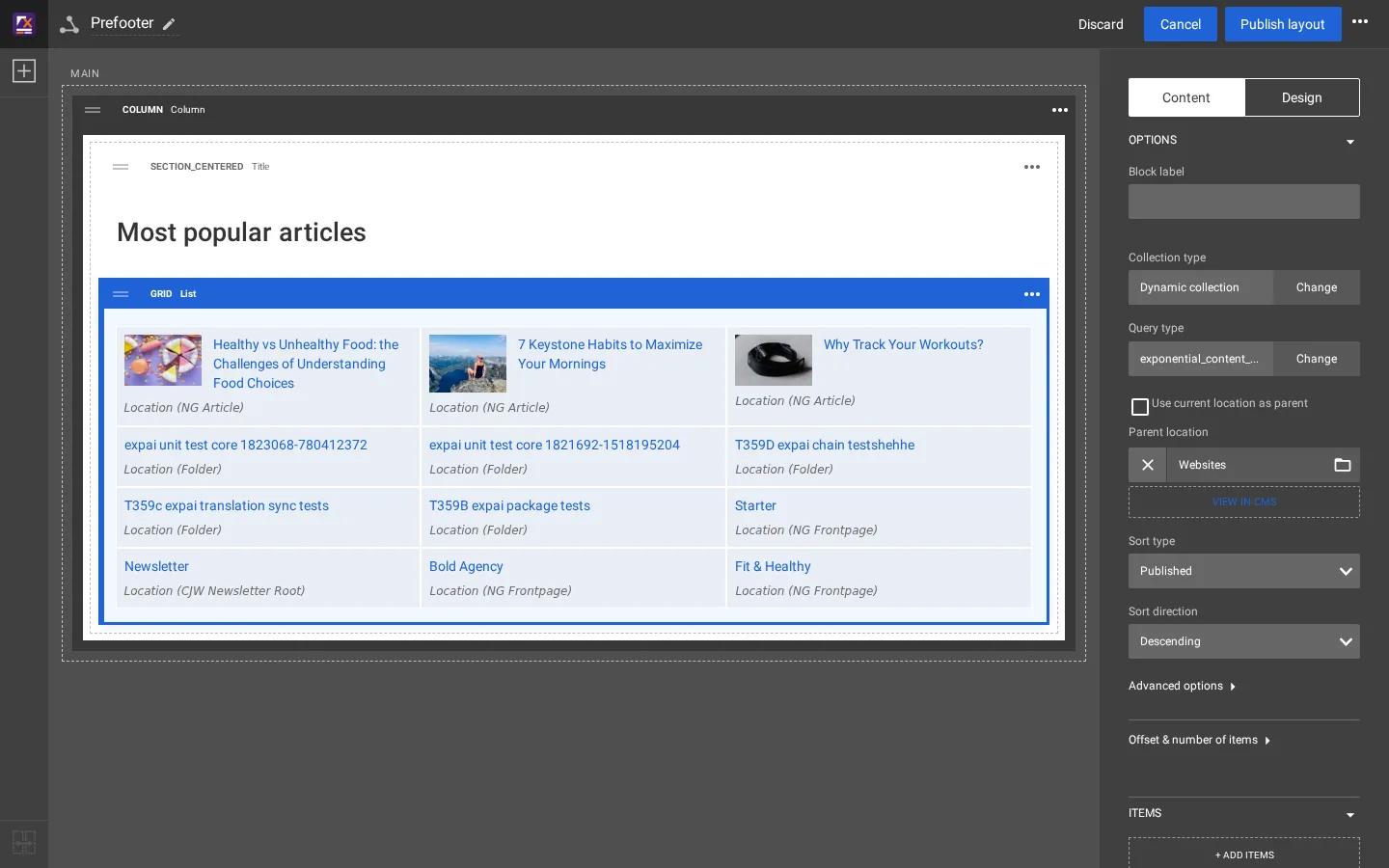
The middle of the editor shows the result at once. On the test copy the three hand-picked items stayed at the top of the list after the switch, followed by the query result. The draft was then discarded with Discard.
The same in a template
The template way to list the newest articles below Fitness (node 92):
{def $latest = fetch( 'content', 'list', hash( 'parent_node_id', 92,
'class_filter_type', 'include',
'class_filter_array', array( 'ng_article' ),
'sort_by', array( 'published', false() ),
'limit', 3 ) )}
<ul>
foreach $latest as $item
<li><a href=$item.url_alias|ezurl>$item.name|wash</a></li>
/foreach
</ul>
undef $latest| Dynamic collection | fetch() in a template | |
|---|---|---|
| Who changes the parent, sort, number | an editor, in the Layouts editor | a developer, in the template |
| Where it can appear | in any zone of any layout | wherever the template is included |
| Look | the block's view type and item view type | the template's own markup |
Both read the same content tree. A common split: the template defines how one item looks (an item view type), the editor decides which items and where.
Related pages
- Change the prefooter in the Layouts editor
- How a block maps to its templates
- Free documentation: this page is free to copy, translate and improve under the GNU FDL 1.3.
Become an Exponential Partner
Partners share their information, provide funding, contribute back and develop the products with us, and that is how Exponential grows. A partner website and dashboard are planned for mid-2027: please become a partner today to speed up our growth rate and land new features faster.