Which layout does a page get?
Layouts > Layout mappings lists the rules that tie layouts to pages. The page explains it in one sentence: A mapping links a layout to pages: the first enabled mapping by priority whose targets and conditions match the page wins.

Contents
- Targets and conditions
- The mappings of Fit & Healthy
- Create a mapping
- Finding the layout of one page
- Templates and mappings
Targets and conditions
| Part | Kinds seen on this installation | Example |
|---|---|---|
| Target | Location (one node), Subtree (a node and everything below), path prefix | Subtree: starter |
| Condition | content class, siteaccess | class: NG Article; siteaccess: starter, starter_ger |
| Priority | a number; higher is tried first | 210 for the home page |
| Enabled | on or off |
The mappings of Fit & Healthy
From the database of the installation (enabled mappings for the Fit & Healthy tree, node 89):
| Priority | Target | Condition | Layout |
|---|---|---|---|
| 210 | Location 89 (the home page) | Landing Page / Home | |
| 160 | Subtree 89 | class ng_recipe | Full / Recipe |
| 130 | Subtree 89 | class ng_article, ng_blog_post, ng_news | Full / Article |
| 120 | Subtree 89 | class ng_topic | Full / Topic |
| 10 | path prefix / | Default Layout |
Location mappings tie the landing pages Fitness (92), Healthy eating (130), Running (163), Video (164) and Showcase
(192) to their layouts; further mappings serve the Bold Agency and
Starter sites. A recipe matches the recipe mapping (160) before the article one (130); a page no other
mapping takes falls through to Default Layout (10), which links its header and footer to Header / Footer.
Create a mapping
New mapping opens a panel: Link layout (the layout), Priority, Enabled, then targets and conditions. The target types offered are Path, Path prefix, Path regex, Location, Subtree and Route; the condition types Siteaccess, Class, Query parameter, Route parameter and Time. Any target can be met; every condition must be.
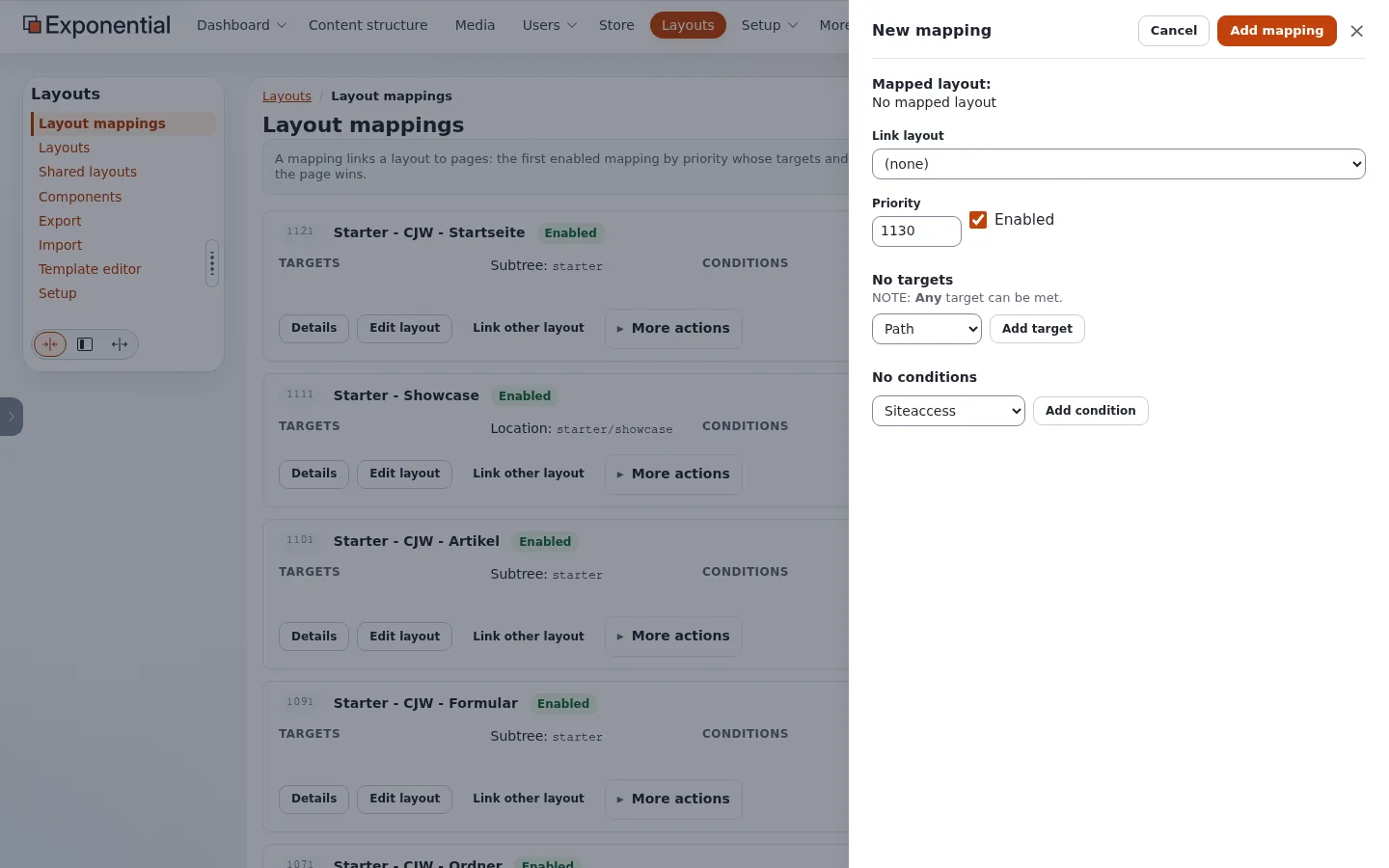
A Siteaccess condition is a list of the installation's siteaccesses to choose from:

A Route target names an Exponential module view instead of an address: content/search (the search page),
user/* (all user pages), content/view (every content page; a URL alias counts as the content view it stands for)
or * (every module). A leading slash is fine. Since explayouts 1.4.42 a Route target matches on the site. The media
design lays out non-content pages (search, user, a module of an extension) only through a mapping with a Route target;
the catch-all and path mappings keep to content pages. In a template of your own,
fetch( 'explayouts', 'resolve_route_layout', hash() ) returns the layout a Route mapping chose.
The resolver remembers its answer per address and siteaccess for [ResolverSettings] CacheTTL (3600 seconds on this
installation). Since explayouts 1.4.42 there are two exceptions:
- An answer that depends on a Query parameter condition of a mapping naming the page is not remembered, so
/showcaseand/showcase?variant=beach get their own layout on every request (A/B on one address works). The page cache does not keep an address whose query has a parameter outside[HttpCacheSettings] QueryStringParameters. On the live installation a mapping with Query parameterp643b=bon one article showedlayout_4with?p643b=band the regularlayout_2without it, on both Apache and Velocity, in any request order. - An answer that depends on a Time condition is remembered only until the condition's next start or end (
from,to), not forCacheTTL. When that moment is within the page cache's[HttpCacheSettings] MaxAge(3600 seconds), the page is kept out of the page caches (Cache-Control: private, no-store). So a Time condition switches at its start and end, without lag. A range that is over is cached normally.
Finding the layout of one page
- In the site's HTML, the layout's wrapper names its type without the underscore (
<div class="zone-layout-layout2">forlayout_2) and every zone is a<section class="zone zone-<identifier>">. - In the administration, a content page has a Layouts tab.
- In Layout mappings, go down from the highest priority: the first mapping whose target and conditions fit the page is the one.
Templates and mappings
A page with no matching mapping, or whose layout has no blocks, is drawn by the design's plain page layout
(pagelayout.tpl with pagelayout/header.tpl, the module result and pagelayout/footer.tpl). So a site can run
without any mapping: the template way alone.
Related pages
- Shared layouts and zone linking
- Why doesn't my change appear?
- Free documentation: this page is free to copy, translate and improve under the GNU FDL 1.3.
Become an Exponential Partner
Partners share their information, provide funding, contribute back and develop the products with us, and that is how Exponential grows. A partner website and dashboard are planned for mid-2027: please become a partner today to speed up our growth rate and land new features faster.