Choose branch or GitHub Actions
Every publish pushes the build to a branch of the repository. GitHub Pages then serves it in one of two ways; the target's setting Delivery chooses which.
What you'll have at the end
GitHub Pages set to serve your target the way you chose, and the target's settings matching it.
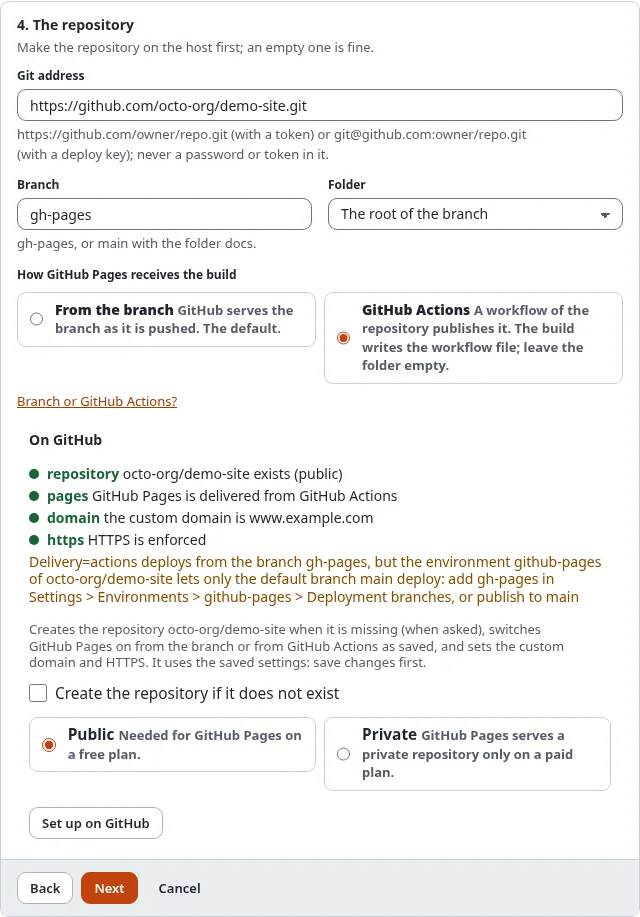
From the branch (the default)
GitHub Pages serves the files of the branch as they are pushed.
- Branch
gh-pageswith the folder at the root, ormainwith the folder/docs(GitHub Pages offers only these two folders). - Nothing else is needed. The file
.nojekyll(in the extras by default) stops GitHub from running Jekyll, which would leave out every file and folder starting with_or.. - In the wizard: step 4, From the branch. Setting:
Delivery=branch.
Take this unless you have a reason not to.
GitHub Actions
GitHub Pages is deployed by a workflow of the repository. The build writes it for you:
.github/workflows/static-publish-pages.yml. It runs on every push to the branch, uploads the files as they are (it
builds nothing) and deploys them with GitHub's own deploy-pages action.
- The build must be at the root of the branch (leave Folder empty): GitHub reads workflows only from there.
- A token needs the Workflows: Read and write permission to push the workflow file.
- GitHub's environment
github-pagesallows deployments from the default branch only, unless you add others in Settings > Environments. Use the repository's default branch (oftenmain), or add yours there. ./console exp:static:github status <target>, the "On GitHub" box and Set up on GitHub in the wizard warn when the target's branch is not the repository's default branch.- In the wizard: step 4, GitHub Actions. Setting:
Delivery=actions.
Take this when the repository should also hold other workflows, when you want GitHub's deployment history, or when an organization requires Actions.
Switch GitHub Pages on
With a token or a GitHub App, Set up on GitHub in step 4 of the wizard (or ./console exp:static:github setup <target>) switches GitHub Pages on the way the target says. A branch must exist before GitHub Pages can serve it, so
for a new repository: publish once, then set up again.
By hand: repository > Settings > Pages > Build and deployment > Source: Deploy from a branch (choose the branch and folder) or GitHub Actions.
Check it
History and Preview show the box On GitHub with the delivery and the state of the last Pages build:
built, building, queued or failed, with a link to the details. ./console exp:static:github status <target> prints the same and says when GitHub's settings differ from the target's.