Search, forms and comments on a static site
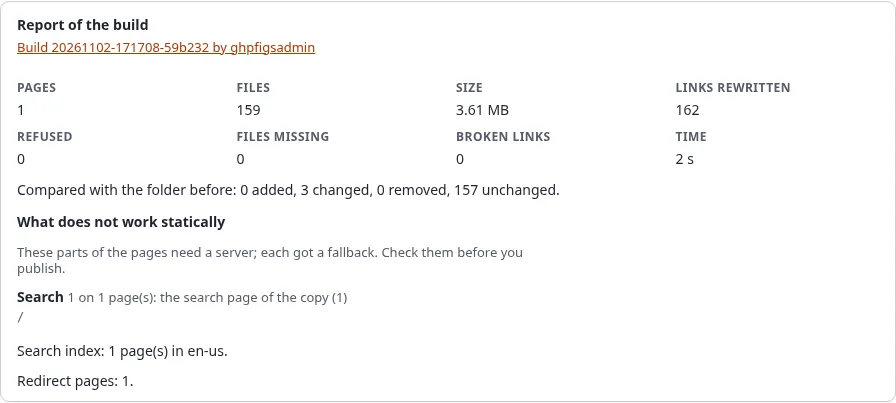
A static host serves files and nothing else: there is no database to search and no server that takes a form. Static publishing finds these parts in every page it builds and gives each one a fallback, so a visitor never meets a form that does nothing. The report of each build lists what it found.
What you'll have at the end
A static copy whose search works without a server, whose contact forms reach your live site (or say where to go instead), and a report that tells you which pages had which of these parts.
What happens to each part
| Part of the site | On the static copy | Set in the wizard, step 7 |
|---|---|---|
| Search form | Goes to the copy's own search page search.html | Search page: Yes |
| Search form, search page off | Goes to the search of the live site | Search page: No |
| Information collector (contact form, poll, feedback) | Posts to the live site, which collects it as usual | Forms: Send them to the live site |
| Information collector, forms hidden | A short text with a link to the same page on the live site | Forms: Hide them |
| Comments, basket, wish list | The short text with the link | always |
| Login form | Left out; the links to the login go to the live site | always |
| Scripts that call the server (ezjscore) | Reported; they call the live site or nothing | always |
| Any other form that posts | Left as it is, so it posts to the live site; reported | always |
The short text is This form works on the live site only. Open this page there. A site can change it with
[StaticPublishSettings] FormFallbackText and FormFallbackLink in staticcache.ini, and style it with the class
exp-static-fallback.
The search page
With Search page on, every build writes:
search.html, a plain page with a search field and the results;- one index per language,
static-search/index-<language>.json, with the title, address, a short teaser and the words that tell most about each page; - a small script,
static-search/search.js, without any library.
The site's own search forms point to search.html and keep their field SearchText, so the words a visitor typed
arrive there. The search runs in the visitor's browser and needs no server. Pages marked noindex are not in the
index. An index is kept below 2 MB (SearchMaxBytes); on a very large site it keeps fewer words per page first, then
leaves out the last pages and the report says how many.
Forms that post to the live site
With Forms: Send them to the live site, an information collector on a static page posts to the form endpoint of
your installation, /staticpublish/form, which hands it to the normal information collection: the same
validation, the same e-mail, the same collected information in the administration.
This needs:
- the public address of the copy (or its custom domain) in the target, because the endpoint takes posts only from there;
- the live site to be reachable from the internet (the target's Live site address);
[StaticPublishSettings] FormEndpoint=enabled(the default).
Each form carries a token the build signs for this target and this form. A token is valid for 400 days
(FormTokenDays); publishing again writes new ones. An address may send 5 posts in 10 minutes (FormRateLimit,
FormRateWindow). After a post the visitor comes back to the page with #exp-static-form-sent (or
#exp-static-form-failed) at the end of the address. The details are in the
form endpoint specification.
When there is no live site, choose Hide them: the forms then show the short text.
The report
The report of a build, on the preview and on the page of the job, has a section What does not work statically: each part found, on how many pages, what was done with it, and the first pages that have it. Check it before you publish: a page that relies on a form you did not expect to lose is easy to spot there.
Next step
Publish automatically, or read the dynamic features guide for the details.