Connect to GitHub: token, deploy key or GitHub App
A target signs in to its repository with a credential. The target only stores its name; the value stays in
Setup > Secrets and reaches git through the environment of the one git process (GIT_ASKPASS or
GIT_SSH_COMMAND), never through the address of the repository, a command line or a log.
What you'll have at the end
A target that can push to GitHub, and, with a token or a GitHub App, use the GitHub steps of the wizard.
Which one to choose
| Token | Deploy key | GitHub App | |
|---|---|---|---|
| Setting | Credential=token:<secret> | Credential=sshkey:<secret> | Credential=app:<installation id> |
| Address of the repository | https://github.com/owner/repo.git | [email protected]:owner/repo.git | https://github.com/owner/repo.git |
| Pushes | yes | yes | yes |
| Creates the repository, switches GitHub Pages on, sets the domain, shows the Pages build | yes | no | yes |
| Valid for | until it expires (you choose) | until you remove it | one hour per token, made for each push |
| Best for | one site, getting started | a server that should reach only this one repository | organizations, many sites |
Start with a token. Choose a deploy key when the server must not hold anything that reaches other repositories, and a GitHub App when an organization publishes several sites.
A fine-grained token
- On GitHub: your picture > Settings > Developer settings > Personal access tokens > Fine-grained tokens > Generate new token.
- Resource owner: the account or organization of the repository. Repository access: only the repository of the site (choose all repositories only if the wizard should create new ones).
- Repository permissions: Contents: Read and write (to push), Pages: Read and write (to switch GitHub Pages on and set the domain), Administration: Read and write only to create repositories, Workflows: Read and write only with GitHub Actions (the build writes a workflow file).
- Copy the token once and store it in Setup > Secrets under a name such as
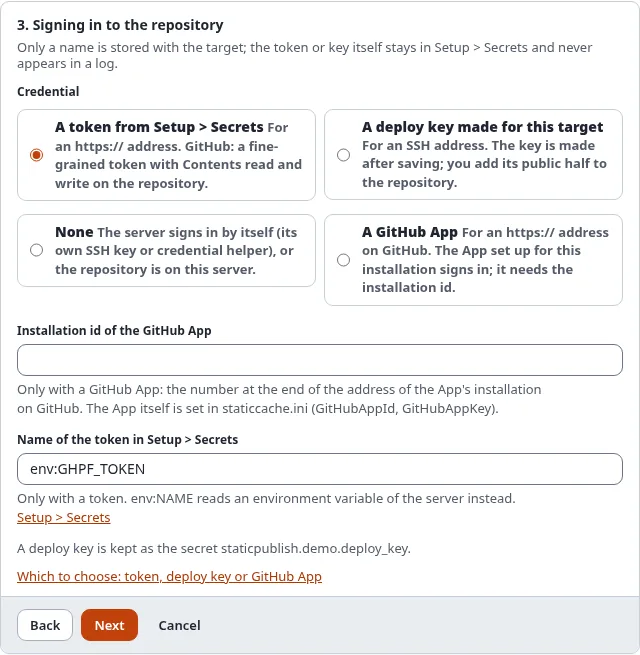
github_pages_token. - In the wizard, step 3: A token from Setup > Secrets with that name. The setting is
Credential=token:github_pages_token.
token:env:NAME reads the token from an environment variable of the server instead (for CI).
Sign in instead of copying a token
With an OAuth App that has the device flow switched on (its client id in [StaticPublishSettings] GitHubOAuthClientId), the console signs you in and keeps the token for you:
./console exp:static:github signin --secret=github_pages_tokenIt prints an address and a code; open the address, enter the code and allow access. The token goes to the secret store, never to the screen.
A deploy key
A deploy key reaches exactly one repository. Save in the wizard opens the target's Deploy key page; Make
the key creates an ed25519 key, keeps its private half in Setup > Secrets and shows the public half. On GitHub:
repository > Settings > Deploy keys > Add deploy key, paste it and tick Allow write access. The
target's address must be the SSH one ([email protected]:owner/repo.git). Details:
SSH deploy keys.
A deploy key only pushes: create the repository and switch GitHub Pages on in its settings yourself.
A GitHub App
A GitHub App belongs to an account or organization and is installed on chosen repositories. Static publishing makes a short-lived token for each push from the App's private key.
- On GitHub: Settings > Developer settings > GitHub Apps > New GitHub App. Switch the webhook off. Repository permissions: Contents, Pages and (to create repositories) Administration, each Read and write; Workflows too with GitHub Actions.
- Generate a private key: GitHub downloads a
.pemfile. Store its whole text in Setup > Secrets, for example asgithub_app_key. - Note the App ID and set, in
settings/override/staticcache.ini.append.php:[StaticPublishSettings] GitHubAppId=123456 GitHubAppKey=github_app_key - Install App on the repository of the site. The address of the installation ends in its installation id
(
.../settings/installations/45678901). - In the wizard, step 3: A GitHub App, with the installation id. The setting is
Credential=app:45678901.
Check it
./console exp:static:status <target>says whether the credential can be read (never its value)../console exp:static:github status <target>signs in with it and shows the repository and GitHub Pages.
When it does not work
| Message | What to do |
|---|---|
the secret ... is not set | Store the token in Setup > Secrets under that name |
GitHub answered 401: Bad credentials | The token expired or was revoked: make a new one and store it under the same name |
GitHub answered 403 or 404 for the repository | The token does not cover this repository, or lacks a permission listed above |
the GitHub steps need a token or a GitHub App | The target signs in with a deploy key or none: use a token or an App for the GitHub steps |
the GitHub App is not set up | Set GitHubAppId and GitHubAppKey |
the GitHub App ... gave no token | The App is not installed on the repository, or the installation id is wrong |