Content packages (.ezpkg)
This page is for application creators who ship content classes or starter content with their application, or move them
between development and production. A package is a directory with a package.xml and the files it names; exported,
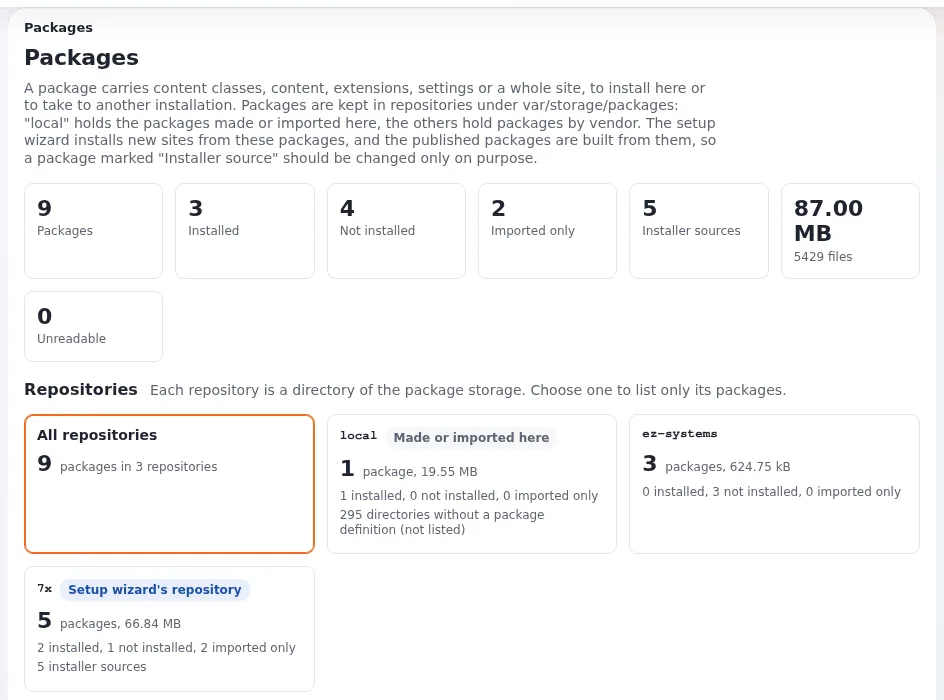
it is one .ezpkg file (Packages).
Contents
- What a package carries
- Where packages live
- Creating one
- On the command line
- Installing
- Packages in an application
What a package carries
Content classes, content objects (with their locations), extensions, settings files, images and documents. A package is
installed (its items are created), imported (kept, as a site package is) or exported (written as .ezpkg).
Where packages live
Repositories under var/storage/packages/: local for packages made or imported here, one directory per vendor (7x
...). Site packages the installer uses are marked Installer source in Setup > Packages.
Creating one
Setup > Packages > Create new package (/package/create) offers wizards: content object export, content class export,
extension export, site style. You give the parts, name, summary, version, license and maintainer, and the format
(classic XML or JSON); the last step reviews everything before writing into local
(The package wizard).
On the command line
php ezpm.php list --allow-root-user
php ezpm.php export <package> -d var/tmp --allow-root-user
php ezpm.php import var/tmp/<package>.ezpkg --allow-root-user
php ezpm.php help --allow-root-user
Uploads and imports are inspected before anything is written: a file that is not a package, too large, or with a path outside the package, a link or a device is refused.
Installing
Installing creates the classes and objects; classes that exist are matched by identifier and remote ID. Check what a package will do on its page before pressing install, and do it on staging first. Packages can also install content as drafts (JSON package format).
Packages in an application
- Ship your classes as a package in the extension (
share/or apackages/folder) and install it from your install command, so every installation has the same classes and identifiers. - Keep class identifiers and remote IDs stable; templates and code depend on them.
- For changes to classes after the first release, write an upgrade step rather than reinstalling the package.
Related pages
- Content classes for websites
- Packaging your application as an extension
- ezpm package manager CLI
- Free documentation: this page is free to copy, translate and improve under the GNU FDL 1.3.
Become an Exponential Partner
Partners share their information, provide funding, contribute back and develop the products with us, and that is how Exponential grows. A partner website and dashboard are planned for mid-2027: please become a partner today to speed up our growth rate and land new features faster.