Maintenance mode during changes
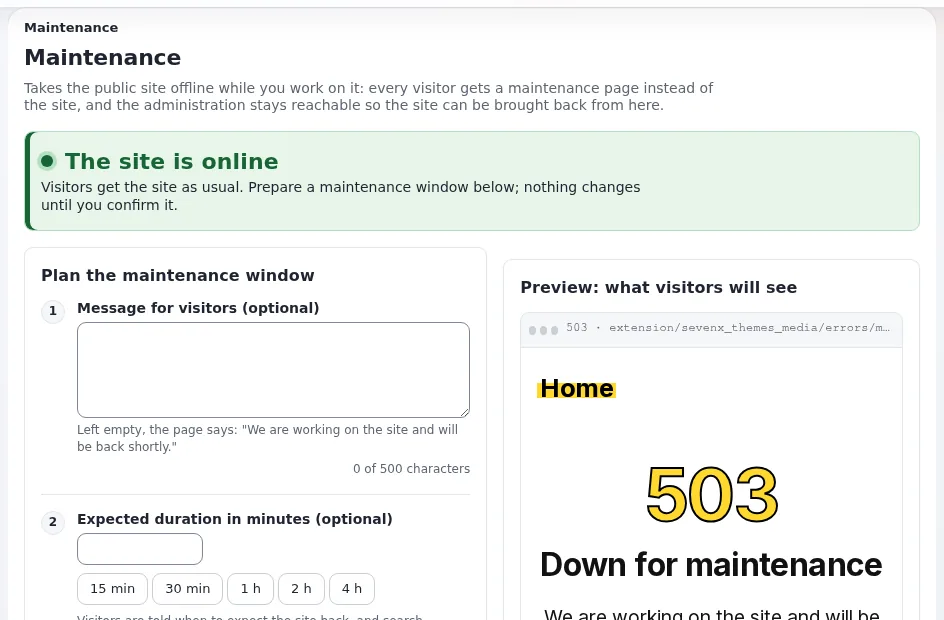
This page is for website creators who must take a site offline for a while: an upgrade, an import, a restore. Maintenance mode answers every public page with a friendly 503 page while you work, and keeps the administration reachable (Maintenance mode).
Contents
What visitors get
Every page request gets the maintenance page with status 503 Service Unavailable, Retry-After and no-store, so
search engines come back later and nothing is cached. Images, styles and scripts are still served. Your message and the
expected end are shown.
From the administration
Setup > Maintenance (/setup/maintenance): an optional message, an optional expected duration (15 minutes to 4
hours in one click), who still gets in (your own address with one tick, other addresses), a preview, and a confirmation
before Take the site offline. While offline, the page shows an amber banner and Bring the site back online.
Maintenance never ends by itself.
From a shell
php bin/php/maintenance.php on --message="Back soon" --until=2h --allow-admin --allow-root-user
php bin/php/maintenance.php status --allow-root-user
php bin/php/maintenance.php off --allow-root-user
Without --allow-admin the administration is offline too. The same is ./console exp:maintenance.
The way back in
The whole state is one file, var/maintenance.json. Deleting it ends maintenance, whatever else is wrong. Every switch
is recorded in the audit trail.
Good practice
- Announce planned maintenance in advance and keep the window short.
- Let your own address through to test before switching back.
- Under Velocity, clear the response cache after switching back.
- For a backup alone, maintenance mode is only needed to keep database and files consistent.
Related pages
- Backups and restores
- Updates and upgrades for site owners
- Maintenance mode feature
- Free documentation: this page is free to copy, translate and improve under the GNU FDL 1.3.
Become an Exponential Partner
Partners share their information, provide funding, contribute back and develop the products with us, and that is how Exponential grows. A partner website and dashboard are planned for mid-2027: please become a partner today to speed up our growth rate and land new features faster.