Demo script: editor tour
This page is for creators who make a video for editors: people who will write and publish in Exponential every day. The script follows the eight steps of In action: editing a folder and adds languages. It runs about ten minutes. Sign in as a demo editor account with invented details, so viewers see what an editor sees, not what an administrator sees.
Prepare the installation first (Setting up a demo installation): a folder with invented items, a second content language, and no drafts left from a previous take.
Contents
- Part 1: finding your way (2 minutes)
- Part 2: editing a folder (4 minutes)
- Part 3: versions (1 minute 30)
- Part 4: languages and right to left (2 minutes 30)
- Recovering on camera
Part 1: finding your way (2 minutes)
| Click | Say | Source |
|---|---|---|
| Point at the tabs | "An editor may see only Dashboard, Content structure and Media; administrators see more." | A tour of the administration |
Press / | "The slash key jumps to search from anywhere." | Keyboard shortcuts |
Esc, then the sun button | "Light, dark, or the mode of your computer; it is remembered for your account." | The header |
| Open a folder in the tree | "Click the triangle to open a folder, the name to open the item." | The left column |
| On the item's page, point at the buttons | "Edit, Move, Copy, Remove, and three round buttons: View on site, Preview and Manage versions." | An item's page |

Part 2: editing a folder (4 minutes)
- Press Edit next to the language list. Say: "The form opens with a new draft, a copy of the published version."
- Point at the buttons at the top: Send for publishing, Store draft and exit, Discard draft.
- Point at the field bar: "One button per field jumps to its card; a red star marks a required field."
- Type in Description. Point at the toolbar and the Editor switch below the field. Say what your installation shows, for example: "The Editor switch changes the editor of this field; switching keeps what I typed." The defaults differ: a fresh installation keeps TinyMCE 3.5.12 as the default with TinyMCE 8 as an opt-in engine (The online editor on TinyMCE 8), while the demonstration server in the tour uses TinyMCE 8 with Tiptap as the alternative.
- Press Store draft and exit. Say: "The draft waits under My drafts; only I see it. The form also saves by itself every few minutes."
- Open My drafts on the dashboard, press Edit on the draft.
- Press Preview in the form's left column; show the phone and tablet widths; press Back to edit.
- Press Send for publishing. Say: "The draft becomes the published version, and the one before it is kept."
Mention approval only as documented: "If a site uses an approval, the version waits under My pending items."

Part 3: versions (1 minute 30)
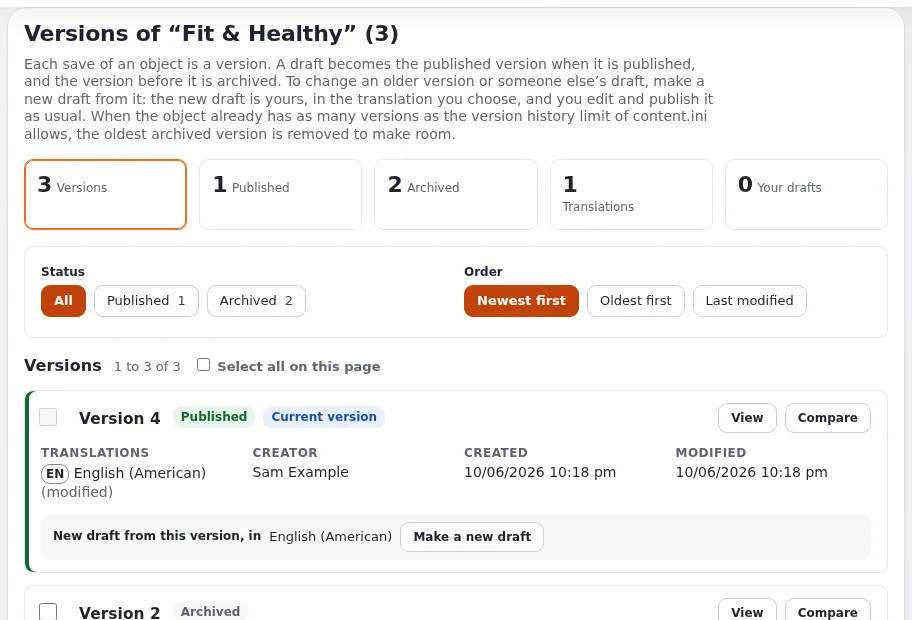
- Press Manage versions (the round button with a clock).
- Press Compare between the two newest versions. Say: "I see exactly what changed."
- Point at Make a new draft: "Going back means starting a draft from an older version and publishing it." (Go back to an earlier version)
Part 4: languages and right to left (2 minutes 30)
- On an item, point at the language badges: "A filled badge exists; a dashed one does not yet."
- Click the dashed badge, choose Translate based on the existing translation, translate the name, publish. Say: "Each translation is published on its own." (Translate an item)
- Leave the edit form. In the right column, Interface, choose Arabic or Hebrew and press Apply. Say: "The administration turns around: the side columns change places and text starts at the right." (Right to left)
- Switch back to English.
If you give numbers, use the documented ones with their source: 368 locale files usable as content languages, administration translations (the current totals are at the top of the languages page) (Languages in Exponential).

Recovering on camera
| What happens | What to say and do |
|---|---|
| Possible edit conflict | "A draft from an earlier take." Open Manage versions, discard it; cut in editing |
| No Interface box | You are still in the edit form; leave it first |
| A language shows English texts | "This translation of the administration is not complete." |
| An error page | Pause the recording, read it before showing it (it may contain paths), and move on |
More: Demo scripts, What can go wrong.
Related pages
- A tour of the administration
- Creating and editing content
- Demo script: Exponential Layouts
- Video walkthrough guide
- Free documentation: this page is free to copy, translate and improve under the GNU FDL 1.3.
Become an Exponential Partner
Partners share their information, provide funding, contribute back and develop the products with us, and that is how Exponential grows. A partner website and dashboard are planned for mid-2027: please become a partner today to speed up our growth rate and land new features faster.