Demo script: Exponential Layouts
This page is for creators who show the page builder of Exponential. Exponential Layouts brings "the concept of the upstream layouts
packages to the Exponential kernel" (README.md, quoted in
Brand and naming rules); credit Netgen when you
show it. The script runs about eight minutes and works on a copy of a layout, so nothing on your demo site changes
unless you publish. Every click comes from The layouts editor and
In action: the layouts editor.
Sign in with an account whose role may work with layouts: the Layouts tab is shown only to such roles. The current editor belongs to the 6.0.15 line; say which version you show.
Contents
- The words you will use
- Part 1: the dashboard and a new layout (1 minute 30)
- Part 2: blocks (3 minutes)
- Part 3: shared layouts and linked zones (1 minute 30)
- Part 4: publish or discard, and mappings (2 minutes)
- What not to claim
The words you will use
| Word | Meaning, as the help defines it |
|---|---|
| Layout | The plan of a page |
| Zone | An area of the layout, such as header, main or footer; the layout type decides which zones exist |
| Block | One part inside a zone: a title, rich text, an image, a list, a gallery ... |
| Mapping (rule) | Decides on which pages a layout is used |
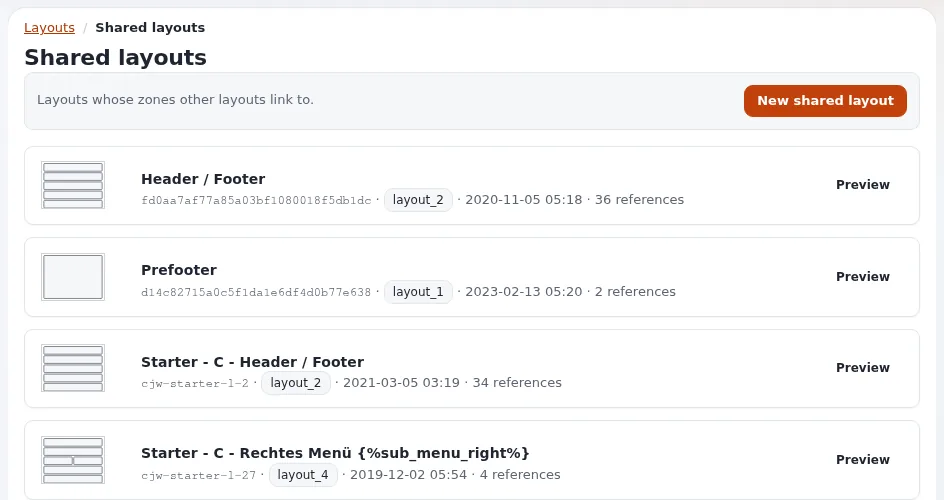
| Shared layout | Holds blocks many pages use, such as a header and footer; other layouts link to it |
Source: Layouts, zones and blocks.
Part 1: the dashboard and a new layout (1 minute 30)
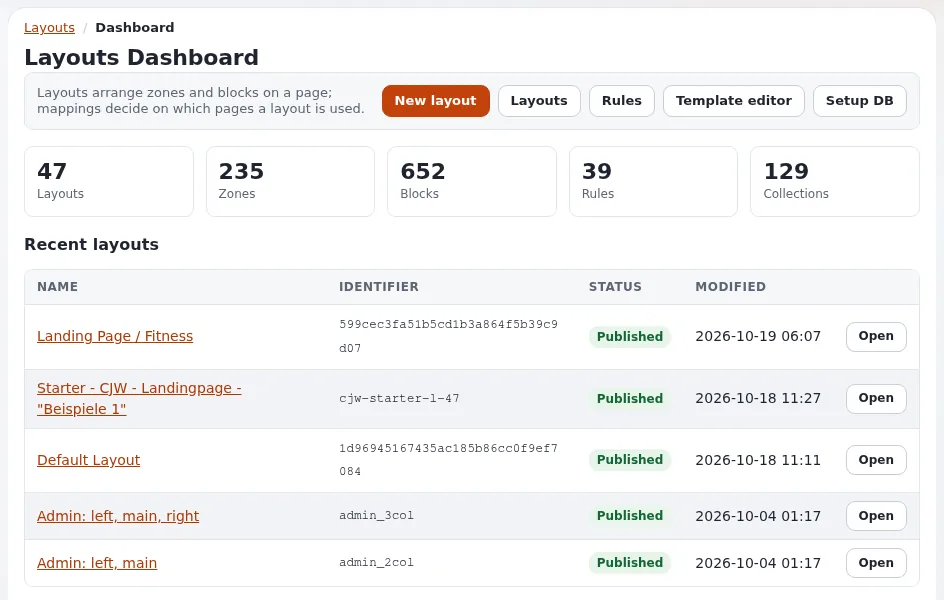
- Open the Layouts tab. Say: "The Layouts Dashboard shows the numbers of layouts, zones, blocks and mappings, and the recently changed layouts."
- Press New layout, choose a Layout type (for example 2 columns), give it a Name, press Create layout. Say: "The editor opens with the empty zones of that type."
- Point at the four areas: the name and buttons at the top, Add a block on the left, the zones in the middle, the properties on the right (Select a block to access its properties.).
Part 2: blocks (3 minutes)
- Press Add a block (the plus button). Show the groups: Basic, Components, Listing, Gallery, Containers, Placeholders.
- Drag a Title block into a zone. Click it: it is outlined in blue and its settings appear in two tabs.
- In Content, type a title. Say: "Changes show in the block at once."
- Open Design. Say: "How the block looks: for example the view type and style."
- Open the menu with three dots on the block, choose Duplicate block.
- Drag the copy by its header bar into another zone. Then Delete block on it.
Part 3: shared layouts and linked zones (1 minute 30)
Switch to an existing layout that has a linked zone (Layouts, Open).
- Point at a zone with a red dashed border and hatched blocks. Say: "This zone is linked to a zone of a shared layout. The header and footer live once, and many layouts link to them instead of copying them."
- Say: "Linked blocks cannot be changed here; you change them by opening the shared layout itself."
- Press Link zone with shared layout zone at the bottom left. Show step 1 (Link zone on each zone) and say what step 2 asks for: the shared layout and its zone. Press Back.
Part 4: publish or discard, and mappings (2 minutes)
- Open the menu with three dots at the top and show Publish and continue editing and Save draft and close.
- Press Discard and confirm in the Discard changes dialog. Say: "I worked on a draft; the published layout is exactly as it was."
- Back on the dashboard, open Rules. Point at one mapping's Targets and Conditions. Say: "The first enabled mapping by priority whose targets and conditions match a page wins." (Which pages use a layout)
If you publish on camera and the editor asks whether to clear caches, choose Clear caches so the change shows.

What not to claim
| Do not say | Say instead |
|---|---|
| "Every Exponential product has this editor." | "Exponential Platform DXP does not ship a layouts editor." (Knowing the product family) |
| "It's Netgen Layouts." | "It brings the concept of the upstream layouts packages to the Exponential kernel." |
| "Netgen made this for Exponential." | Credit the concept only; the sources do not say Netgen built the port |
| "Anyone can change any page." | "Roles decide who sees the Layouts tab; mappings decide whole parts of the site." |
DESCRIPTION BLOCK
Shows Exponential Layouts in Exponential <version>, on my own test installation.
Exponential Layouts brings the concept of the upstream layouts packages to the Exponential kernel.
The layouts editor: <link to "The layouts editor">
Walk-through with screenshots: <link to "A tour of the administration, In action: the layouts editor">
Related pages
- The layouts editor
- Talking points: Exponential Layouts
- Demo script: editor tour
- Free documentation: this page is free to copy, translate and improve under the GNU FDL 1.3.
Become an Exponential Partner
Partners share their information, provide funding, contribute back and develop the products with us, and that is how Exponential grows. A partner website and dashboard are planned for mid-2027: please become a partner today to speed up our growth rate and land new features faster.