Backups: what to back up
This page is for hosting companies that design a backup service for Exponential sites and for the administrators who run it. It answers: which data an Exponential site cannot live without, which files hold keys that cannot be recreated, what can be left out because the site rebuilds it, and how to take a backup whose database and files agree.
The facts come from 10.9 Backups and restore, Backup and restore and the feature pages linked below.
Contents
- A backup is two halves
- The files to back up
- Keys and secrets that cannot be recreated
- What to leave out
- Taking database and files together
- Storing the backup
- Backups from the administration
- Checklist
A backup is two halves
Exponential keeps its state in two places: the database (content, users, roles, versions, settings stored in tables) and the files (uploaded images and documents, the installation's settings, your own extensions and designs). "A backup is the database and the files, taken at the same moment" (10.9). An image that exists in the database but not on disk shows as a broken image; a file without its database row is dead weight.
The database half depends on the engine; the commands for each of the six supported databases are on Database backups per engine.
The files to back up
| Path | Why it matters |
|---|---|
var/storage/ | uploaded images and files and their variations |
var/<site>/storage/ | the same, when a site has its own var directory |
var/storage/sqlite3/ | the database file of a SQLite site; take it with SQLite's online backup, never by copying a busy file |
settings/override/ | the installation's settings, including database credentials and the generated keys below |
settings/siteaccess/ | the settings of each siteaccess |
| your own extensions and designs | when they are not kept in a repository |
config.php, config.cluster.php, config.env.php | PHP-level configuration, cluster constants and the environment name, when present |
var/<site>/log/audit/ | the audit trail: live files, archives and their signed manifests |
var/log/ | optional: useful when an incident has to be investigated later |
When the customer's installation is managed with Composer, also keep the project's composer.json and
composer.lock: they are what rebuilds vendor/ at the same versions.
Warning
settings/override/ holds the database password and other credentials. A backup that contains it is as sensitive
as the server itself: encrypt it, restrict who can read it, and never hand it to a customer without checking what
it contains.
Keys and secrets that cannot be recreated
Some files hold keys the software generated on first use. If they are lost, things break that no restore of content can repair:
| File | Holds | If it is lost |
|---|---|---|
settings/override/audit.ini.append.php | the signing and pseudonym keys of the audit trail | the existing records can no longer be verified as intact (The audit trail) |
settings/override/mailpreferences.ini.append.php | [SecretSettings] TokenSecret, the site secret of the e-mail preferences | "a new secret invalidates every link in every mail already sent, and every entry of the suppression list stops matching" (E-mail preferences) |
Velocity's configuration tree (/etc/vc, or var/vc/qbix/etc when /etc/vc is not used) | site configuration and, in its ssl/ directory, private keys of certificates (mode 0600) | HTTPS on Velocity has to be set up again (8.3.10) |
These files are small. Include them in every backup, and keep them as private as the site's credentials.
What to leave out
These are regenerated and only cost space and time in a backup:
| Path | Why it can go |
|---|---|
var/cache/, var/<site>/cache/ | caches; "regenerated" (10.9) |
var/autoload/ | class maps; php bin/php/ezpgenerateautoloads.php -e rebuilds them |
vendor/ | Composer packages; rebuilt from composer.lock |
var/vc/*/log/, var/vc/*/run/ | Velocity's logs and pid files |
var/log/mail/ | mails written by the file transport on a test site |
var/tmp/ | temporary work |
The kernel, lib/, bin/ and the shipped settings/*.ini come with the release and can be fetched again at the same
version. Back them up only when someone changed them in place; Setup > Upgrade check lists files that differ from the
release (The upgrade check).
Taking database and files together
Maintenance mode makes the pair consistent: no visitor or editor writes between the database dump and the file copy (10.9, procedure).
php bin/php/maintenance.php on --message="Back soon" --until=30m --allow-root-user
# 1. the database, with the tool of its engine (see Database backups per engine)
# 2. the files
tar czf /backup/files-$(date +%F).tar.gz var/storage settings/override settings/siteaccess
php bin/php/maintenance.php off --allow-root-user
Add var/<site>/storage, the audit directory and your own extensions to the tar line as your layout needs.
Note
Maintenance mode is not required for the database alone: "On SQLite and MySQL with InnoDB the database backup is consistent without maintenance mode; maintenance mode makes the database and the files agree." A host that cannot take customer sites offline every night can take the database online and the files right after it, and accept a small window in which a new upload may be in one half only.
Storing the backup
From the installation book: "Store backups away from the server, and keep several generations." How many and for how long is a product decision; Backup schedules and retention lays out the options.
Backups from the administration
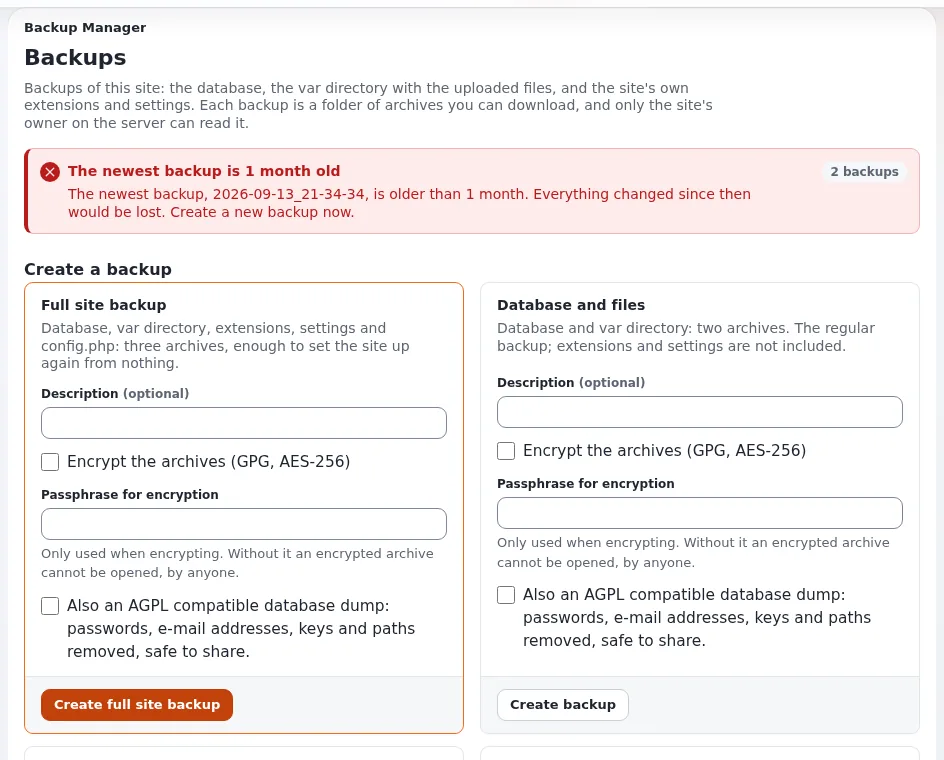
For customers without a shell, the extension git_manager adds Setup > Backup (/git_manager/backup):
timestamped backups ("captions") of the database and files, optional encryption with GnuPG, and sanitized SQL dumps.
It needs mysqldump for the database part, so it covers MySQL and MariaDB sites
(git_manager). A host-side backup of every engine remains the
host's own job.
Checklist
- To do: The database is backed up with the tool of its engine, not by copying data files of a running server.
- To do:
var/storage(and everyvar/<site>/storage) is in the backup. - To do:
settings/override/andsettings/siteaccess/are in the backup, encrypted at rest. - To do: The audit and mail-preference key files are in every backup.
- To do: Caches,
var/autoload,vendor/and Velocity's logs are excluded. - To do: Database and files are taken in one window, in maintenance mode where the customer allows it.
- To do: Backups leave the server, and several generations are kept.
- To do: A restore has been tested (Restore and restore tests).
Related pages
- Database backups per engine
- Backup schedules and retention
- Restore and restore tests
- Restore from backup (runbook)
- Storage layout
- Security hardening: backups and recovery
- Free documentation: this page is free to copy, translate and improve under the GNU FDL 1.3.
Become an Exponential Partner
Partners share their information, provide funding, contribute back and develop the products with us, and that is how Exponential grows. A partner website and dashboard are planned for mid-2027: please become a partner today to speed up our growth rate and land new features faster.