The cronjob console
This page is for support staff who look at a customer's scheduled jobs without a shell, and for system administrators who decide what customers may do there. It answers: what Setup > Cronjobs shows, what it needs from a hosting platform's PHP configuration, how pausing works, which parts it never starts, and how to hand it to a customer.
The full user guide is Cronjobs: running, scheduling and following them; the feature reference is Cronjobs console. What the parts do is on Cron jobs.
Contents
- What the page does
- What it needs from the platform
- Who may use it
- Pausing parts
- Parts the page will not start
- Files the page keeps
- Support scenarios
- Checklist
What the page does
Setup > Cronjobs (/setup/cronjobs) shows one card or row per part:
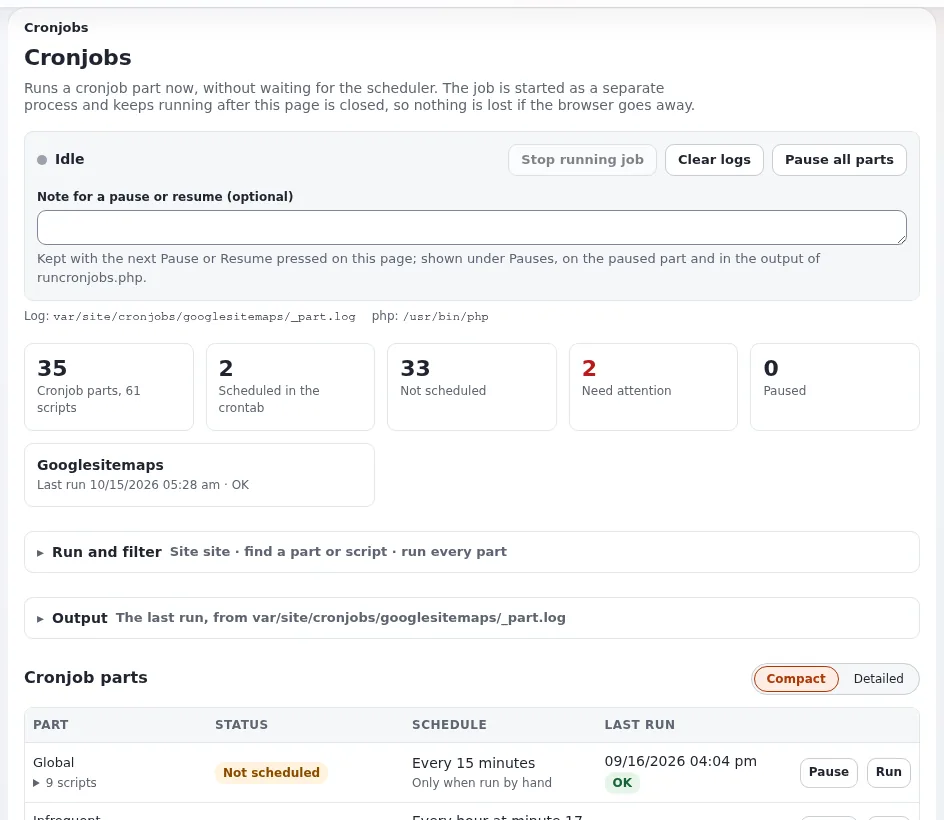
- whether the crontab runs it, its schedule in words, its next and last run;
- the shell command that runs it, with a Copy button;
- its scripts, with what each one does (from the script's
@description); - Run part and, per script, Run, for the site chosen under Run for site;
- Output, which follows the running job live; Stop running job; Clear logs;
- Pause and Resume per part, and Pause all parts;
- a Crontab section with what the crontab holds now and suggested lines for parts nothing runs.
Only one job started from the page runs at a time. Jobs the crontab starts are separate processes; the script locks keep the two apart. Everything works without JavaScript.
What it needs from the platform
Hosting platforms often restrict PHP. The page says what is missing instead of failing:
| Needs | For | If it is missing |
|---|---|---|
| a PHP command-line binary | starting a job as its own process | the page says so in red and every Run button is disabled |
proc_open | starting a job | "proc_open is disabled, so a cronjob cannot be started from the interface. Run it from a shell." |
exec | reading the crontab (crontab -l) | the page still opens and says which feature is missing |
posix_kill | Stop running job | the page still opens and says which feature is missing |
runcronjobs.php in the installation root | every run | the page names the path it expected |
The binary is cronjob.ini [AdminSettings] PhpCliPath when set, otherwise the first executable of PHP_BINDIR/php,
/usr/bin/php and /usr/local/bin/php; never the PHP-FPM binary that answers the web request. "On a host with several
PHP versions set PhpCliPath to the one the site runs on":
# settings/override/cronjob.ini.append.php
[AdminSettings]
PhpCliPath=/opt/<php version>/bin/php
Or with the INI command (scope global writes settings/override), then clear the INI cache:
./console exp:ini set cronjob.ini/AdminSettings/PhpCliPath /opt/<php version>/bin/php global
php bin/php/ezcache.php --clear-tag=ini
Note
The page reads the crontab of the system user the web server runs as. A crontab installed for another user (root, a deploy user) is not shown, and its parts appear as Not scheduled although they run. Install customer crontabs under the site's user, as Cron jobs recommends.
Who may use it
The page and its output stream need the policy setup/managecronjobs; only the Administrator role has it in a new
installation. Running a job uses the server's resources and acts on content (notifications are sent, links are
checked, content jobs run), so decide per plan whether the customer's own administrators get it, or whether it stays
with your support team.
Stop running job sends SIGTERM, not SIGKILL, so the script can release its lock. It fails with "Process <pid>
could not be signalled. It may belong to another user." when the job runs as a different system user than the web
server answering the request, for example when Velocity's workers and PHP-FPM run as different users.
Pausing parts
A paused part is left out by runcronjobs.php whoever starts it: the crontab, ./console cron:<part>, Velocity's
cron: commands or the page (Pausing cronjob parts). A part paused while it
runs finishes the script that runs and leaves out the rest. The notice says since when, by whom and why:
Notice: The cronjob part 'frequent' is paused (Setup > Cronjobs). Paused since 2026-10-15 13:05 CEST by admin: Index rebuild until noon.- Every run a pause leaves out is logged in
cronjob_skipped.login the log directory. - The state is one file per part,
cronpart_deactivated_<part>.txt, in<cache directory>/cronjob_control/, or incronjob.ini [PauseSettings] Directorybelow the var directory.Pause=disabledswitches the check off. - The directory follows the siteaccess. When the crontab runs
-s <site>with another var directory than the administration, set[PauseSettings] Directoryso both find the same files. - Several servers: the files are local unless the directory is shared.
- Queue workers that run as a systemd service are not cronjobs and keep working; stop the service for that.
Tip
Pausing is the safe way to hold jobs back during a maintenance window or a migration: it needs no edit of the crontab on any server, and the page shows who paused what.
Parts the page will not start
cronjob.ini [AdminSettings] ForbiddenParts[] ships with cluster_maintenance (purges cluster storage) and unlock
(releases locks other processes hold). "Both are destructive and belong to an administrator on a shell, not to a
button"; their cards say Blocked, and the shell command on the card still shows how to run them. Add parts of your
own to the list in an override when a customer must not start them from the browser.
Files the page keeps
Below the var directory of the administration siteaccess, in cronjobs/
(Cronjobs, section 14):
| File | Holds |
|---|---|
cronjobs/<part>/_part.log | the output of each run of a whole part from the page |
cronjobs/<part>/<script>.log | the output of each run of one script |
cronjobs/error.log (ErrorFile) | standard error of runs from the page |
cronjobs/history.json | the runs (at most HistoryLength, 100) |
cronjobs/state.json, cronjobs/run.pid | the job running now |
Runs started by the crontab write wherever their line redirects them; the page does not read those files. Rotate the per-part logs with the system's logrotate.
Support scenarios
| Ticket | What to do on the page |
|---|---|
| "Notifications stopped" | check that frequent is Scheduled and not Paused; run it and read Output |
| "We imported content and nothing is indexed" | run the default part (global) for the right site |
| "A job hangs" | Stop running job; if it belongs to another user, stop it from a shell |
| "Pause everything during our migration" | Pause all parts with a note; resume afterwards |
| "Which crontab line do I need?" | copy the suggested entry from Crontab |
Checklist
- To do:
PhpCliPathnames the PHP binary the site runs on. - To do:
proc_open,execandposix_killare allowed for the account, or the limits are documented for support. - To do: Customer crontabs are installed under the user the page reads.
- To do:
setup/managecronjobsis given deliberately, per plan. - To do: Destructive parts stay in
ForbiddenParts[]. - To do: On several servers,
[PauseSettings] Directorypoints at shared storage.
Related pages
- Cron jobs
- Maintenance mode
- PHP settings for Exponential
- Cron and shell access
- Support tiers
- Free documentation: this page is free to copy, translate and improve under the GNU FDL 1.3.
Become an Exponential Partner
Partners share their information, provide funding, contribute back and develop the products with us, and that is how Exponential grows. A partner website and dashboard are planned for mid-2027: please become a partner today to speed up our growth rate and land new features faster.