Mail consent and bounces
This page is for system administrators and support staff who run the mail of hosted Exponential sites, and for product managers who describe what the platform does about consent and unsubscribing. It answers: how Exponential decides whether a mail may go, what has to be set up per customer, how bounces and spam complaints reach the suppression list, and how requests about personal data are handled.
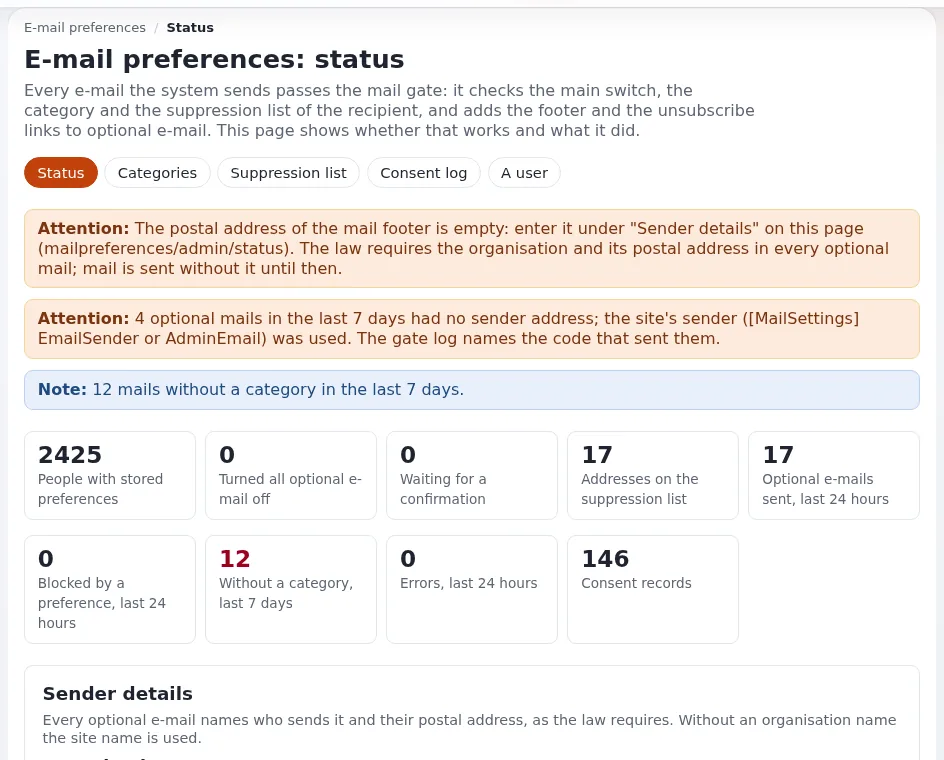
The administrator's guide is E-mail preferences: setting them up and running them;
the settings are in settings/mailpreferences.ini. Transports and deliverability are on Mail delivery.
Note
This page describes what the software provides. It is not legal advice. Which mail needs consent, what a footer must say and how long records are kept are legal questions; the host and its customers must take their own legal counsel. The project keeps a checklist of the rules it considered, including its gaps: mail preferences compliance.
Contents
- The mail gate
- Setting it up per customer
- The suppression list
- The bounce mailbox
- The consent log and data requests
- Retention
- Checklist
The mail gate
"Every mail the installation sends passes the mail gate in eZMailTransport::send(), whatever transport you use."
A mail that declares a category is checked against the recipient's preferences, the suppression list and a pending
double opt-in:
- Optional mail goes only to people who turned it on, one mail per recipient, with a footer (why, unsubscribe,
manage, the organization and its postal address) and the one-click unsubscribe headers of RFC 8058
(
List-Unsubscribe,List-Unsubscribe-Post). - Essential mail always goes.
- Mail without a category is sent as before and counted, so you can find the code that sends it.
The shipped categories in mailpreferences.ini:
| Optional (off until turned on) | Essential (always sent) |
|---|---|
content (content notifications), collaboration, newsletter (double opt-in), marketing (double opt-in), system | security (password reset, activation, address confirmation), orders, legal, admin |
Setting it up per customer
Tables. Five tables (
expmail_category,expmail_preference,expmail_consent_log,expmail_suppression,expmail_pending) are in the schema of a new installation; an upgraded one gets them fromupdate/database/<engine>/6.0/dbupdate-6.0.0-6.0.15.sql. Check with./console exp:mail:status(five timesok).Footer.
[FooterSettings] OrganisationNameandOrganisationAddressship empty; the status page warns until they are filled in. Set them in an override, never in the shipped file:./console exp:ini set mailpreferences.ini/FooterSettings/OrganisationName "<customer organization>" global --dry-runDrop
--dry-runto write; do the same forOrganisationAddress(a line break is written as\n).Link address.
[LinkSettings] BaseURLis empty, meaninghttps://and theSiteURLof the default siteaccess. Set it when the public site has another host name.Site secret. Generated on first use into
settings/override/mailpreferences.ini.append.php([SecretSettings] TokenSecret). "A new secret invalidates every link in every mail already sent, and every entry of the suppression list stops matching." Back it up, and copy it when a site moves (Backups: what to back up).Roles.
mailpreferences/administrateopens Setup > E-mail preferences;mailpreferences/exportallows the CSV export of the consent log. Decide whether the customer's administrators get them.Cron. The bounce reader runs in
frequent, retention ininfrequent(Cron jobs).
The suppression list
No optional mail goes to an address on the list. Reasons ([SuppressionSettings] Reasons[]): bounce, complaint,
unsubscribe_all, legal, admin and bridge. Only a hash of the address is stored, so the list cannot be read; an
entry is found by typing the address.
./console exp:mail:suppression check --email=<address>
./console exp:mail:suppression add --email=<address> --reason=legal --note="Ticket reference, no personal data"
./console exp:mail:suppression lift --email=<address>
Entries for bounces, complaints and legal requests stay until an administrator lifts them, and they also stop "send
me a link" and confirmation mails. Extensions can keep their own block lists in step through
[SuppressionSettings] Listeners[] (the newsletter extension adds its blacklist there).
The bounce mailbox
The bounce reader reads the mailbox that bounces and spam complaints arrive in (the Return-Path of the mail, and the
address given to the feedback loops of large mail providers). Hard bounces (RFC 3464 delivery status notifications)
and complaints (RFC 5965 reports) put the address on the suppression list. It is off until set up
([BounceSettings] Reader=disabled).
# settings/override/mailpreferences.ini.append.php (never committed)
[BounceSettings]
Reader=enabled
Protocol=imap
Server=<mail server>
User=<mailbox user>
Password=<mailbox password>
SSL=enabled
Folder=INBOX
AfterRead=keep| Setting | Shipped | Meaning |
|---|---|---|
Protocol | imap | imap or pop3 |
Port | empty | 993 for IMAP and 995 for POP3 with SSL, 143 and 110 without |
AfterRead | keep | keep: IMAP reads only unread messages; delete: understood messages are deleted |
MaxMessages | 500 | messages per run |
HardStatusCodes[] | 5.1., 5.2.1, 5.4.4 | failures that count as hard bounces; others are counted, not suppressed |
StatusFile | log/mailbounces.json | the last run, for the status page |
It is read by the cronjob part mailbounces (also in frequent). Try it without changing anything:
./console exp:mail:bounces --dry-runTip
A host that runs the mail relay can offer the bounce mailbox as part of the plan: one mailbox per customer domain, set as the envelope sender, with its credentials written into the customer's override by provisioning.
The consent log and data requests
Every change of a preference is written to the consent log with the exact text the person saw. Setup > E-mail preferences > Consent log filters and exports it; the export holds addresses and IP addresses, so treat it as personal data and delete it when the request it answers is done.
| Request | Command |
|---|---|
| "What do you have about me?" | ./console exp:mail:preferences export --email=<address> --format=json --output=var/tmp/request.json (written with mode 0600) |
| "Stop sending me anything" | the person's unsubscribe link, or a suppression entry with reason legal |
| "Delete my data" | ./console exp:mail:preferences erase --email=<address> --yes |
Erasure removes the preferences and anonymizes the consent log rows, which keep the time, category and change "so you can still prove that mail stopped". Removing a user account does not yet erase that account's preferences; erase them on the console when you remove an account on request.
Retention
The cronjob part mailpreferences (in infrequent) removes consent log rows of people who are gone once they are older
than [ConsentSettings] RetentionDays (shipped 1095), removes confirmations older than PendingDays (7), and old
suppression entries when [SuppressionSettings] RetentionDays is above 0 (shipped 0: kept forever). Preview it:
./console exp:mail:consent cleanup --dry-runSee Backup schedules and retention for how these periods meet the backup period.
Checklist
- To do:
./console exp:mail:statusshows the five tablesokand no problems. - To do:
OrganisationNameandOrganisationAddressare filled in for the customer. - To do:
BaseURLis right; a manage link opens in a browser. - To do: The site secret is in the override file and in every backup.
- To do: The bounce mailbox is set up where the customer sends optional mail, and
frequentruns. - To do: Mail-preference roles are given deliberately; consent exports are handled as personal data.
- To do: The customer has taken legal advice on categories, footer and retention.
Related pages
- Mail delivery
- Compliance and GDPR
- Log and data retention
- Cron jobs
- E-mail preferences (what the people on a site see)
- Free documentation: this page is free to copy, translate and improve under the GNU FDL 1.3.
Become an Exponential Partner
Partners share their information, provide funding, contribute back and develop the products with us, and that is how Exponential grows. A partner website and dashboard are planned for mid-2027: please become a partner today to speed up our growth rate and land new features faster.