Mail delivery
This page is for system administrators who connect Exponential sites to a mail service, and for support staff who answer "the password mail never arrived". It answers: which transports Exponential has, which settings choose and configure them, what the host's mail setup has to provide, and how to stop a test copy from sending real mail.
The settings are in settings/site.ini [MailSettings]; the walkthrough is
10.4 Mail: the file transport and real sending.
Consent, unsubscribe and bounces are on Mail consent and bounces.
Contents
- What sends mail
- The three transports
- Settings per customer
- What the host must provide
- Test and staging sites
- When mail does not arrive
- Checklist
What sends mail
Exponential sends mail for password changes and resets, registrations, forms with an e-mail receiver, notifications
and newsletters. Every mail passes the mail gate in eZMailTransport::send(), whatever transport is used; the gate
checks optional mail against the recipient's preferences (E-mail preferences).
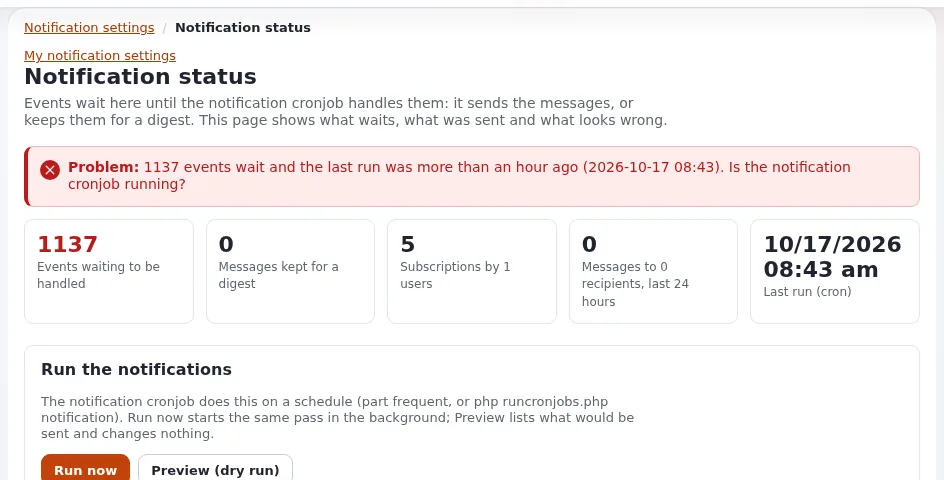
Notifications are sent by the cronjob part frequent, so mail that depends on them only goes out when cron runs
(Cron jobs).
The three transports
[MailSettings] Transport chooses one; TransportAlias[] maps the names to classes:
| Transport | Class | What it does | Use it for |
|---|---|---|---|
sendmail (shipped) | eZSendmailTransport | hands the mail to the local sendmail program | a server with a local mail transfer agent or a sendmail-compatible relay client |
SMTP | eZSMTPTransport | connects to an SMTP server, optionally with TLS and a login | a relay service or the host's mail server |
file | eZFileTransport | writes each mail as a file to var/log/mail/ (or FileTransportDirectory) | test, staging and restore tests |
Settings per customer
Put these in settings/override/site.ini.append.php of each installation. An SMTP example from the installation book:
[MailSettings]
Transport=SMTP
TransportServer=smtp.example.com
TransportPort=587
TransportConnectionType=tls
TransportUser=<smtp user>
TransportPassword=<smtp password>
SenderHost=www.example.com
AdminEmail=[email protected]
EmailSender=[email protected]| Key | Shipped | Meaning |
|---|---|---|
TransportServer, TransportPort | empty, 25 | the SMTP server; secure SMTP is usually 465 (ssl) or 587 (tls) |
TransportConnectionType | empty | empty (no encryption), ssl or tls; a login sent without encryption to a host other than localhost logs a warning |
TransportUser, TransportPassword | empty | the SMTP login |
TransportAuthMethod | empty | the SMTP authentication method: PLAIN, LOGIN, CRAM-MD5, DIGEST-MD5, NTLM or XOAUTH2; empty tries the strongest the server offers. Set LOGIN or PLAIN for a server that offers NTLM, which needs the mcrypt extension that PHP no longer has |
SenderHost | localhost | the name given in EHLO; set it to the site's host name |
AdminEmail | a placeholder | the administrator's address and the fallback sender; change it |
EmailSender, EmailReplyTo | empty | From and Reply-To unless a template sets them |
UserAgent | empty | the User-Agent header of every mail, ASCII only |
SendmailOptions[] | empty | extra sendmail options, one per line |
SendmailEnvelopeSender | enabled | disabled leaves out -f <sender>, for msmtp with --read-envelope-from. -f is only given for a plain address (letters, digits, ._%+=-, one @, a host name); any other sender is left out with a warning in the debug log |
ExcludeHeaders[] | empty | headers removed before SMTP sending; add bcc if your server does not hide them |
DebugSending, DebugReceiverEmail | disabled, empty | send every mail to one address instead of its recipients |
Warning
TransportPassword is a credential in settings/override/. Keep that directory out of version control and out of
anything a customer downloads, and give each customer site its own SMTP login so one leaked password does not send
mail as every customer.
What the host must provide
From 10.4: "Mail that should reach real inboxes needs a sender address of a domain you control, with SPF (and preferably DKIM and DMARC) records that allow the sending server, for every address family the server sends from: if the server sends over IPv6 and the SPF record lists only IPv4 addresses, large providers reject the mail."
For a host this means, per customer domain:
- a sender address (
EmailSender) in a domain the customer controls, notlocalhostor the host's own name; - SPF that lists the relay or server that sends, over IPv4 and IPv6 if both are used;
- DKIM signing on the relay; the e-mail preferences checklist also asks that "your mail server signs
List-UnsubscribeandList-Unsubscribe-Postwith DKIM"; - a bounce mailbox if the customer sends newsletters (Mail consent and bounces).
Offering a managed relay with these records prepared is a natural part of an Exponential hosting plan; whether it is included or an option is your decision.
Test and staging sites
A copy of a live site has real addresses. Before it runs:
# settings/override/site.ini.append.php of the copy (or an EXP_ENV variant)
[MailSettings]
Transport=file
Every mail is then written to var/log/mail/ as <time>-<random>.mail:
ls -lt var/log/mail/ | headAlternatively DebugSending=enabled with DebugReceiverEmail=<test address> delivers every mail to one test inbox.
A per-machine variant file keeps this out of the live settings
(Settings per environment). Also leave the crontab out on a copy, or
notifications go to real people (Restore and restore tests).
Warning
Transport can be set in several files (the global override, a siteaccess, an extension), and a copy keeps all of
them. Check which file wins before you trust a test copy:
./console exp:ini where site.ini/MailSettings/Transport lists every file that sets it, in load order, and the value
in effect (exp:ini).
When mail does not arrive
| Symptom | Look at |
|---|---|
| No mail at all | Transport and its settings; var/log/error.log; for sendmail, the local mail log of the server |
| Mail rejected by large providers | sender domain, SPF (including IPv6), DKIM, DMARC |
| Notifications missing, password mail fine | cron: frequent must run |
| Optional mail missing for one person | the mail gate: preferences, suppression list (Mail consent and bounces) |
| msmtp refuses the mail | SendmailEnvelopeSender=disabled for --read-envelope-from |
| Recipients see each other's addresses | add bcc to ExcludeHeaders[] for SMTP |
Send a test by changing a test user's password, or through a form with an e-mail receiver, and read the mail server's log. Setup > System information has a Mail card with the effective transport.
Checklist
- To do:
AdminEmailandEmailSenderare real addresses in the customer's domain. - To do: SMTP credentials are per customer and live only in
settings/override/. - To do: SPF covers every address family the sending server uses; DKIM signs; DMARC is published.
- To do: Test and staging copies use the file transport or
DebugSending, and run no crontab. - To do:
frequentruns, so notifications go out.
Related pages
- Mail consent and bounces
- Cron jobs
- New customer site go-live
- Compliance and GDPR
- E-mail preferences: setting them up and running them
- Free documentation: this page is free to copy, translate and improve under the GNU FDL 1.3.
Become an Exponential Partner
Partners share their information, provide funding, contribute back and develop the products with us, and that is how Exponential grows. A partner website and dashboard are planned for mid-2027: please become a partner today to speed up our growth rate and land new features faster.