Maintenance mode
This page is for system administrators and support staff who run upgrades, imports, restores and repairs on hosted Exponential sites. It answers: how to take a site offline and bring it back, what visitors and search engines see, who can still reach the site, what to watch on a hosting platform (separate administration host names, proxies, caches, cron), and how to get back in when something went wrong.
The full guide is Maintenance mode: taking the site offline and bringing it back; the feature reference is Maintenance mode.
Contents
- What it does
- Switching it on and off
- Who still gets in
- The state file and the way back in
- Caches, proxies and CDNs
- Cron, installers and deploys
- The page visitors see
- Troubleshooting
- Checklist
What it does
While maintenance is on, every request to index.php, index_rest.php and index_treemenu.php is answered with one
self-contained maintenance page "before the settings or the database are touched":
- status
503 Service UnavailablewithRetry-After(the seconds until the expected end, or 120 when none is given); Cache-Control: no-storeandX-Robots-Tag: noindex, so no cache or search engine keeps the page;- images, styles, scripts and fonts are still served, so the page keeps its look;
- commands and cronjobs in a shell keep running: maintenance concerns web requests only.
"A 503 with Retry-After is the answer search engines understand as 'come back later': the pages keep their place in
the index." Because the check runs before the settings and the database, the page needs nothing that may be broken
during the window.
Switching it on and off
From a shell, in the installation directory, as the site's user (as root, add --allow-root-user):
php bin/php/maintenance.php on --message="Back at 06:00 UTC" --until=2h --allow-admin
php bin/php/maintenance.php status
php bin/php/maintenance.php off
./console exp:maintenance on|off|status # the same through the console| Option | Meaning |
|---|---|
--message="..." | what the page says instead of the default text |
--until=30m, 2h, "2026-09-28 06:00" | the expected end, shown to visitors and sent as Retry-After |
--allow-ip=<address>,<address> | addresses that still see the site |
--allow-admin | keep /admin reachable; without it the administration is offline too |
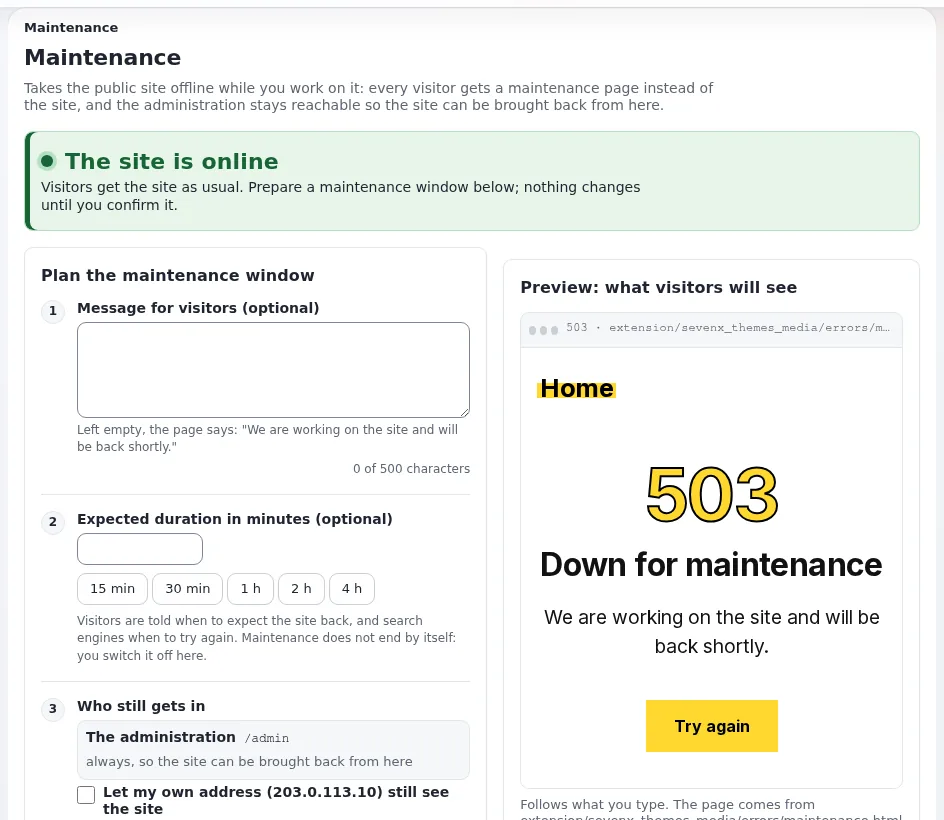
From the administration: Setup > Maintenance (/setup/maintenance, policy setup / administrate) does the same,
with a message, a duration in one click, who still gets in, a live preview of the page and a required confirmation.
It shows who switched maintenance on, since when, until when, and whether you yourself see the site.
Warning
The expected end is a promise, not a timer: "maintenance does not end by itself when it passes." Put switching it off into the runbook of every window, and let your monitoring alert when a window overruns (Health checks and uptime).
Every switch on and off is written to the audit trail as system.maintenance.change; the page lists the latest eight.
Who still gets in
| Who | How |
|---|---|
The administration under /admin | always from the page; with --allow-admin from a shell |
| Given addresses | --allow-ip, or Other addresses on the page; each address is compared exactly, "Ranges and networks (10.0.0.0/8) are not supported" |
| Your own address | Let my own address still see the site on the page |
| The browser of a running setup wizard | its own cookie (exp_setup_wizard) |
Two traps on hosting platforms:
- An administration on its own host name. The page keeps paths below
/adminreachable. An administration reached by a host name of its own (https://edit.example.com/setup/maintenance) or under another path "is not below/admin: switching maintenance on from there locks that address out." Use the/adminaddress, allow your own address, or keep a shell ready. - Proxies. An allowed address must be the one PHP sees. Behind a load balancer or reverse proxy, that is only the
visitor's address when the proxy is trusted (
[HTTPHeaderSettings] TrustedProxies[]); otherwise every visitor seems to come from the proxy (Several web nodes).
The state file and the way back in
"The whole state is one file, var/maintenance.json." While it exists, the front controllers include
kernel/classes/expmaintenance.php and answer with the page; while it does not, the cost is one is_file() call per
request. A marker that cannot be read still means maintenance: "a maintenance page is better than a half-changed site."
Deleting the file ends maintenance, whatever else is wrong:
rm /path/to/installation/var/maintenance.jsonThis is the way back in for support staff when the administration is locked out and PHP will not run on the command
line. On several nodes with their own var/ directories, each node has its own file: switch on and off on every node.
Caches, proxies and CDNs
- The HTTP cache. Switching on and off moves the HTTP cache directories (
var/<site>/cache/exphttpcache) aside tovar/tmp/<site>-exphttpcache-before-maintenance-<time>-<pid>instead of deleting them; remove those later to free the space. - Velocity. The generated site configuration names the marker as the response cache's pause file, so "neither
Velocity's cache nor the application's HTTP cache answers" during the window (Velocity 0.0.4.34 or later). The
command clears Velocity's response cache when it switches; when Apache serves the administration page, clear it
yourself after switching off:
./console exp:velocity cache clear --apply --allow-root-user. - A CDN or reverse proxy does not store the maintenance page (
no-store), "but it may still hold pages from before the window. Purge it when the window changed content."
Cron, installers and deploys
- Cronjobs keep running. Pause the parts that must not run against a half-changed site on Setup > Cronjobs, or remove them from the crontab for the window, and run them again afterwards (Cron jobs).
- The kickstarter switches maintenance on for its run and off when the site is installed and checked. After a failed step it leaves maintenance on, so a half-installed site is not shown; the administration is offline during a kickstarter run too. If maintenance was already on, it keeps that window as it is.
- The web setup wizard switches it on at its first posted step with a lease (
expMaintenance::WIZARD_LEASE, 900 seconds in the code), renewed with every step, so a wizard that is left gives the site back by itself. - Deploys (
exp:velocity deploy) do not switch maintenance on or off. Open a window yourself for a deploy that changes the database or many files (Deploying changes).
The page visitors see
The page is the active theme's errors/maintenance.html when an active extension has one, otherwise
share/maintenance.html: a self-contained HTML file with placeholders for the message and the expected end. To brand
it for a customer, give the customer's theme extension its own errors/maintenance.html
(section 8 of the guide).
Tip
Write the message in the customer's words and give an end time with a time zone: "We are upgrading the shop. Back at 06:00 UTC." Support then gets fewer "is the site down?" tickets.
Troubleshooting
| Symptom | Fix |
|---|---|
| The administration shows the maintenance page | it is not under /admin, or --allow-admin was missing: php bin/php/maintenance.php off, or delete var/maintenance.json |
| "It is on but the site still shows normally" | your address is allowed, or a CDN still holds the page: check from another network with curl -sI |
| An allowed tester gets the maintenance page | the address PHP sees differs (proxy, IPv6): look it up in the access log |
| "var/maintenance.json is not writable" | make var/ writable for the web server's user; check the owner of an existing marker |
| The site comes back with old pages | clear Velocity's response cache, purge the CDN |
| An installation is running and nothing installs | a kickstarter run failed and left it on: repair, then switch off |
| The REST API answers 503 | the API is a front controller too: allow its clients' addresses or keep the window short |
The complete table is in section 15 of the guide.
Checklist
- To do: The window is announced to the customer with a time zone, and the message says when the site is back.
- To do: The administration is reached under
/admin, or your address is allowed, or a shell is open. - To do: Cron parts that must not run are paused for the window.
- To do: A backup was taken before the change.
- To do: Maintenance is switched off on every node at the end; Velocity's cache and the CDN are cleared.
- To do: The moved-aside HTTP cache directories in
var/tmp/are removed later.
Related pages
- Health checks and uptime
- Upgrading customer sites, Deploying changes
- Restore and restore tests
- Site down (runbook)
- Maintenance mode guide
- Free documentation: this page is free to copy, translate and improve under the GNU FDL 1.3.
Become an Exponential Partner
Partners share their information, provide funding, contribute back and develop the products with us, and that is how Exponential grows. A partner website and dashboard are planned for mid-2027: please become a partner today to speed up our growth rate and land new features faster.