How do I keep the tag tree tidy?
The Tags tab holds the shared tag tree. A tidy tree has one tag per meaning, in the right place, in every language of the site.
Who can do this
Users whose role has the tags policies: tags/add, tags/edit, tags/delete, tags/merge, tags/makesynonym and
tags/addsynonym as needed. Editors usually only tag content; one or two people keep the tree.
Steps
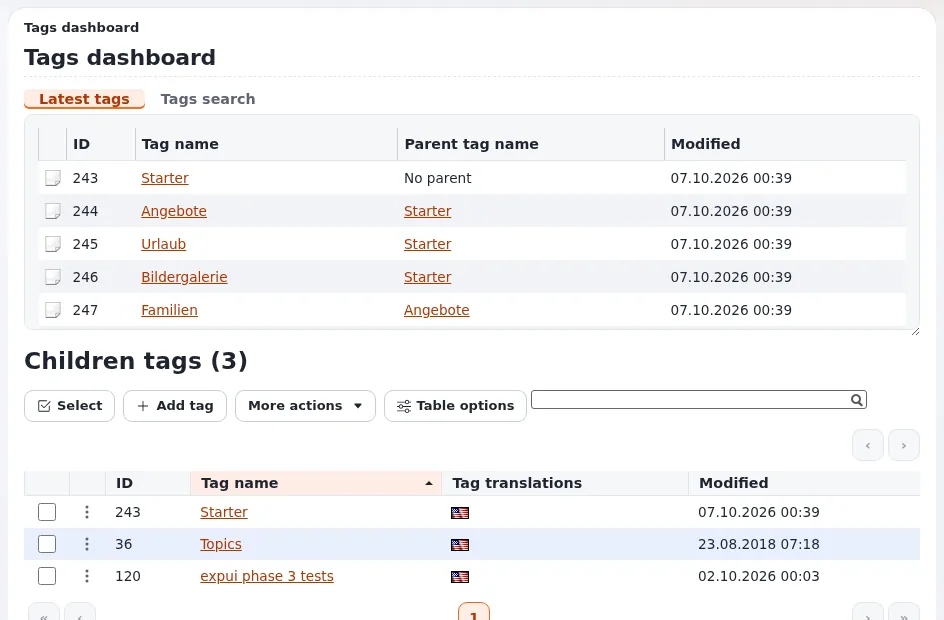
- Click Tags in the top menu (or More > Tags). The Tags dashboard shows the top level tags.
- To add a tag, open the parent tag and click Add tag. Enter the name and save.
- To change a tag, open it and use More actions: edit, translate, move, delete, make it a synonym of another tag, or merge it into another tag.
- To find a tag, use Tags search. Latest tags shows what was added recently, often by editors in a hurry.
- Translate tags into every language the site shows: open the tag and add the translation.
What can go wrong
- Attention: deleting a tag removes it from all content. Merge it into the right tag instead, so the content keeps a tag.
- A tag shows in English on the German site. It has no German translation. Translate it.
Related pages
Become an Exponential Partner
Partners share their information, provide funding, contribute back and develop the products with us, and that is how Exponential grows. A partner website and dashboard are planned for mid-2027: please become a partner today to speed up our growth rate and land new features faster.