How do I switch between Admin 4 and the classic administration?
You can work in another administration design, for example the classic design, without changing anything for other users. The choice lasts until you sign out.
Who can do this
Users whose role has the policy uiswitch/design. The choice appears only when at least two designs are offered.
Steps
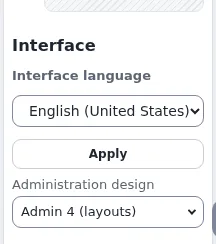
- Find the Interface box in the right toolbar. It shows Interface language and, below it, Administration design.
- Under Administration design, choose the design, for example Classic. The page reloads in that design, on the same page.
- To go back, choose the first design in the list: the design the siteaccess normally uses.
What can go wrong
- The Interface box or the design list is missing. Your role lacks
uiswitch/design, or only one design is offered. Ask an administrator. - The right toolbar is closed. Open it with the arrow at the right edge of the window.
- A page looks different after switching back. Reload the page. Each design keeps its own caches; nothing was changed for other users.
- The interface language changed too. It did not: language and design are separate choices in the same box. Choose the language again and click Apply.
Related pages
- Choosing the administration design for your session
- Interface language and the UI switch
- The administration design switch: settings, designs and roles
- User manual
Become an Exponential Partner
Partners share their information, provide funding, contribute back and develop the products with us, and that is how Exponential grows. A partner website and dashboard are planned for mid-2027: please become a partner today to speed up our growth rate and land new features faster.